In the ever-evolving landscape of cybersecurity, defenders face a difficult challenge: trying to stop attackers whose methods change daily. Tracking malicious IP addresses or file hashes (Indicators of Compromise, or IoCs) is necessary, but it’s a losing battle. They are easy for an attacker to change.
To truly defend an organization, you must understand the behavior of your adversary. You need to know not just what hit you, but how they got in, why they are there, and what they plan to do next.
Enter the MITRE ATT&CK framework.
Whether you are an aspiring SOC analyst, a seasoned penetration tester, or an IT professional looking to pivot into security, mastering this framework is no longer optional—it is essential.
This guide will take you from the basics of the framework to practical applications using the ATT&CK Navigator, finishing with a study guide to help you ace your next interview.
What is MITRE ATT&CK?
MITRE ATT&CK stands for Adversarial Tactics, Techniques, and Common Knowledge.
At its core, it is a globally accessible knowledge base of adversary behaviors based on real-world observations. It doesn’t deal in theory; it documents what advanced persistent threat (APT) groups and cybercriminals are actually doing in the wild right now.
Think of it as the “Periodic Table” for hackers. Just as chemists use the periodic table to understand the building blocks of matter, cybersecurity professionals use ATT&CK to understand the building blocks of a cyberattack.
The Hierarchy: Understanding the Structure
To use the framework, you must understand how it is organized into a hierarchy of four distinct parts:
-
Tactics (The “Why”): These are the adversary’s tactical goals. What are they trying to achieve at this stage? (e.g., “I want to steal passwords”).
-
Techniques (The “How”): How are they achieving that goal? (e.g., “I will use OS Credential Dumping”).
-
Sub-techniques (The Specifics): A more granular level of detail for a technique. (e.g., “I will specifically use LSASS Memory dumping”).
-
Procedures (The Examples): The specific implementation used by a real threat group. (e.g., “APT28 used the tool Mimikatz to dump LSASS memory on victim systems”).
The 14 Phases of an Attack (The Tactics)
The ATT&CK Enterprise matrix is broken down into 14 Tactics representing the typical lifecycle of a cyberattack, from pre-planning to final impact.
-
Reconnaissance: The attacker is gathering information about your organization to plan future operations (e.g., scanning public websites, researching employees on LinkedIn).
-
Resource Development: The attacker is establishing infrastructure to support their operations (e.g., buying domains, renting servers, creating malware).
-
Initial Access: The attacker is trying to get their foot in the door of your network (e.g., sending a phishing email with a malicious attachment).
-
Execution: The attacker is trying to run malicious code on a compromised system (e.g., running a PowerShell script).
-
Persistence: The attacker is trying to maintain their foothold so they don’t lose access if the computer restarts (e.g., creating a scheduled task or a new user account).
-
Privilege Escalation: The attacker has low-level access and wants higher-level permissions, like Administrator or SYSTEM rights (e.g., exploiting a vulnerability to bypass User Account Control).
-
Defense Evasion: The attacker is actively trying to avoid being detected by your security tools and teams (e.g., deleting security logs, hiding malware inside legitimate system processes).
-
Credential Access: The attacker is trying to steal account names and passwords (e.g., keylogging, dumping password hashes from memory).
-
Discovery: The attacker is trying to figure out where they are. What is this computer? What is the network layout? Where are the file servers? (e.g., scanning for open ports internally).
-
Lateral Movement: The attacker is moving from the initial compromised system to other systems in the network (e.g., using stolen credentials to RDP into a server).
-
Collection: The attacker is gathering the sensitive data they came for (e.g., taking screenshots, accessing files on a shared drive).
-
Command and Control (C2): The compromised systems are communicating with the attacker outside the network to receive instructions.
-
Exfiltration: The attacker is stealing the collected data by sending it out of your network (e.g., uploading files to a cloud storage account).
-
Impact: The attacker is trying to disrupt your business operations or destroy data (e.g., encrypting files with ransomware).
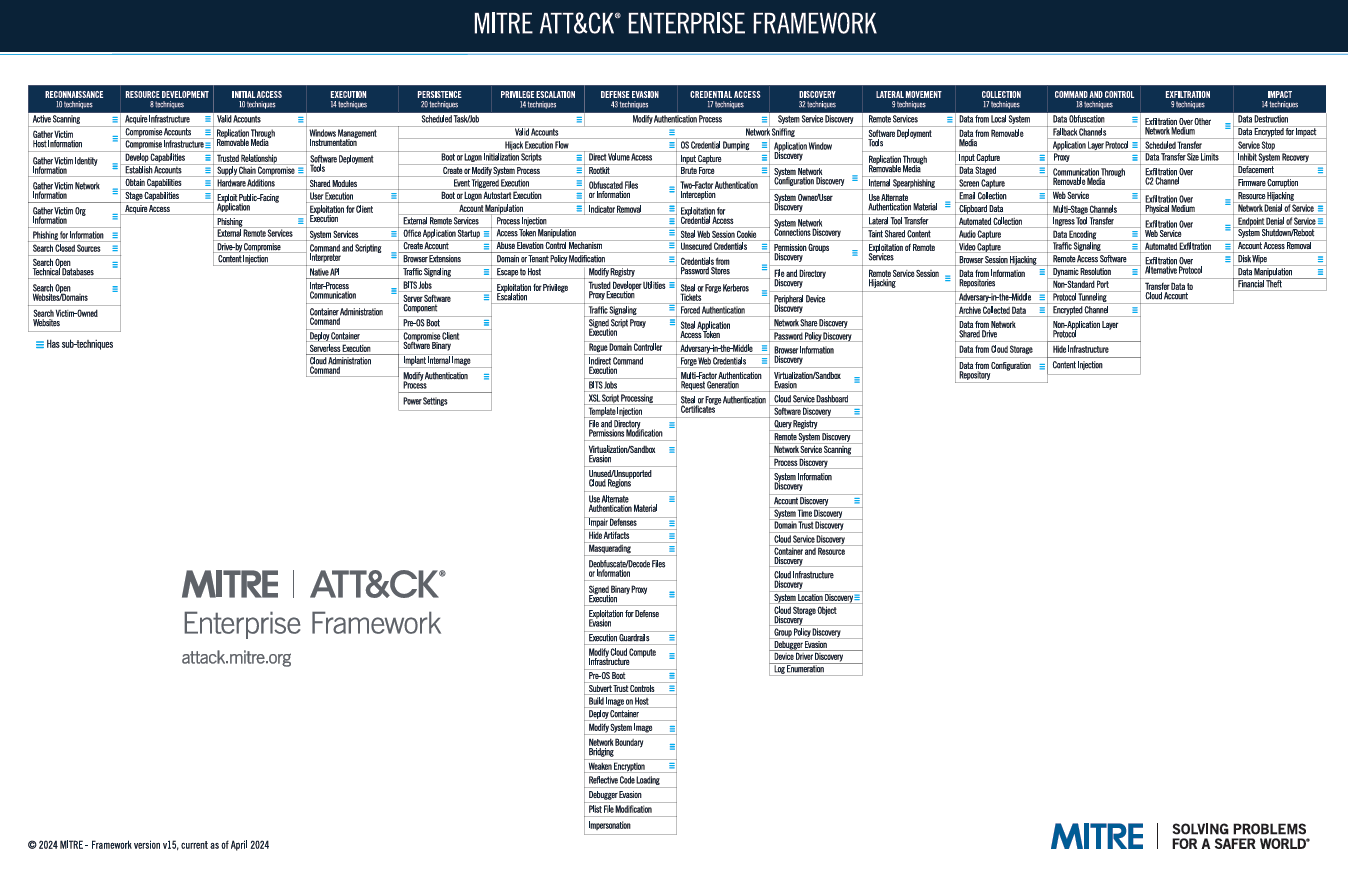
Operationalizing the Framework: The ATT&CK Navigator
The ATT&CK matrix on the MITRE website is a static knowledge base. To actually use it in daily operations, professionals rely on the MITRE ATT&CK Navigator.
The Navigator is an open-source, web-based tool designed to visualize and manipulate the matrix. It transforms the static data into a dynamic workspace for both Red (offensive) and Blue (defensive) teams.
Key Uses of the Navigator:
-
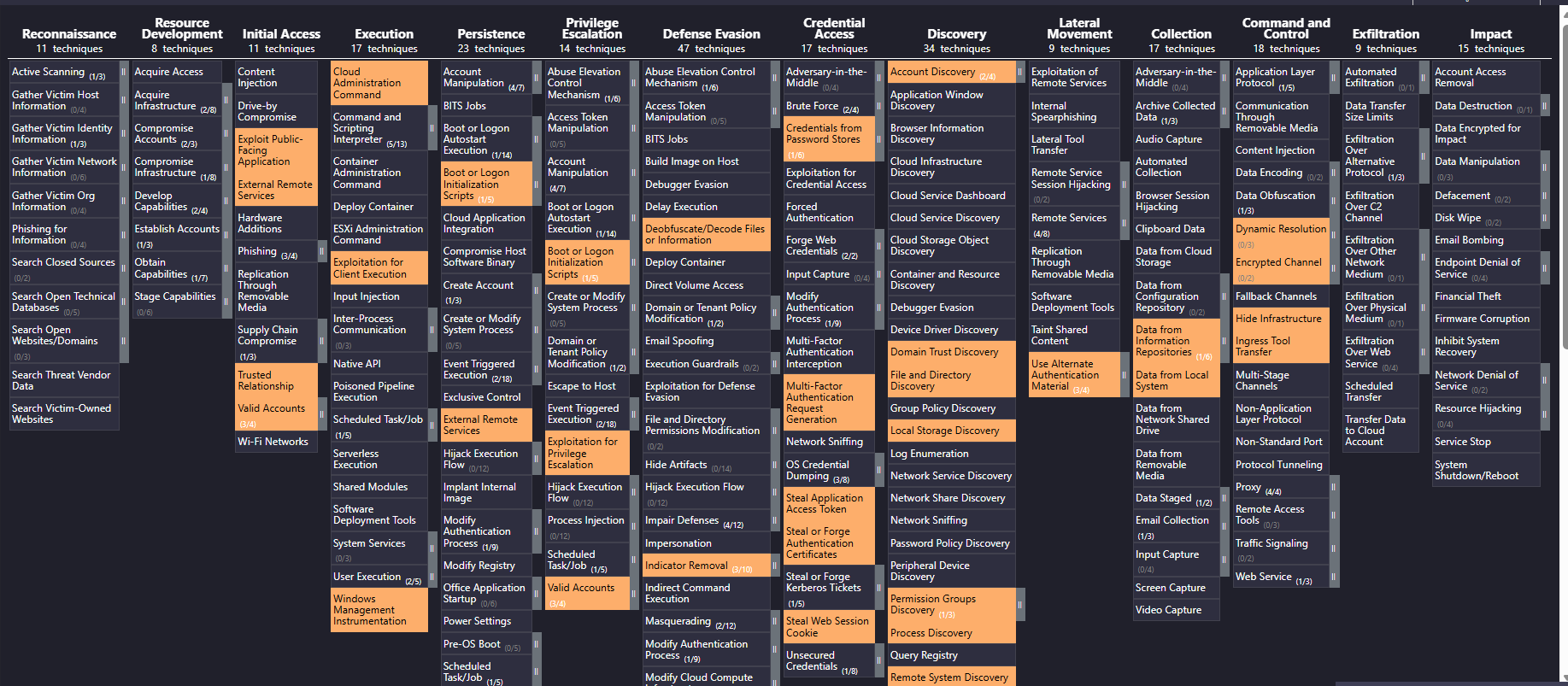
Mapping Threat Actors: You can instantly visualize the behavior of specific groups. By searching for “APT29” (Cozy Bear) in the Navigator, the tool will highlight every technique that group is known to use. This is critical for threat intelligence.
-
Gap Analysis (Defensive Coverage): Blue teams use the Navigator to visualize their blind spots. They can color-code techniques green that their SIEM or EDR can detect, and color-code techniques red that they cannot. The resulting “heat map” clearly shows management where security investments are needed.
-
Standardized Communication: The framework provides a common language through unique IDs (e.g., T1059 for Command and Scripting Interpreter). Instead of vaguely saying “they ran a script,” analysts can say “The adversary used T1059.001 (PowerShell),” ensuring everyone understands the exact behavior.
-
Red Team Planning & Reporting: Red teams use it to plan engagements by selecting specific techniques to emulate. Afterward, they use color-coded layers to visually report to the client which attacks were successful (red) and which were blocked (green).
-
Layer Algebra (Advanced Analysis): The Navigator allows you to combine different layers mathematically. For example, you could take a layer representing APT28 and add it to a layer representing APT29 to find the techniques common to both groups, helping you prioritize defenses against the most frequent attack methods.
‘In this I have marked techniques which are related to APT29. But its not fully shown here better to use navigator.’
The Study Guide: Interview & Scenario Prep
If you are preparing for a cybersecurity interview, expect questions on MITRE ATT&CK. Below is a curated list of common questions to help you prepare.
Top Interview Questions
-
Q: What is the difference between a Tactic and a Technique?
A: A Tactic is the adversary’s goal—the “why” (e.g., Credential Access). A Technique is the method used to achieve that goal—the “how” (e.g., OS Credential Dumping).
-
Q: How does ATT&CK differ from the Cyber Kill Chain?
A: The Kill Chain is a high-level, linear model of stages. ATT&CK is a non-linear matrix of specific behaviors. ATT&CK is much more granular and focuses on the “how” of an attack in detail.
-
Q: What is “Lateral Movement” and why is it critical?
A: It is the tactic used by attackers to move from their initial entry point to other systems within the network. It’s critical because attackers rarely land directly on their target data; they have to navigate the network to find it.
-
Q: How would a SOC team use MITRE ATT&CK for “Gap Analysis”?
A: They map their existing security alerts and logs against the matrix in the Navigator. By seeing which techniques they cannot currently detect, they identify gaps in their defensive coverage.
-
Q: What is “Defense Evasion”? Give an example.
A: These are techniques used to avoid being caught. An example is “Indicator Removal,” such as an attacker clearing Windows Event Logs after they perform a malicious action to remove the evidence.
Scenario-Based Questions
Scenario 1: The Phishing Email
Question: An employee reports receiving an email with a malicious Word document attachment. They opened it, and it ran a macro. Which Tactics and Techniques are involved?
Answer: The Tactic is Initial Access, and the Technique is Phishing: Spearphishing Attachment. The macro execution falls under the Execution Tactic, specifically Command and Scripting Interpreter.
Scenario 2: The Hidden Admin
Question: During an investigation, you find a new user account named “Support_Admin” that was created yesterday at 3 AM and added to the local Administrators group. What two Tactics does this represent?
Answer: Creating the account to ensure future access is Persistence (Technique: Create Account). Adding it to the admin group is Privilege Escalation (Technique: Valid Accounts).
Scenario 3: The Ransom Note
Question: An organization’s file servers suddenly become inaccessible, and a text file appears demanding payment to decrypt the files. What Tactic is this?
Answer: This is the Impact Tactic. The specific Technique is Data Encrypted for Impact.
Scenario 4: The “Living off the Land” Attack
Question: You observe a user’s machine executing a series of legitimate Windows commands like net user, whoami, and ipconfig in rapid succession. What tactic is this, and how would you map it?
Answer: This falls under the Discovery tactic. Specifically, the techniques are System User Discovery (T1033) and System Network Configuration Discovery (T1016). This is “Living off the Land” (using built-in tools) to avoid Defense Evasion triggers that normally fire on third-party malware.
Scenario 5: The Stolen API Key
Question: A developer accidentally pushes a hardcoded AWS S3 API key to a public GitHub repository. An hour later, thousands of files are downloaded from a private bucket. Map this to the matrix.
Answer:
- Initial Access: Unsecured Credentials (T1552).
- Collection: Data from Information Repositories (T1213).
- Exfiltration: Exfiltration to Cloud Storage (T1567).
Scenario 6: The “Golden Ticket”
Question: An attacker has compromised a Domain Controller and generated a Kerberos Ticket Granting Ticket (TGT) that is valid for 10 years. What is the tactic and how does the Navigator help visualize the impact?
Answer: This is Persistence and Privilege Escalation via Steal or Forge Kerberos Tickets: Golden Ticket (T1558.001). In the Navigator, you would highlight this to show that even if the attacker’s initial malware is removed, they still have “God-mode” access to the entire domain.
Scenario 7: Comparing Two Threat Groups
Question: Your manager asks you which group poses a bigger threat to your Linux-based web servers: APT28 or APT29. How do you use the Navigator to answer?
Answer: I would open two layers in the Navigator—one for APT28 and one for APT29. I would use the Filters to select only “Linux.” Then, I’d use Layer Algebra to see which group has more techniques mapped to Linux. If one group heavily favors Windows-specific TTPs (like WMI), they may be a lower priority for our specific infrastructure.
Scenario 8: The Suspicious “Svchost”
Question: You find a process named svchost.exe running, but its parent process is Chrome.exe instead of services.exe. What is the attacker’s goal?
Answer: The goal is Defense Evasion. This is Masquerading (T1036). Attackers name their malware after legitimate system processes to blend into the Task Manager and avoid basic scrutiny from IT staff.
Scenario 9: Measuring Defensive ROI
Question: The company just spent €100,000 on a new Email Security Gateway. How do you demonstrate the value of this investment using MITRE?
Answer: In the Navigator, I would create a “Before” layer showing all Initial Access techniques (Phishing, Malicious Links, etc.) in Red. Then, I’d create an “After” layer showing those same techniques in Green. The visual “flip” from Red to Green demonstrates the reduction in the attack surface and justifies the expenditure.
Scenario 10: The “Scheduled Task” Discovery
Question: You find an attacker created a scheduled task that triggers every time a specific user logs in. Which tactic does this satisfy?
Answer: This satisfies two tactics: Persistence (to survive a reboot) and Execution (to ensure the code runs). The technique is Scheduled Task/Job: Scheduled Task (T1053.005).
Scenario 11: The Supply Chain Compromise
Question: A legitimate software update for your PDF reader contains a hidden backdoor. What is the Initial Access technique?
Answer: Supply Chain Compromise (T1195). Specifically, Supply Chain Compromise: Compromise Software Dependencies and Development Tools (T1195.001). This is one of the hardest techniques to detect because the “Initial Access” comes from a trusted vendor.
Scenario 12: The Data Dump
Question: You notice a server is compressing 50GB of data into a .zip file in a temp folder before sending it out. What technique is this?
Answer: This is Archive Collected Data (T1560) under the Collection tactic. Attackers compress data to make the Exfiltration phase faster and to bypass size-based network triggers.
Scenario 13: Communicating with “The Mothership”
Question: A compromised workstation is sending a single HTTP “beacon” packet to an external IP every exactly 60 seconds. What is the tactic and how do you mitigate it?
Answer: This is Command and Control (C2), specifically Application Layer Protocol: Web Protocols (T1071.001). Using the Navigator’s Mitigation section, I would recommend implementing a web proxy with “Domain Fronting” detection or traffic analysis to spot non-human, rhythmic heartbeats.
Scenario 14:Using “Software” in Navigator
Question: Management is worried about “AnyDesk” being used by attackers. How do you find out how they use it?
Answer: In the Navigator, I would search for “AnyDesk” under the Software category. It would highlight techniques like Remote Services (T1021), showing exactly how adversaries repurpose legitimate remote desktop tools for malicious access.
Scenario 15: Detecting Exfiltration
Question: You see a 5GB upload to an IP address in a country where your company does no business. What is the tactic and how would you investigate?
Answer: Exfiltration. Specifically, Exfiltration Over C2 Channel (T1041). I would look at the Navigator’s Data Sources for this technique, which recommends looking at “Network Traffic: Network Connection Creation.”
Scenario 16: DNS as a Tunnel
Question: Your firewall shows very little traffic, but your DNS logs show thousands of requests to a weird domain like x1j9.attacker-site.com. What is happening?
Answer: This is Command and Control (C2) using Protocol Tunneling (T1572). The attacker is “hiding” their instructions inside legitimate DNS queries to bypass standard web filters.
Scenario 17: The “Cloud Instance Metadata” Theft
Question: An attacker compromises a web application hosted on an AWS EC2 instance. They then run a curl command to the address 169.254.169.254. What are they trying to do?
Answer: They are performing Discovery via the Software Discovery (T1518) and specifically targeting Cloud Instance Metadata Services. Their goal is to steal temporary IAM credentials to move from the instance to the wider AWS environment (Privilege Escalation).
Navigator Tip: Look at the “Cloud” matrix specifically to see how attackers pivot from a single VM to the entire Cloud control plane.
Scenario 18: The “Ghost” Admin (Persistence)
Question: You find an attacker has modified the “Golden Image” (the base template) used to deploy all new virtual workstations in your company. Which tactic is this?
Answer: This is a high-level Persistence technique: Create or Modify System Process: Windows Service (T1543.003) or Supply Chain Compromise: Compromise Software Dependencies and Development Tools (T1195.001). Every new machine deployed will already be infected.
Scenario 19: The “Wait and See” (Staged Execution)
Question: You find a suspicious file on a server that was downloaded 30 days ago but only executed for the first time today. Why would an attacker do this?
Answer: This is Defense Evasion, specifically Execution Guardrails (T1480). Attackers often program “sleep” timers or logic bombs to wait out the typical retention period of security logs or to bypass sandbox analysis that only runs for a few minutes.
Scenario 20: Browsing without a Browser
Question: You see a server using Certutil.exe (a legitimate Windows tool for handling certificates) to download a file from a random GitHub URL. Map this behavior.
Answer: This is Defense Evasion using System Binary Proxy Execution (T1218). It is also an example of Ingress Tool Transfer (T1105). They are using a “trusted” Windows tool to bypass firewall rules that might block bitsadmin or powershell.
Scenario 21: The “MFA Fatigue” Attack
Question: An attacker has a user’s correct username and password. They trigger 50 MFA push notifications to the user’s phone until the user finally clicks “Approve” out of frustration. Which tactic is this?
Answer: Initial Access or Credential Access. The technique is Multi-Factor Authentication Request Generation (T1621).
Impact: This demonstrates that even “Strong” security controls have a human element that can be bypassed using social engineering.
Scenario 22: The “Email Forwarding” Spy
Question: You discover a mailbox rule on the CFO’s Outlook that automatically forwards any email containing the word “Invoice” or “Payment” to an external Gmail address. Map this.
Answer: This is Collection and Exfiltration via Email Forwarding Rule (T1114.003). It is a classic “Business Email Compromise” (BEC) technique used to monitor financial transactions without needing to stay logged into the account.
Conclusion
The MITRE ATT&CK framework has become the industry standard for describing cyber threats. It shifts the focus from static indicators to dynamic behaviors, allowing defenders to be proactive rather than reactive.
By understanding the 14 tactics and learning how to operationalize the data using the Navigator, you gain a tremendous advantage in understanding, detecting, and emulating adversaries. Start exploring the matrix today, and look beyond the “what” to understand the “how” and “why” of cyberattacks.