HTTP Request Smuggling: Understanding the Mechanics
HTTP Request Smuggling (also known as HTTP Desynchronization) is a vulnerability that targets the complex architecture of modern web applications. Unlike standard attacks that exploit the application code (like SQLi or XSS), this exploits the communication channel itself.
It arises when the Front-End server (Load Balancer/Proxy) and the Back-End server disagree on where one HTTP request ends and the next one begins. This “desynchronization” allows an attacker to hide (smuggle) a malicious request inside a benign one, bypassing security controls and attacking other users.
🔸 1. The Architecture: The Pipeline
To understand smuggling, we must understand how modern infrastructure handles traffic.
- Front-End (FE): Reverse proxies (NGINX, HAProxy, AWS ELB) or CDNs (Akamai, Cloudflare). They handle SSL termination and load balancing.
- Back-End (BE): The application server (Gunicorn, Apache, Tomcat) processing the logic.
- Keep-Alive (The Catalyst): To improve performance, servers reuse the same TCP connection to send a stream of multiple HTTP requests back-to-back.
The Problem: The Front-End and Back-End must agree strictly on the boundaries of each request. If they disagree, the Back-End might interpret part of Request A as the start of Request B.
⚙️ 2. The Mechanics: Measuring Length
The core conflict lies in two HTTP headers defined by RFCs to determine the length of a request body:
A. Content-Length (CL)
Specifies the exact size of the body in bytes.
POST /search HTTP/1.1
Content-Length: 14

q=smuggledData
B. Transfer-Encoding: chunked (TE)
Specifies that the body is sent in chunks. Each chunk is prefixed with its size in Hexadecimal. The message ends with a 0 chunk.
POST /search HTTP/1.1
Transfer-Encoding: chunked

b
q=smuggledData
0
(Note: b is Hex for 11 bytes. The 0 terminates the request).
The Vulnerability
If an attacker sends both headers, or obfuscates one, the Front-End might use one method (e.g., CL) while the Back-End uses the other (e.g., TE). This creates the desync.
🧨 3. Attack Vectors: The “Big Three”
1️⃣ CL.TE (Front-End uses CL, Back-End uses TE)
Here, the Front-End uses the Content-Length header, but the Back-End prioritizes Transfer-Encoding.
The Attack:
The attacker sends a request with a Content-Length that covers the entire payload. However, inside the body, they put a 0 chunk early.
-
Front-End: Sees
Content-Length. Reads the whole body (including theGPOST...). Forwards everything. -
Back-End: Sees
Transfer-Encoding: chunked. Reads up to the0chunk and thinks the request is done. -
The Smuggle: The remaining bytes (
GPOST...) are left “floating” in the Back-End’s socket buffer. -
The Victim: When the next request arrives, the Back-End appends it to the floating
GPOSTbytes, executing the attacker’s command.
Attack Payload:
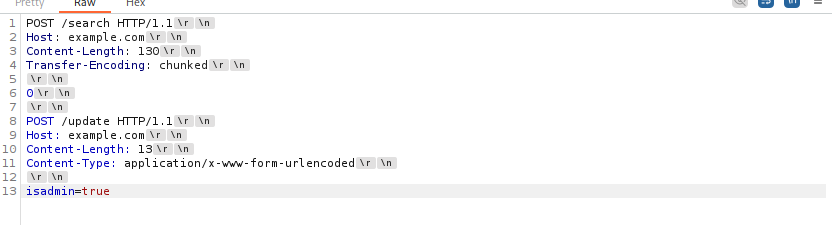
⚠️ Important Syntax Note for CL.TE:
Always ensure you have the empty line between the 0 and the smuggled request line.
0->\r\n->\r\n->GET...
Why Content-length is 130?
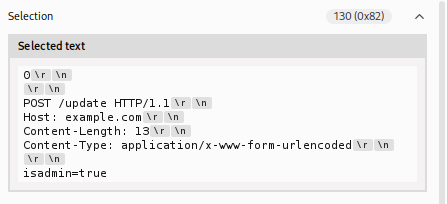
Here, the front-end server sees the Content-Length of 130 bytes and believes the request ends after isadmin=true. However, the back-end server sees the Transfer-Encoding: chunked and interprets the 0 as the end of a chunk, making the second request the start of a new chunk. This can lead to the back-end server treating the POST /update HTTP/1.1 as a separate, new request, potentially giving the attacker unauthorized access.
2️⃣ TE.CL (Front-End uses TE, Back-End uses CL)
Here, the Front-End uses Transfer-Encoding, but the Back-End prioritizes Content-Length.
The Attack:
The attacker sends a chunked request. The Front-End processes it perfectly. However, the Content-Length header is set to a very small number (e.g., 4).
-
Front-End: Sees
chunked. Reads the entire stream until the0. Forwards everything. -
Back-End: Sees
Content-Length: 4. Reads only the first few bytes (e.g.,5c\r\n) and stops. -
The Smuggle: The rest of the chunked body is left in the buffer, treated as the start of the next request.
For Detection
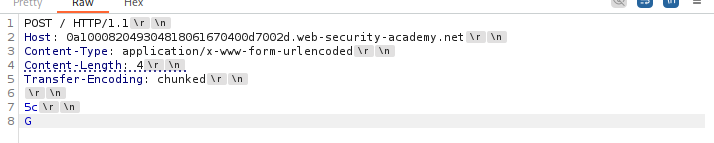
- Backend reads 4 bytes (“5c” + \r\n) and stops.
- Frontend expects 92 bytes (0x5c).
- We stop early. Frontend waits -> Timeout.
How we calculate those values
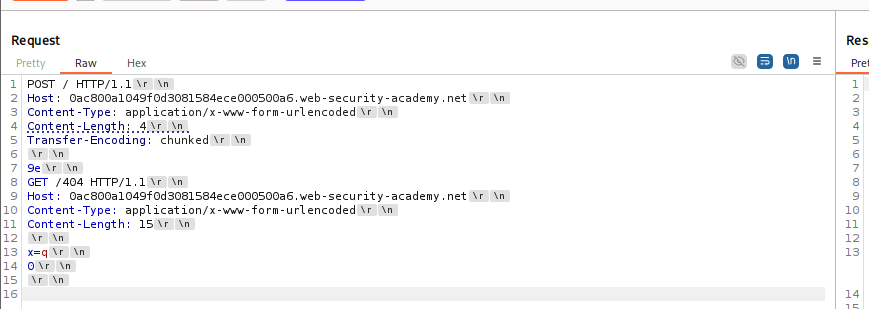
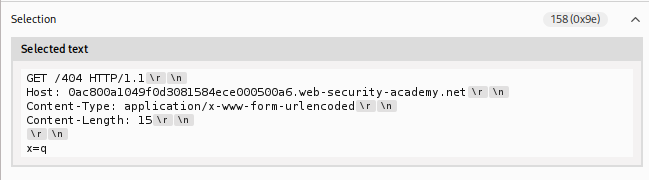
First content-length: 4 => 9e\r\n how 9e ? Here we need to stop at q and shouldn’t include \r\n after x=q
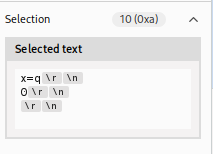
Why 15? The actual request is 10 bytes but those extra byes helps to include the next request. So, then the complete request will be pushed.
POST / HTTP/1.1
Host: example.com
Content-Length: 4            <-- (B) Back-end trusts this
Transfer-Encoding: chunked   <-- (A) Front-end trusts this

78                   <-- (B) Back-end reads these 4 bytes (7, 8, \r, \n) and STOPS.
POST /update HTTP/1.1        <-- (A) Front-end reads this as the 1st chunk
Host: example.com
Content-Type: application/x-www-form-urlencoded
Content-Length: 15

isadmin=true
0                            <-- (A) Front-end sees this as the end of the request
3️⃣ TE.TE (Obfuscating the Header)
Both servers support Transfer-Encoding, but one can be tricked into ignoring it via obfuscation.
Techniques:
Transfer-Encoding: cowTransfer-Encoding : chunked(Space before colon)Transfer-Encoding: xchunked
If the Front-End sanitizes the header but the Back-End ignores the malformed one (falling back to Content-Length), you effectively achieve a TE.CL desync.
🚀 4. Advanced Mechanics: HTTP/2 Downgrading
HTTP/2 uses binary framing with explicit length fields, which should prevent smuggling. However, many Front-Ends (Load Balancers) downgrade HTTP/2 requests to HTTP/1.1 before sending them to the Back-End.
If this translation is flawed, smuggling re-emerges.
H2.CL & H2.TE
-
H2.CL: Attacker injects a
content-lengthheader into the H2 request. Front-End (H2) ignores it (uses frames), but Back-End (H1) respects it. -
H2.TE: Attacker injects
transfer-encoding: chunked. Front-End (H2) forwards it. Back-End (H1) prioritizes it.
CRLF Injection (H2 Request Splitting)
In HTTP/2, headers can technically contain newlines (\r\n). If the Front-End doesn’t sanitize these during downgrade, the \r\n becomes a literal delimiter in HTTP/1.1.
-
Attack: Inject
\r\n\r\ninto a header value. -
Result: This terminates the HTTP/1.1 request mid-header and starts a new smuggled request immediately.
📤 5. Impact: What can an attacker do?
-
Bypass Security Controls: Access internal endpoints like
/adminthat are usually blocked by the Front-End. By smuggling the request, the Front-End thinks it’s sending a benign request, but the Back-End executes the hidden admin request. -
Session Hijacking (Request Storage): Smuggle a partial request that posts a comment (e.g.,
comment=). The victim’s next request (including their Session Cookie) gets appended to your comment and saved in the database. -
Cache Poisoning: Force the server to respond to a victim’s request with malicious content (e.g., XSS), which then gets cached for all users.
-
Response Queue Poisoning: Desynchronize the response queue so the Front-End sends User A’s private data (Response A) to User B.
🛡️ 6. Remediation Strategies
-
Use HTTP/2 End-to-End: Avoid downgrading. If the Back-End speaks H2, use it.
-
Disallow Ambiguous Headers: Configure the Front-End to normalize requests. If both
CLandTEare present, drop the request. -
Strict Header Validation: Reconfigure WAFs/Proxies to reject headers with newlines (
\r\n) or malformedTransfer-Encodingvalues. -
Disable Connection Reuse: If feasible, disable Keep-Alive on the Back-End (performance trade-off).
❓ 7. Interview Corner: Common FAQs
If you are interviewing for AppSec or Pentesting roles, expect these questions.
Q1: What is the fundamental root cause of HTTP Request Smuggling?
Answer: The root cause is a discrepancy in how the Front-End server and Back-End server parse the boundaries of an HTTP request. Specifically, one server uses Content-Length while the other uses Transfer-Encoding, leading to desynchronization of the TCP stream.
Q2: Explain the difference between CL.TE and TE.CL.
Answer:
-
CL.TE: Front-End uses
Content-Length, Back-End usesTransfer-Encoding. We send a request with a valid CL but a short chunked body (0chunk early). -
TE.CL: Front-End uses
Transfer-Encoding, Back-End usesContent-Length. We send a valid chunked request but a tiny CL header (e.g., 4 bytes), causing the Back-End to stop reading early.
Q3: How do you detect a CL.TE vulnerability using timeouts?
Answer: You send a request with a valid Content-Length (covering the whole body) but a broken/partial chunked body (e.g., missing the closing 0).
-
Front-End: Sees valid CL, forwards everything.
-
Back-End: Sees
Transfer-Encoding, waits for the terminating0chunk which never arrives. -
Result: The Back-End times out.
Q4: What is “TE.TE” and how is it exploited?
Answer: TE.TE occurs when both servers support Transfer-Encoding, but one can be obfuscated to ignore it. By sending headers like Transfer-Encoding: cow or Transfer-Encoding: xchunked, we can force one server to fall back to Content-Length, converting the scenario into a simple CL.TE or TE.CL attack.
Q5: Can HTTP/2 be vulnerable to Request Smuggling?
Answer: Yes, via HTTP/2 Downgrading. If the Front-End accepts HTTP/2 but rewrites it to HTTP/1.1 for the Back-End, attackers can inject H2.CL (fake CL header), H2.TE (forbidden TE header), or CRLF sequences into headers to desynchronize the downgraded HTTP/1.1 stream.
Q6: What is “CL.0” Smuggling?
Answer: CL.0 occurs when the Back-End ignores the Content-Length header entirely (treating it as 0) on certain endpoints (like static files or redirects). If the attacker sends a body, the Back-End ignores it, leaving the data in the buffer to become the start of the next request.
Q7: Describe “Response Queue Poisoning”.
Answer: This happens when an attacker smuggles a complete standalone request. The Front-End sends 1 request, but the Back-End sees 2 and sends 2 responses. The Front-End matches Response 1 to the attacker and Response 2 to the next victim request. The victim receives the attacker’s response (or the attacker receives the victim’s response).
Q8: How can Request Smuggling lead to Session Hijacking?
Answer: By using the “Request Storage” technique. An attacker smuggles a partial request that ends with an open parameter, like comment=. The victim’s request is appended to this. The application saves the comment, effectively storing the victim’s headers (including their Session Cookie) in the database for the attacker to retrieve.
Q9: What is WebSocket Smuggling?
Answer: It exploits broken WebSocket upgrades. If a proxy thinks a WebSocket tunnel is established (e.g., via a fake 101 response or loose validation) but the Back-End keeps the connection as HTTP, the attacker can smuggle HTTP requests through the “tunnel” that bypass Front-End security filters.
Q10: How does h2c Smuggling work?
Answer: h2c is HTTP/2 over cleartext. An attacker sends an Upgrade: h2c header. If a proxy forwards this blindly to the Back-End, the Back-End switches to HTTP/2. The proxy, unaware of the switch, creates a tunnel. The attacker can then send HTTP/2 requests directly to the Back-End, bypassing proxy rules.
🎭 8. Scenario-Based Questions
🎭 Scenario 1: The “Unreachable” Admin
Context: You are testing a site. /admin is blocked by the Load Balancer with a 403 Forbidden. You confirmed the site is vulnerable to CL.TE smuggling.
The Question: How do you access the admin panel?
The “Hired” Answer: “I would perform a security bypass attack. I will construct a CL.TE request where the smuggled part is a GET /admin HTTP/1.1 request. I will ensure the smuggled request includes Host: localhost (to bypass IP checks). The Load Balancer checks the outer request (benign), forwards it, and the Back-End executes the smuggled /admin request from the internal context.”
🎭 Scenario 2: The “Reflected” Header
Context: You found that the User-Agent header is reflected in the response body, vulnerable to XSS. However, it requires the user to send that specific header. You also found a Request Smuggling vulnerability.
The Question: How do you weaponize this into a “Mass XSS” attack without phishing?
The “Hired” Answer: “I would use Reflected XSS via Request Smuggling. I will smuggle a request that targets the vulnerable endpoint and includes the malicious XSS payload in the User-Agent header. I leave this request in the socket. When a victim visits the site, their request triggers the execution of my smuggled request. The server reflects the XSS payload back to the victim’s browser.”
🎭 Scenario 3: The “Invisible” Request
Context: You suspect Response Queue Poisoning (H2.TE). You send a request, and get a 404. You wait, send another, and get a 200.
The Question: How do you confirm you are stealing other users’ responses?
The “Hired” Answer: “I would smuggle a request to a non-existent endpoint (e.g., /nonexistent).
-
Send the attack. The Back-End queues a 404 response.
-
Wait for a victim to browse.
-
Send a normal request myself.
-
If my normal request returns the victim’s content (e.g., their Dashboard) instead of the expected page, or if I receive a
302 Redirectintended for them, I have confirmed queue desynchronization.”
🎭 Scenario 4: The “Safe” WAF
Context: A client uses a WAF that blocks Transfer-Encoding headers containing spaces or tabs.
The Question: Is the system safe from TE.TE attacks?
The “Hired” Answer: “Not necessarily. I would fuzz the Transfer-Encoding header with other obfuscations the WAF might miss but the Back-End might accept. Examples include Transfer-Encoding: chunked (using a specific character encoding), Transfer-Encoding: xchunked (if the backend strips the ‘x’), or using HTTP/2 CRLF injection to smuggle the header past the WAF entirely during downgrade.”
🎭 Scenario 5: The “Static” File
Context: You are testing a static image endpoint /logo.png. It ignores POST bodies.
The Question: Can this be exploited?
The “Hired” Answer: “Yes, this is a candidate for CL.0 Smuggling. If the Front-End forwards the body (based on Content-Length) but the Back-End ignores it (because it’s a static file), the body stays in the socket. I would verify this by appending a ‘poison’ prefix (like GET /404) to the image request and checking if the next request triggers a 404.”
🛑 Summary of Part 1
-
Concept: Frontend and Backend disagree on request length.
-
Flaw: RFC ambiguity (CL vs TE) or Protocol Downgrade (H2->H1).
-
Attack: We leave malicious data (“poison”) in the TCP stream, which gets appended to the next request (victim’s).