[!NOTE] 🧠 In Real Attacks:
- Footprinting helps attackers know who to target.
- Fingerprinting helps them know how to attack.
Infrastructure Based Enumeration
- Goal: Collect comprehensive information about a company’s online presence and infrastructure without triggering alerts or detection.
- Approach: Use passive reconnaissance methods, viewing the company as a developer would, to identify the necessary technologies and structures for their services.
Initial Assessment of Company Website
- Analyze the main website to understand the company’s services.(wapplayzer)
- Identify technologies required to offer these services – We take the developer’s view and look at the whole thing from their point of view. This point of view allows us to gain many technical insights into the functionality.
- Understand the company structure based on the services offered.
Finding Presence on internet
- SSL Certificates
- Examine the SSL certificate of the main website to find additional domains and subdomains.
- Example tool: crt.sh (Certificate Transparency logs) for finding issued certificates.
- https://crt.sh/ – to identify domain details
Output will be in JSON query
curl -s https://crt.sh/\?q\=inlanefreight.com\&output\=json | jq .
Making List of subdomain
curl -s https://crt.sh/\?q\=inlanefreight.com\&output\=json | jq . | grep name | cut -d":" -f2 | grep -v "CN=" | cut -d'"' -f2 | awk '{gsub(/\\n/,"\n");}1;' | sort -u
- Identifying Company-Hosted Servers
- Use tools like
hostto check which subdomains point to IP addresses that belong to the company. - Focus on IP addresses owned by the company to avoid targeting third-party services.
- Use tools like
In subdomain.txt, finding Ip address of each subdomain
for i in $(cat subdomainlist);do host $i | grep "has address" | grep inlanefreight.com | cut -d" " -f1,4;done


blog.inlanefreight.com 10.129.24.93
s3-website-us-west-2.amazonaws.com 10.129.95.250
- Shodan for IP Enumeration
- Use Shodan to find devices and systems connected to the Internet via the collected IPs.
- Look for open ports and services on these IPs, noting any specific technologies like HTTP, HTTPS, FTP, SSH, etc.
- As a result, we can find devices and systems, such as
surveillance cameras,servers,smart home systems,industrial controllers,traffic lightsandtraffic controllers, and various network components.
We split only ip from previous result.
for i in $(cat subdomainlist);do host $i | grep "has address" | grep inlanefreight.com | cut -d" " -f4 >> ip-addresses.txt;done
Shodan search
for i in $(cat ip-addresses.txt);do shodan host $i;done
- DNS Record Analysis
- Perform a DNS query (e.g.,
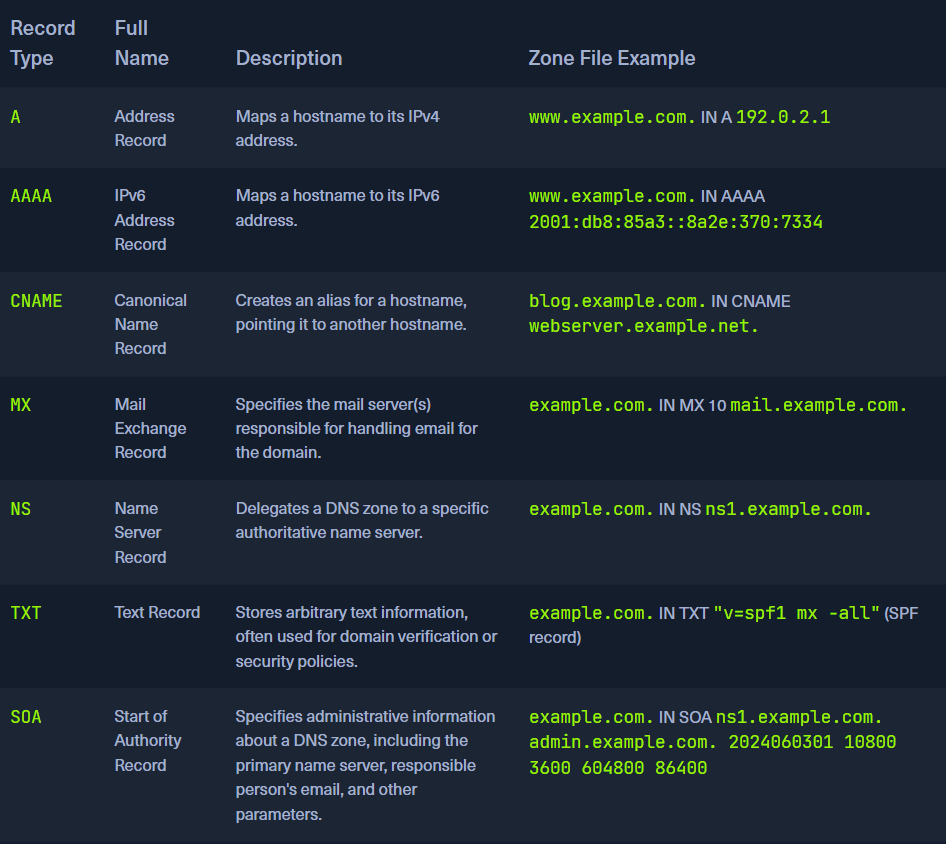
dig any) to retrieve DNS records such as A, MX, NS, and TXT records.
DNS Records
dig any inlanefreight.com
Third-Party Tools for Cloud Discovery:
- Tools like Domain.Glass and GrayHatWarfare provide insights into a company’s infrastructure, including cloud storage.
- GrayHatWarfare allows for searching and filtering cloud storage by file format, aiding in the passive discovery of stored files.
Top 10 Ports
21/tcp   open     ftp
22/tcp   open     ssh
23/tcp   open     telnet
25/tcp   open     smtp
80/tcp   open     http
110/tcp  open     pop3
139/tcp  open     netbios-ssn
443/tcp  open     https
445/tcp  open     microsoft-ds
3389/tcp open     ms-wbt-server
grep -oP '\d+/tcp\s+open' ports.txt | awk -F'/' '{ printf "%s,", $1 }' | sed 's/,$//'
Services
FTP(21)
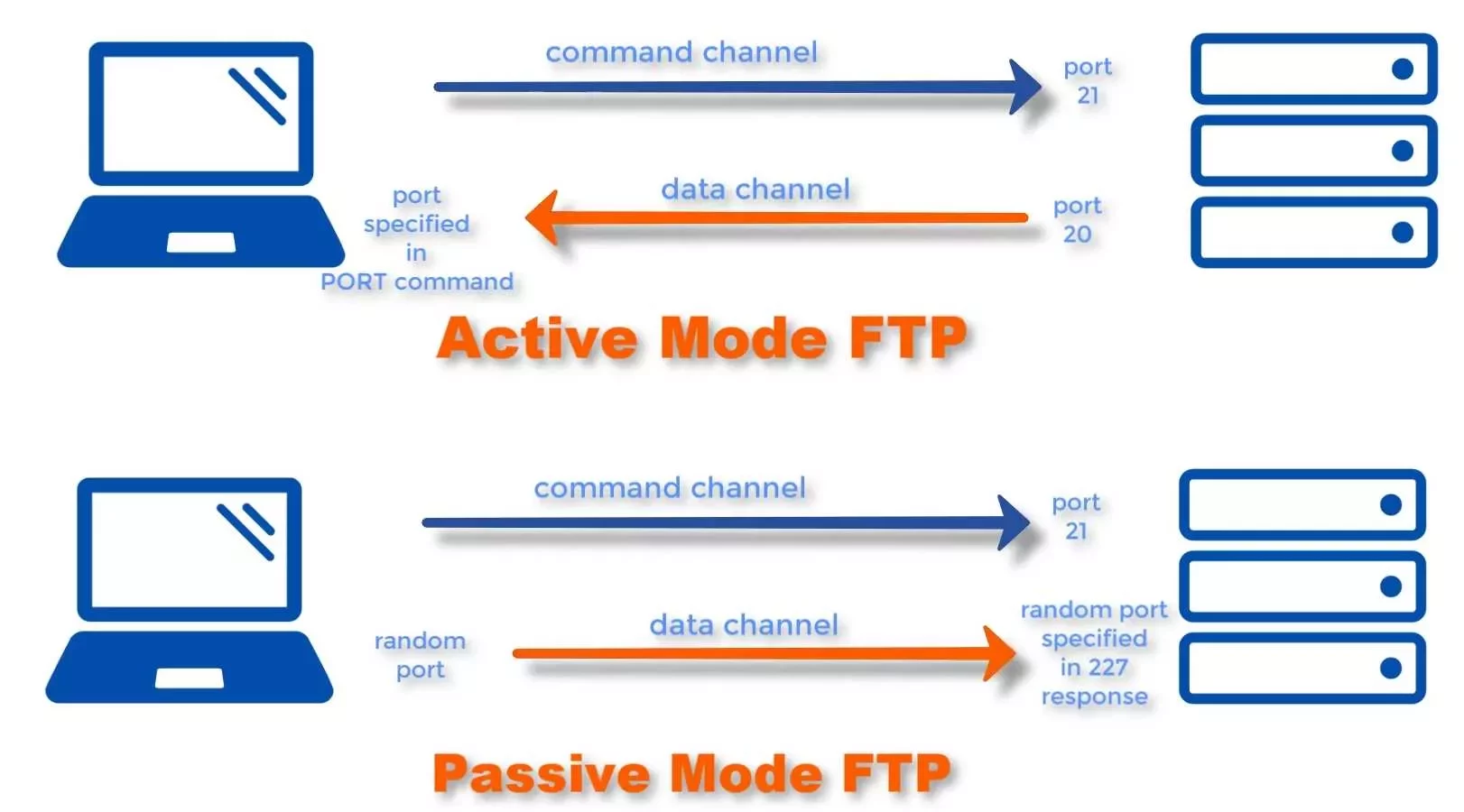
- In an FTP connection, two channels are opened. First, the client and server establish a control channel through
TCP port 21. The client sends commands to the server, and the server returns status codes. Then both communication participants can establish the data channel viaTCP port 20. - FTP servers on Linux-based distributions is vsFTPd.
-
Active FTP:
- The client opens a connection on port 21.
- The server then connects back to the client using a dynamically assigned port for the data channel.
- Problem: If the client is behind a firewall, the server’s attempt to establish a data connection may be blocked.
-
Passive FTP:
- The server opens a port and waits for the client to connect to it, which helps avoid firewall issues on the client side.
- Advantage: Since the client initiates the connection for both control and data channels, it bypasses firewall restrictions
Anonymous Login
21/tcp open ftp vsftpd 3.0.3
 ftp-anon: Anonymous FTP login allowed (FTP code 230)
$ ftp 10.129.14.136

Connected to 10.129.14.136.
220 "Welcome to the HTB Academy vsFTP service."
Name (10.129.14.136:cry0l1t3): anonymous
| Settings | Description |
|---|---|
hide_ids=YES |
All user and group information in directory listings will be displayed as “ftp”. |
drwxrwxr-x    2 ftp     ftp         4096 Sep 14 17:03 Clients
drwxrwxr-x    2 ftp     ftp         4096 Sep 14 16:50 Documents
ls_recurse_enable=YES |
Allows the use of recurse listings. |
Recursive Listing
ftp> ls -R
Download a File
ftp> get Notes.txt
Download All Available Files
$ wget -m --no-passive ftp://anonymous:anonymous@10.129.14.136
This may cause trigger because no one in company wants to download all files
Upload a File
ftp> put testupload.txt
Foot Printing the Service
$ sudo nmap -sV -p21 -sC -A 10.129.14.136
Service Interaction – Establishes a raw TCP connection to the FTP server for manual interaction.
$ nc -nv 10.129.14.136 21
$ telnet 10.129.14.136 21
If the FTP server runs with TLS/SSL encryption. Because then we need a client that can handle TLS/SSL. Use the client openssl and communicate with the FTP server.
$ openssl s_client -connect 10.129.14.136:21 -starttls ftp
TFTP(69)
-
Trivial File Transfer Protocol(TFTP) is simpler than FTP and performs file transfers between client and server processes. - it
does notprovide user authentication, TFTP usesUDP, Port Number – 69 - TFTP only be used in local and protected networks.
Commands: GET, PUT, CONNECT, QUIT, STATUS
https://medium.com/@aashutos.katare/silent-servers-the-art-of-tftp-enumeration-265c3785a6b4
SMB(139,445)
-
Server Message Block(SMB) is a client-server protocol that regulates access to files and entire directories and other network resources such as printers, routers, or interfaces released for the network. -
Access rights are defined by
Access Control Lists(ACL). attributes such asexecute,read, andfull accessfor individual users or user groups.
Port 139: SMB originally ran on top of NetBIOS using port 139. Port 445: Later versions of SMB (after Windows 2000) began to use port 445 on top of a TCP stack. Using TCP allows SMB to work over the internet.
SMBclient - Connecting to the Share
Listing shares
$ smbclient -N -L //10.129.14.128
Use specific share
$ smbclient //10.129.14.128/notes
Download Files from SMB
$ smb: \> get prep-prod.txt
From the administrative point of view, we can check these connections using smbstatus. not need for exam.
Samba Status
$ root@samba:~# smbstatus
Footprinting the Service
$ sudo nmap 10.129.14.128 -sV -sC -p139,445
if nmap doesn’t provide much info we can use smbclient or rpcclient
$ rpcclient -U "" 10.129.14.128
No password.
| Command of RPCClient | Description |
|---|---|
srvinfo |
Server information. |
enumdomains |
Enumerate all domains that are deployed in the network. |
querydominfo |
Provides domain, server, and user information of deployed domains. |
netshareenumall |
Enumerates all available shares. |
netsharegetinfo <share> |
Provides information about a specific share. |
enumdomusers |
Enumerates all domain users. |
queryuser <RID> |
Provides information about a specific user. |
Same thing can be done by different tools. helpful for the enumeration of SMB services. We can’t connect only enumeration.
- samrdump.py
- SMBMap
- CrackMapExec
- Enum4Linux-ng
Impacket - Samrdump.py
$ samrdump.py 10.129.14.128
SMBmap
$ smbmap -H 10.129.14.128
CrackMapExec
$ crackmapexec smb 10.129.14.128 --shares -u '' -p ''
Enum4Linux-ng - Enumeration
$ ./enum4linux-ng.py 10.129.14.128 -A
Can do entire enumeration.
Enumeration in windows
net view \\dc01 /all
NetBIOS
this to query the NetBIOS name service for valid NetBIOS names, specifying the originating UDP port as 137 with the -r option.
sudo nbtscan -r 192.168.50.0/24
NFS(111,2049)
NFS (Network File System) is a protocol that allows users to access and interact with files over a network as if they were on a local disk. It is predominantly used in Linux and Unix environments, facilitating file sharing between systems in a networked environment.
- Purpose: Like SMB (Server Message Block), NFS allows file systems to be shared over a network, but it uses a different protocol. NFS is specifically designed for communication between Linux and Unix systems.
- Incompatibility: NFS clients cannot directly communicate with SMB servers due to the differences in protocols.
Foot Printing the Service
$ sudo nmap 10.129.14.128 -p111,2049 -sV -sC

PORT     STATE SERVICE VERSION
111/tcp  open  rpcbind 2-4 (RPC #100000)
| nfs-ls: Volume /mnt/nfs
we have discovered such an NFS service, we can mount it on our local machine.
Show Available NFS Shares
$ showmount -e 10.129.14.128
Mounting NFS Share
$ mkdir target-NFS
$ sudo mount -t nfs 10.129.14.128:/ ./target-NFS/ -o nolock
List Contents with Usernames & Group Names
$ ls -l mnt/nfs/

-rw-r--r-- 1 root     root     1872 Sep 19 17:27 id_rsa
-rw-r--r-- 1 root     root      348 Sep 19 17:28 id_rsa.pub
-
It is important to note that if the
root_squashoption is set, we cannot edit thebackup.shfile even asroot. -
We can also use NFS for further escalation – by uploading a shell in nfs and run it via ssh connection
Unmounting
$ cd ..
$ sudo umount ./target-NFS
DNS(53)
-
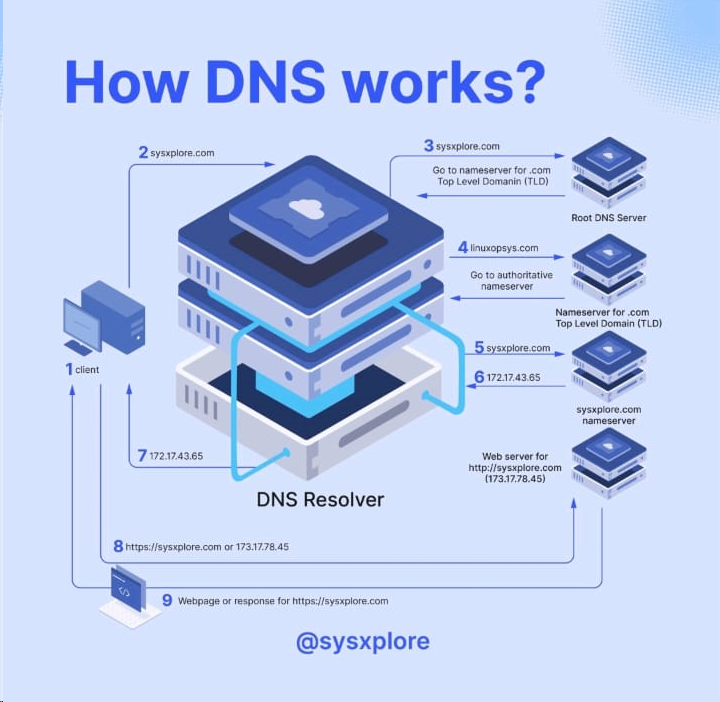
DNS is a system for resolving computer names into IP addresses, and it does not have a central database. DNS is mainly unencrypted.
-
By default, IT security professionals apply
DNS over TLS(DoT) orDNS over HTTPS(DoH) here. In addition, the network protocolDNSCryptalso encrypts the traffic between the computer and the name serve

What is CNAME?
- Alias for Multiple Domains: If you want multiple domains to point to the same IP address without manually managing multiple A records, you can create one A record and then use CNAME records for the other domains.
- Subdomain Redirection: CNAME records are often used to direct traffic from subdomains (like
www,mail, etc.) to the main domain or another domain.
DNS Configuration Files
- local DNS configuration files –
named.conf.localandnamed.conf.options. - zone files – important
- reverse name resolution files
Zone files
A zone file describes a zone completely. There must be precisely one SOA record and at least one NS record. The SOA resource record is usually located at the beginning of a zone file. The main goal of these global rules is to improve the readability of zone files
Foot Printing the Service
dig ns inlanefreight.htb @10.129.14.128

dig <OPTION> DOMAIN NAME @DNS SERVER
DIG - Version Query
dig CH TXT version.bind 10.129.120.85
DIG - ANY Query
dig any inlanefreight.htb @10.129.14.128
Zone transfer
A zone transfer is a process where a copy of the DNS records (the zone file) for a domain is transferred from one DNS server to another. It is primarily used to keep multiple DNS servers in sync with each other.
There are two types of zone transfers:
- Full Zone Transfer (AXFR): Transfers the entire zone file.
- Incremental Zone Transfer (IXFR): Transfers only the changes made since the last update.
dig axfr inlanefreight.htb @10.129.14.128
If the administrator used a subnet for the allow-transfer option for testing purposes or as a workaround solution or set it to any, everyone would query the entire zone file at the DNS server.
Subdomain Brute Forcing
- SecList
[!bash!]$ for sub in $(cat /opt/useful/SecLists/Discovery/DNS/subdomains-top1million-110000.txt);do dig $sub.inlanefreight.htb @10.129.14.128 | grep -v ';\|SOA' | sed -r '/^\s*$/d' | grep $sub | tee -a subdomains.txt;done
- DNSENUM(Preferred way)
[!bash!]$ dnsenum --dnsserver 10.129.14.128 --enum -p 0 -s 0 -o subdomains.txt -f /opt/useful/SecLists/Discovery/DNS/subdomains-top1million-110000.txt inlanefreight.htb
SMTP(25)
By default, SMTP servers accept connection requests on port 25. However, newer SMTP servers also use other ports such as TCP port 587.
This port is used to receive mail from authenticated users/servers, usually using the STARTTLS command to switch the existing plaintext connection to an encrypted connection.
| Commands | Description |
|---|---|
AUTH PLAIN |
AUTH is a service extension used to authenticate the client. |
HELO |
The client logs in with its computer name and thus starts the session. |
MAIL FROM |
The client names the email sender. |
RCPT TO |
The client names the email recipient. |
DATA |
The client initiates the transmission of the email. |
RSET |
The client aborts the initiated transmission but keeps the connection between client and server. |
VRFY |
The client checks if a mailbox is available for message transfer. |
EXPN |
The client also checks if a mailbox is available for messaging with this command. |
NOOP |
The client requests a response from the server to prevent disconnection due to time-out. |
QUIT |
The client terminates the session. |
To interact with the SMTP server, we can use the telnet tool to initialize a TCP connection with the SMTP server.
telnet 10.129.14.128 25
Initialization of the session is done with the command – HELO
Here with the help of VRFY command we check whether user root,cry0l1t3 are present. if code 252 then it is confirmed.
VRFY root
252 2.0.0 root


VRFY cry0l1t3
252 2.0.0 cry0l1t3
Send an Email
MAIL FROM: <cry0l1t3@inlanefreight.htb>
250 2.1.0 Ok


RCPT TO: <mrb3n@inlanefreight.htb> NOTIFY=success,failure
250 2.1.5 Ok

DATA
After initialize a tcp connection with server we can send mail to specific accounts.
Open Relay Configuration
An open relay is an SMTP server that is configured to allow anyone on the internet to send emails through it. This configuration can be exploited by attackers to send large volumes of spam, phishing emails, or to perform other malicious activities, all while hiding the true origin of the emails.
Misconfiguration Risks
In many cases, administrators may not fully understand the range of IP addresses that should be allowed to use their SMTP server. To avoid potential disruptions in email traffic, they might misconfigure the SMTP server by allowing all IP addresses (0.0.0.0/0) to send emails through it.
mynetworks = 0.0.0.0/0
Foot Printing the Service
$ sudo nmap 10.129.14.128 -sC -sV -p25
Nmap - Open Relay
$ sudo nmap 10.129.14.128 -p25 --script smtp-open-relay -v
IMAP/POP3(110, 143, 993, 995)
IMAP – IMAP allows online management of emails directly on the server and supports folder structures. Thus, it is a network protocol for the online management of emails on a remote server.
POP3 – it only provides listing, retrieving, and deleting emails as functions at the email server.
IMAP Commands
| Command | Description |
|---|---|
1 LOGIN username password |
User’s login. |
1 LIST "" * |
Lists all directories. |
1 CREATE "INBOX" |
Creates a mailbox with a specified name. |
1 DELETE "INBOX" |
Deletes a mailbox. |
1 RENAME "ToRead" "Important" |
Renames a mailbox. |
1 LSUB "" * |
Returns a subset of names from the set of names that the User has declared as being active or subscribed. |
1 SELECT INBOX |
Selects a mailbox so that messages in the mailbox can be accessed. |
1 UNSELECT INBOX |
Exits the selected mailbox. |
1 FETCH <ID> all |
Retrieves data associated with a message in the mailbox. |
1 CLOSE |
Removes all messages with the Deleted flag set. |
1 LOGOUT |
Closes the connection with the IMAP server. |
POP3 Commands
| Command | Description |
|---|---|
USER username |
Identifies the user. |
PASS password |
Authentication of the user using its password. |
STAT |
Requests the number of saved emails from the server. |
LIST |
Requests from the server the number and size of all emails. |
RETR id |
Requests the server to deliver the requested email by ID. |
DELE id |
Requests the server to delete the requested email by ID. |
CAPA |
Requests the server to display the server capabilities. |
RSET |
Requests the server to reset the transmitted information. |
QUIT |
Closes the connection with the POP3 server. |
Footprinting the Service
$ sudo nmap 10.129.14.128 -sV -p110,143,993,995 -sC
995/tcp open  ssl/pop3 Dovecot pop3d
|_pop3-capabilities: AUTH-RESP-CODE USER SASL(PLAIN) TOP UIDL RESP-CODES CAPA PIPELINING
| ssl-cert: Subject: commonName=mail1.inlanefreight.htb/organizationName=Inlanefreight/stateOrProvinceName=California/countryName=US
cURL
To connect to imaps with username and password
$ curl -k 'imaps://10.129.14.128' --user user:p4ssw0rd
OpenSSL - TLS Encrypted Interaction POP3 & IMAP
$ openssl s_client -connect 10.129.14.128:pop3s
$ openssl s_client -connect 10.129.14.128:imaps
MYSQL(3306)
Footprinting the Service
sudo nmap 10.129.14.128 -sV -sC -p3306 --script mysql*
Interact with mysql
mysql -u root -pP4SSw0rd -h 10.129.14.128
Tip: There shouldn’t be any spaces between ‘-p’ and the password.
In Windows
C:\htb> mysql.exe -u username -pPassword123 -h 10.129.20.13
IMPORTANT TABLE -> Information schema, System schema
IMPORTANT command:

mysql -u <user> -p<password> -h <IP address>
show databases;
use <database>;
show tables;
show columns from <table>;
select * from <table>;
select * from <table> where <column> = "<string>";
MSSQL(1433)
-
Authentication being set to
Windows Authenticationmeans that the underlying Windows OS will process the login request and use either the local SAM database or the domain controller (hosting Active Directory) before allowing connectivity to the database management system. -
Using Active Directory can be ideal for auditing activity and controlling access in a Windows environment, but if an account is compromised, it could lead to privilege escalation and lateral movement across a Windows domain environment.
Dangerous Settings
- MSSQL clients not using encryption to connect to the MSSQL server
- The use of self-signed certificates when encryption is being used. It is possible to spoof self-signed certificates
- The use of named pipes
- Weak & default
sacredentials. Admins may forget to disable this account
Footprinting the Service
$ sudo nmap --script ms-sql-info,ms-sql-empty-password,ms-sql-xp-cmdshell,ms-sql-config,ms-sql-ntlm-info,ms-sql-tables,ms-sql-hasdbaccess,ms-sql-dac,ms-sql-dump-hashes --script-args mssql.instance-port=1433,mssql.username=sa,mssql.password=,mssql.instance-name=MSSQLSERVER -sV -p 1433 10.129.201.248
can see the hostname, database instance name, software version of MSSQL and named pipes are enabled.
MSSQL Ping in Metasploit
Like nmap, We can also use metasploit
msf6 auxiliary(scanner/mssql/mssql_ping)
If we can guess or gain access to credentials, this allows us to remotely connect to the MSSQL server and start interacting with databases using T-SQL (Transact-SQL).
$ python3 mssqlclient.py Administrator@10.129.201.248 -windows-auth
OR
$ impacket-mssqlclient Administrator:Lab123@192.168.50.18 -windows-auth
Oracle TNS(1521)
-
The
Oracle Transparent Network Substrate(TNS) server is a communication protocol that facilitates communication between Oracle databases and applications over networks. -
TNS supports various networking protocols between Oracle databases and client applications, such as
IPX/SPXandTCP/IPprotocol stacks. -
Preferred solution for managing large, complex databases in the healthcare, finance, and retail industries.
-
Its built-in encryption mechanism ensures the security of data transmitted
$ sudo nmap -p1521 -sV 10.129.204.235 --open
System Identifier (SID) is a unique name that identifies a particular database instance. When a client connects to an Oracle database, it specifies the database’s SID along with its connection string.
Nmap - SID Bruteforcing
$ sudo nmap -p1521 -sV 10.129.204.235 --open --script oracle-sid-brute
odat.py tool to perform a variety of scans to enumerate
$ ./odat.py all -s 10.129.204.235
An retrieve database names, versions, running processes, user accounts, vulnerabilities, misconfigurations. We can even get credential of users
user/pass
SQLplus - Log In
$ sqlplus user/pass@10.129.204.235/XE
[!NOTE]
sqlplus: error while loading shared libraries: libsqlplus.so: cannot open shared object file: No such file or directory, please execute the below, taken from here.
$ sudo sh -c "echo /usr/lib/oracle/12.2/client64/lib > /etc/ld.so.conf.d/oracle-instantclient.conf
using this account to log in as the System Database Admin (sysdba), giving us higher privileges. This is possible when the user scott has the appropriate privileges typically granted by the database administrator
Oracle RDBMS - Database Enumeration
$ sqlplus scott/tiger@10.129.204.235/XE as sysdba
Oracle RDBMS - Extract Password Hashes
After getting admin privileges we can dump hashes
SQL> select name, password from sys.user$;
| OS | Path |
|---|---|
| Linux | /var/www/html |
| Windows | C:\inetpub\wwwroot |
Web server Running Path in different OS
Oracle RDBMS - File Upload
$ echo "Oracle File Upload Test" > testing.txt


$ ./odat.py utlfile -s 10.129.204.235 -d XE -U scott -P tiger --sysdba --putFile C:\\inetpub\\wwwroot testing.txt ./testing.txt
To verify
$ curl -X GET http://10.129.204.235/testing.txt
IPMI(623 - UDP)
Definition: The Intelligent Platform Management Interface (IPMI) is a standardized set of specifications for hardware-based host management systems. It allows for management and monitoring of computer systems independently of the host’s BIOS, CPU, firmware, and operating system.
-
Purpose:
- Before OS Boot: Modify BIOS settings.
- Host Powered Down: Manage systems when they are off.
- System Failure: Access and manage a system that has crashed or is unresponsive.
-
Capabilities:
- System Monitoring: Tracks temperature, voltage, fan status, power supplies, etc.
- Inventory Information: Query hardware inventory and logs.
- Remote Upgrades: Perform upgrades without physical access.
- Alerting: Uses SNMP for alerts.
Components of IPMI
-
Baseboard Management Controller (BMC):
- Role: Central micro-controller managing IPMI functions.
- Implementation: Typically embedded in motherboards or added as a PCI card.
-
Intelligent Chassis Management Bus (ICMB):
- Role: Allows communication between chassis.
-
Intelligent Platform Management Bus (IPMB):
- Role: Extends the BMC functionality.
-
IPMI Memory:
- Role: Stores system event logs, repository data, etc.
-
Communications Interfaces:
- Types: Local system interfaces, serial, LAN, ICMB, PCI Management Bus.
$ sudo nmap -sU --script ipmi-version -p 623 ilo.inlanfreight.local
Metasploit scanner module – (auxiliary/scanner/ipmi/ipmi_version)
| Product | Username | Password |
|---|---|---|
| Dell iDRAC | root | calvin |
| HP iLO | Administrator | randomized 8-character string consisting of numbers and uppercase letters |
| Supermicro IPMI | ADMIN | ADMIN |
Default credentials of BMC’s
If above passwords do not work. then use a flaw in the RAKP protocol in IPMI 2.0. The server sends a salted SHA1 or MD5 hash of the user’s password to the client before authentication takes place.
Hashcat mode 7300
To retrieve hashes
auxiliary(scanner/ipmi/ipmi_dumphashes)
SNMP(161)
created to monitor network devices. In addition, this protocol can also be used to handle configuration tasks and change settings remotely.
snmp enabled HW – routers, switches, servers, IoT devices
A MIB is a text file in which all queryable SNMP objects of a device are listed in a standardized tree hierarchy. It contains at least one Object Identifier (OID).

Footprinting the Service
sudo nmap -sU --open -p 161 192.168.50.1-254 -oG open-snmp.txt
Hosts listening snmp. Alternative for nmap. Onesixtyone can be used to brute-force the names of the community strings
kali@kali:~$ echo public > community
kali@kali:~$ echo private >> community
kali@kali:~$ echo manager >> community

kali@kali:~$ for ip in $(seq 1 254); do echo 192.168.50.$ip; done > ips

kali@kali:~$ onesixtyone -c community -i ips
Scanning 254 hosts, 3 communities
192.168.50.151 [public] Hardware: Intel64 Family 6 Model 79 Stepping 1 AT/AT
Snmpwalk is used to query the OIDs with their information.
snmpwalk -c public -v1 192.168.50.151 1.3.6.1.4.1.77.1.2.25
-v for version (1,2,2c) -c for community (public, private)
last digits are explained in pic.
Once we know a community string, we can use it with braa to brute-force the individual OIDs and enumerate the information behind them.
Braa
$ braa <community string>@<IP>:.1.3.6.*   # Syntax

$ braa public@10.129.14.128:.1.3.6.*
To get the extended objects the following command can be used:
snmpwalk -v2c -c public 192.168.50.151 NET-SNMP-EXTEND-MIB::nsExtendObjects
RDP(3389)
RDP works at the application layer in the TCP/IP
$ nmap -sV -sC 10.129.201.248 -p3389 --script rdp*
RDP Security Check
$ ./rdp-sec-check.pl 10.129.201.248
we can connect to RDP servers on Linux using xfreerdp, rdesktop, or Remmina and interact with the GUI of the server accordingly.
enable RDP
reg add "HKEY_LOCAL_MACHINE\SYSTEM\CurrentControlSet\Control\Terminal Server" /v fDenyTSConnections /t REG_DWORD /d 0 /f
Linux Remote Management Protocols
1. use ssh audit
./ssh-audit.py 10.129.14.132
To change Auth method
ssh -v cry0l1t3@10.129.14.132 -o PreferredAuthentications=password
SSH-1.99-OpenSSH_3.9p1 - can use both protocol versions SSH-1 and SSH-2, and we are dealing with OpenSSH server version 3.9p1.
SSH-2.0-OpenSSH_8.2p1 - we are dealing with an OpenSSH version 8.2p1 which only accepts the SSH-2 protocol version.
Attacking SSH
hydra -l george -P /usr/share/wordlists/rockyou.txt -s 2222 ssh://192.168.50.201
Rsync - to copy files.
2. Rsync
Overview
- Purpose: Efficient file transfer tool that uses a delta-transfer algorithm to minimize data transfer by sending only differences between files.
- Default Port: TCP 873
- Usage: Can operate over SSH for secure file transfers.
Key Features
- Delta-Transfer Algorithm: Reduces data transferred by only sending differences between files.
- File Synchronization: Suitable for backups and mirroring.
Example Commands
- Check Rsync Version:
- Command:
sudo nmap -sV -p 873 <target_ip>
- Command:
- List Shares:
- Command:
nc -nv <target_ip> 873
- Command:
- Enumerate Shares:
- Command:
rsync -av --list-only rsync://<target_ip>/<share_name>
- Command:
Windows Remote Management Protocols
1. RDP
hydra -l george -P /usr/share/wordlists/rockyou.txt -s 2222 rdp://192.168.50.201
2. WinRM
Purpose: Facilitates remote management of Windows systems via command-line interfaces.
- Transport Layer: Uses HTTP (TCP port 5985) and HTTPS (TCP port 5986). The newer ports are used due to security concerns with ports 80 and 443.
-
Configuration: Must be enabled and configured manually in versions older than Windows Server 2012. Default for newer versions.
-
Foot Printing with Nmap:
nmap -sV -sC 10.129.201.248 -p5985,5986 --disable-arp-ping -n-
Output Example:
PORT STATE SERVICE VERSION 5985/tcp open http Microsoft HTTPAPI httpd 2.0 (SSDP/UPnP) |_http-title: Not Found |_http-server-header: Microsoft-HTTPAPI/2.0 -
Checking with PowerShell (on Windows):
Test-WsMan -ComputerName 10.129.201.248 -
Using Evil-WinRM:
evil-winrm -i 10.129.201.248 -u Cry0l1t3 -p P455w0rD!
-
3. WMI
Purpose: Provides comprehensive access to management data and configuration settings across Windows systems. WMI offers extensive management capabilities and is integral for Windows system administration.
- Interface: Built on the Common Information Model (CIM) and Web-Based Enterprise Management (WBEM) standards.
- Usage: Administers and manages various system settings, services, and applications via command-line or scripting tools like PowerShell.
$ wmiexec.py Cry0l1t3:"P455w0rD!"@10.129.201.248 "hostname"