🏗️ Active Directory Basics: Understanding the Core
Before exploiting an Active Directory (AD) environment, you must understand the architecture, the players, and the authentication protocols that hold it together.
This guide explains the fundamental components of AD, how users are managed, and how NTLM and Kerberos authentication actually work.
🏛️ 1. Core Architecture
The Windows Domain
A Domain is a logical grouping of network objects (users, computers, groups) that share a centralized directory database and security policies.
The Domain Controller (DC)
The heart of the network. It is the server running the Active Directory Domain Services (AD DS). Role: Centralized Identity Management & Security Policy Enforcement.
Database: It holds the ntds.dit file, which stores all information about every object in the network.
AD Objects
- Users: Accounts for people or services.
-
Machines: Created automatically when a computer joins the domain.
Naming Convention: Computer Name +
$(e.g.,DC01$is the machine account for the controllerDC01). Privilege: Machine accounts are Local Administrators on themselves.
Security Groups (The Permissions)
Groups allow administrators to assign rights efficiently.
- Domain Admins: The keys to the kingdom. Full control over the entire domain and all DCs.
- Domain Users: The default group for all employees.
- Server Operators: Can administer DCs (reboot, backup) but cannot change admin group memberships.
- Backup Operators: Can bypass file permissions to perform backups (often abused to read
ntds.dit).
📂 2. Organization & Policy
Organizational Units (OUs)
OUs are containers used to classify objects (e.g., “Sales”, “IT”, “HR”).
- Purpose: To apply specific Group Policies (GPOs) to specific sets of users.
- Limitation: A user can only belong to one OU at a time.
Delegation
This feature allows an admin to grant a standard user specific rights over an OU without making them a Domain Admin.
- Example: Granting IT Helpdesk users the right to reset passwords for the “Sales” OU.
- Command:
Set-ADAccountPasswordis used to exercise this delegated right.
Group Policy Objects (GPO)
GPOs control settings across the network (e.g., disabling USB drives, setting wallpaper).
- Distribution: Policies are stored in the SYSVOL share on the DC. All users must have read access to SYSVOL to apply policies.
- Sync:
gpupdate /forceforces a machine to pull the latest policies immediately.
🔑 3. Authentication Protocols
AD relies on two primary protocols: NTLM (Legacy) and Kerberos (Modern).
A. NTLM (Challenge-Response)
NTLM (NT LAN Manager) authentication is a protocol used primarily in Windows environments, particularly when interacting with servers via IP addresses or when hostname resolution fails. It is also utilized by some third-party applications that opt not to use Kerberos, which is the default authentication protocol in Active Directory.
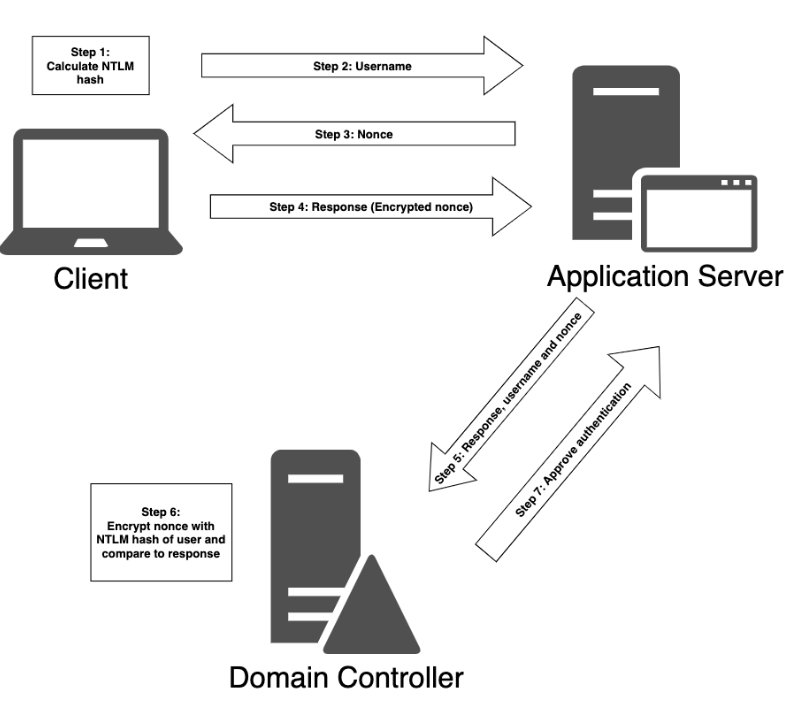
Steps in NTLM Authentication:
- Hash Calculation: The client computes an NTLM hash from the user’s password.
- Username Transmission: The client sends the username to the server.
- Challenge Issuance: The server responds with a random value known as a nonce or challenge.
- Response Creation: The client encrypts the nonce using the NTLM hash, creating a response.
- Response Forwarding: The client sends the response, along with the username and nonce, to the server.
- Validation by Domain Controller: The server forwards this information to the domain controller, which checks the validity.
- Comparison: The domain controller encrypts the nonce using the NTLM hash of the username and compares it with the received response. If they match, authentication is successful.
Security Risk: NTLM hashes are vulnerable to Pass-the-Hash (using the hash directly without the password) and Relay Attacks.
B. Kerberos (Ticket-Based)
Kerberos is the default, stateless protocol for AD. It uses a trusted third party (the Key Distribution Center or KDC) to issue tickets.
The Key Difference:
- NTLM = “Prove you know the password by doing this math.”
- Kerberos = “Here is a stamped ticket from the KDC saying I am allowed in.”
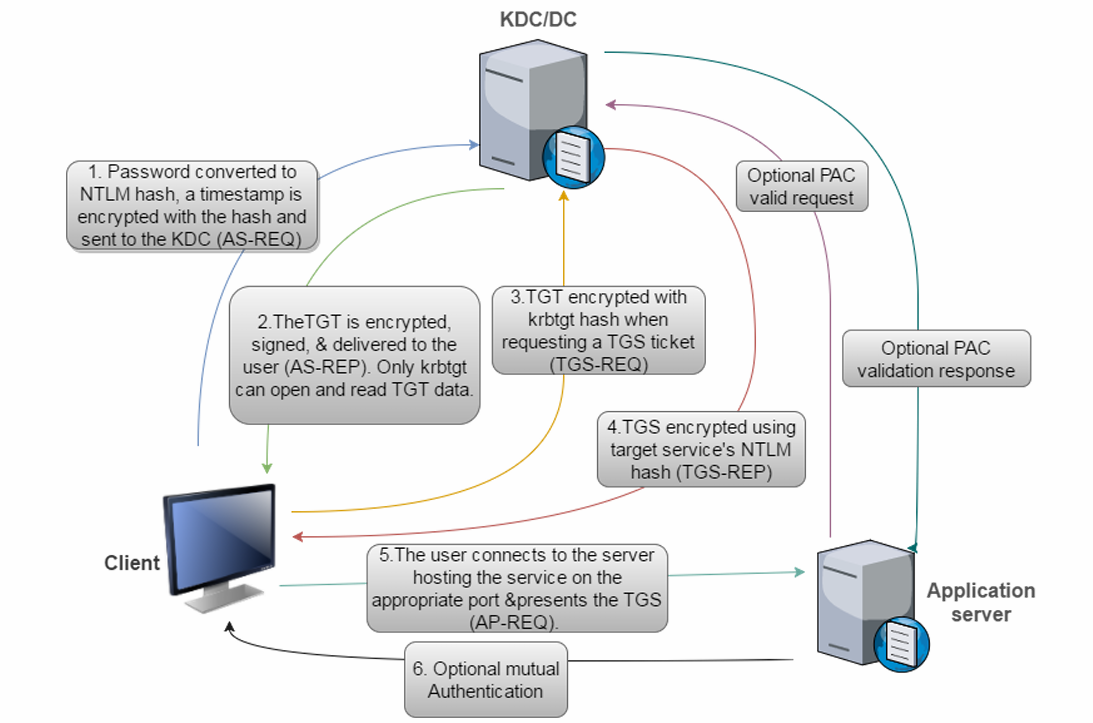
The 6-Step Authentication Flow:
Kerberos Client Authentication Process:
- Authentication Server Request (AS-REQ): The client sends an AS-REQ to the domain controller (KDC) with a timestamp encrypted using a hash derived from the user’s password and username.
- Domain Controller Response: The KDC looks up the password hash associated with the user in the
ntds.ditfile and attempts to decrypt the timestamp. If successful, the authentication is considered successful. - Authentication Server Reply (AS-REP): The KDC replies to the client with an AS-REP containing a session key and a Ticket Granting Ticket (TGT). The session key is encrypted using the user’s password hash, and the TGT contains user information, domain, timestamp, client IP address, and session key.
- Ticket Granting Service Request (TGS-REQ): When the user wants to access a resource, the client constructs a TGS-REQ packet with the current user, timestamp encrypted with the session key, resource name, and encrypted TGT.
- Ticket Granting Service Reply (TGS-REP): The KDC decrypts the TGT using a secret key, extracts the session key, and verifies the request. If successful, it responds with a TGS-REP containing the service name, session key, and service ticket.
- Service Authentication: The client sends an Application Request (AP-REQ) to the application server with the username, timestamp encrypted with the session key, and service ticket. The application server decrypts the service ticket, extracts the username and session key, and verifies the request.
⚙️4. Active Directory Advanced: Under the Hood
The “Basics” guide covered Users, Groups, and Authentication. But an AD environment is more than just a login database; it is a complex distributed system.
This guide covers the Trusts that link domains, the DNS that maps them, the FSMO Roles that manage them, and the SPNs that attackers hunt for.
Trusts: The Bridges Between Worlds
Trusts are relationships that allow users in one domain to access resources in another. Understanding the direction and type of trust is key to lateral movement.
Transitivity
Transitive: The trust extends automatically. If Domain A trusts B, and B trusts C, then Domain A trusts C.
*Default behavior for Parent-Child relationships.*
Non-Transitive: The trust stops at the neighbor. If A trusts B, it does not imply trust for C.
*Common in External or manual trusts.*
Trust Types
- Parent-Child: Created automatically when you add a new domain to a tree (e.g.,
us.corp.comis a child ofcorp.com). Always Two-Way Transitive. - Tree-Root: Connects two different trees in the same forest (e.g.,
corp.comandpartners.com). Always Two-Way Transitive. - External: Connects two domains in different forests (or non-trusted domains). Usually Non-Transitive and often One-Way.
- Forest Trust: A manual trust between two forest root domains. Can be One-Way or Two-Way Transitive.
🗺️ 2. DNS
Active Directory cannot function without DNS. It relies on specific DNS records to locate services.
SRV Records (Service Records)
When a computer boots up, it doesn’t know where the Domain Controller is. It queries DNS for SRV records.
_ldap._tcp.dc._msdcs.domain.com: “Where are the LDAP servers?”
_kerberos._tcp.domain.com: “Where is the KDC for authentication?”
Attack Vector: If an attacker can spoof DNS (e.g., via LLMNR/NBT-NS poisoning with Responder), they can redirect authentication traffic to their own machine.
👑 3. FSMO Roles (Flexible Single Master Operations)
While AD is “Multi-Master” (you can change a password on any DC), five specific tasks are so critical they must be handled by a single DC to prevent conflicts.
Forest-Wide Roles (1 per Forest)
- Schema Master: Controls updates to the Schema (the definition of all object attributes).
- Domain Naming Master: Controls the addition/removal of domains in the forest.
Domain-Wide Roles (1 per Domain)
- PDC Emulator: The most important role for users. It handles password updates, account lockouts, and time synchronization. Attack Note: Targeting the PDC Emulator is effective for DoS or locking out accounts quickly.
- RID Master: Allocates pools of RIDs (Relative IDs) to DCs. Every object SID (
S-1-5-21...-500) is made of a Domain SID + a unique RID. - Infrastructure Master: Updates references to objects in other domains (e.g., if a user from Domain A is added to a group in Domain B).
🎯 4. Service Principal Names (SPNs) & Kerberoasting
Service Principal Names (SPNs) are unique identifiers used by Kerberos to associate a service instance with a login account.
Format: ServiceClass/Host:Port (e.g., MSSQLSvc/db-server:1433)
The Mechanism: When a user wants to access SQL, they ask the KDC for a ticket for MSSQLSvc/db-server. The KDC encrypts that ticket using the Password Hash of the account running that service.
The Vulnerability: Kerberoasting
Because any valid user can request a service ticket for any SPN, an attacker can:
- Scan AD for user accounts that have SPNs (
servicePrincipalNameattribute). - Request tickets for them.
- Take the tickets offline and try to crack the encrypted part.
- If successful, they recover the plaintext password of the service account (which is often a Domain Admin).
🛡️ 5. Critical Security Mechanisms
LAPS (Local Administrator Password Solution)
Problem: If every computer uses the same local admin password, compromising one machine means compromising them all (Pass-the-Hash).
Solution: LAPS randomizes the local admin password on every machine periodically and stores it in a secured attribute (ms-Mcs-AdmPwd) in Active Directory.
Enumeration: If ACLs are misconfigured, attackers can read these passwords in cleartext.
AdminSDHolder & SDProp
Problem: What if an attacker modifies the ACL of the “Domain Admins” group to give themselves backdoor access?
Solution:
**AdminSDHolder:** A special container that acts as a "template" for protected groups (Domain Admins, Enterprise Admins, etc.).

**SDProp (Security Descriptor Propagator):** A process that runs every 60 minutes on the PDC Emulator. It checks all protected groups and **resets their ACLs** to match AdminSDHolder.

**Attack Note:** If you can modify AdminSDHolder, your backdoor becomes persistent and is automatically reapplied every hour by AD itself.
❓ 5. Interview Corner: 10 Core Questions
Q1: What is the primary difference between NTLM and Kerberos?
Answer: NTLM uses a 3-way Challenge-Response mechanism where the server validates the user with the DC. Kerberos uses a Ticket-based system where the client obtains a TGT and Service Tickets from a central KDC, avoiding the need for the application server to talk to the DC directly for every request.
Q2: What is the SYSVOL share and why is it important for attackers?
Answer: SYSVOL is a shared folder on Domain Controllers used to distribute Group Policies and login scripts. It must be readable by all users. Attackers often check it for scripts containing hardcoded passwords (GPP passwords).
Q3: Explain the function of a TGT (Ticket Granting Ticket).
Answer: The TGT is proof that a user has successfully authenticated with the KDC. It is encrypted with the krbtgt account’s hash. The user presents the TGT to request access to specific services without needing to re-enter their password.
Q4: What is a “Machine Account” and what privileges does it have?
Answer: A machine account (e.g., PC01$) represents the computer itself in AD. It is a member of the “Domain Computers” group and has Local Administrator privileges on that specific machine, but typically no special privileges on the rest of the domain.
Q5: Why is the Backup Operators group considered high-risk?
Answer: Members of this group can bypass standard file permissions to perform backup operations. This allows them to read sensitive files like ntds.dit (the AD database) or the registry hives (SAM/SYSTEM) to dump hashes, leading to Domain Admin compromise.
Q6: What happens during the AS-REQ step of Kerberos?
Answer: The client encrypts a timestamp with their password hash and sends it to the KDC. This proves to the KDC that the user knows their password (pre-authentication). If valid, the KDC issues a TGT.
Q7: How does an Organizational Unit (OU) differ from a Group?
Answer: An OU is a container for applying management policies (GPOs) and delegation (e.g., “Allow Helpdesk to reset passwords in Sales OU”). A Group is a collection of users used to grant permissions to resources (e.g., “Allow Sales Group to read File Share X”).
Q8: What is a Replay Attack in Kerberos and how is it prevented?
Answer: A replay attack involves capturing a valid ticket/request and re-sending it later. Kerberos prevents this by checking the Timestamp inside the encrypted authenticator. If the timestamp is too old (usually > 5 mins) or is a duplicate, the request is rejected.
Q9: If you compromise a Domain Controller, what specific file are you looking for?
Answer: The ntds.dit file. This is the Active Directory database containing all objects and password hashes for the domain.
Q10: What is the krbtgt account?
Answer: It is the Key Distribution Center Service Account. Its password hash is used to encrypt and sign all TGTs. If an attacker dumps this hash, they can create Golden Tickets (fake TGTs) that allow them to impersonate any user (including Domain Admins) indefinitely.
Q11: What is a Service Principal Name (SPN)?
Answer: An SPN is a unique identifier for a service instance (like SQLServer/server1) running on a specific account. Kerberos uses SPNs to map a service request to the specific service account’s password hash required to encrypt the Service Ticket. Attackers request tickets for accounts with SPNs to perform Kerberoasting.
Q12: Why is DNS critical for Active Directory?
Answer: AD relies on DNS SRV (Service) records to locate Domain Controllers and services (LDAP, Kerberos, Global Catalog). Without DNS, a client computer would not know which IP address to contact to authenticate or apply Group Policy.
Q13: What are FSMO Roles? (Flexible Single Master Operations)
Answer: While most AD changes can happen on any DC (Multi-Master Replication), 5 specific tasks must be handled by a single DC to prevent conflicts. These include the Schema Master, Domain Naming Master, PDC Emulator, RID Master, and Infrastructure Master.
Q14: Explain the difference between a Transitive and Non-Transitive Trust.
Answer:
Transitive: If Domain A trusts B, and B trusts C, then A automatically trusts C. (Default for Parent-Child trusts).
Non-Transitive: If Domain A trusts B, the trust does not extend to B’s partners. (Common in External trusts).
Q15: What is the “Global Catalog”? Answer: It is a distributed data storage that contains a searchable, partial representation of every object in every domain in the multi-domain Active Directory Forest. It allows users to search for objects (like finding a person’s email) without needing to know which specific domain they belong to.
Q16: What is inside the PAC (Privilege Attribute Certificate) of a Kerberos Ticket?
Answer: The PAC is an extension field in the Kerberos ticket that contains the user’s Group Memberships (SIDs). This is how the file server knows if you are a “Domain Admin” or just a “Domain User” when you present your ticket.
Q17: What is the difference between “Enterprise Admins” and “Domain Admins”?
Answer:
Domain Admins: Have full control only within their specific domain.
Enterprise Admins: Exist only in the Forest Root domain and have full control over the entire Forest (all domains).
Q18: What is LAPS (Local Administrator Password Solution)?
Answer: LAPS is a Microsoft solution that automatically randomizes the local administrator password on every computer in the domain and stores it securely in a restricted attribute in Active Directory. It prevents attackers from using the same local admin password to move laterally across the network.
Q19: Which ports are most critical for Active Directory enumeration?
Answer:
- TCP/UDP 53: DNS
- TCP/UDP 88: Kerberos
- TCP/UDP 389: LDAP (and 636 for LDAPS)
- TCP 445: SMB (Directory interaction, SYSVOL)
- TCP 135: RPC (Endpoint mapping)
Q20: What is the “AdminSDHolder” object? Answer: It is a special container in AD that protects high-privilege groups (like Domain Admins). A process called the SDProp (Security Descriptor Propagator) runs every 60 minutes to forcibly reset the ACLs of these protected groups to match the AdminSDHolder, ensuring that any unauthorized permission changes (backdoors) are automatically removed.
🎭 6. Scenario-Based Questions (Bar Raiser)
Scenario 1: The Failed Login
Context: A user claims they cannot log in. You check the logs and see “Kerberos Pre-Authentication Failed.”
Question: What does this likely mean?
Answer: It usually means the user entered the wrong password. The AS-REQ failed because the KDC could not decrypt the timestamp using the user’s stored password hash.
Scenario 2: The Mysterious Admin
Context: You are investigating a breach. You see a user Bob resetting passwords for the CEO, but Bob is not in the “Domain Admins” group.
Question: How is this possible?
Answer: Bob was likely granted Delegation rights over the OU where the CEO’s account resides. This allows specific administrative actions (like password resets) without full Domain Admin membership.
Scenario 3: NTLM Everywhere
Context: You notice a lot of NTLM traffic on the internal network instead of Kerberos.
Question: Why might this be happening, and what is the risk?
Answer: This often happens when users access services via IP Address instead of Hostname (which breaks Kerberos service discovery). The risk is that NTLM is vulnerable to Relay attacks, whereas Kerberos is much harder to relay.
Scenario 4: The Golden Ticket
Context: An attacker has forged a Golden Ticket. They use it to access a File Server.
Question: Does the File Server validate this ticket with the Domain Controller?
Answer: No. The File Server trusts the ticket because it decrypts successfully using the service account’s key and contains a valid PAC (Privilege Attribute Certificate) signed by the KDC. It does not contact the DC to verify the TGT itself.
Scenario 5: The Stale Machine
Context: You find a computer account OLDPC$ that hasn’t logged in for 2 years.
Question: Can you use this account for anything?
Answer: Likely not for active attacks, but it might still have valid DNS entries or permissions. However, if you try to use its credentials, the trust relationship with the domain is likely broken (machine passwords rotate automatically every 30 days).